
About Marketing Suite
The Marketing Suite is WellnessLiving's built-in marketing automation system that gives you the tools to attract new clients, keep existing ones engaged, and grow your business, all without needing third-party tools like Mailchimp or Constant Contact. It runs inside the same platform you already use for bookings, payments, and client management, so your marketing activity connects directly to real business outcomes like bookings, purchases, and attendance.
With the Marketing Suite you can:
Send campaigns – Reach your clients with one-time email, SMS, and push notification campaigns, scheduled in advance and tracked for performance.
Automate your marketing – Set up multi-step workflows that run automatically when clients take specific actions, like booking a service, missing an appointment, or letting a pass run low.
Manage leads – Track every prospective client from first contact through to conversion, with automatic lead source tracking and stage progression.
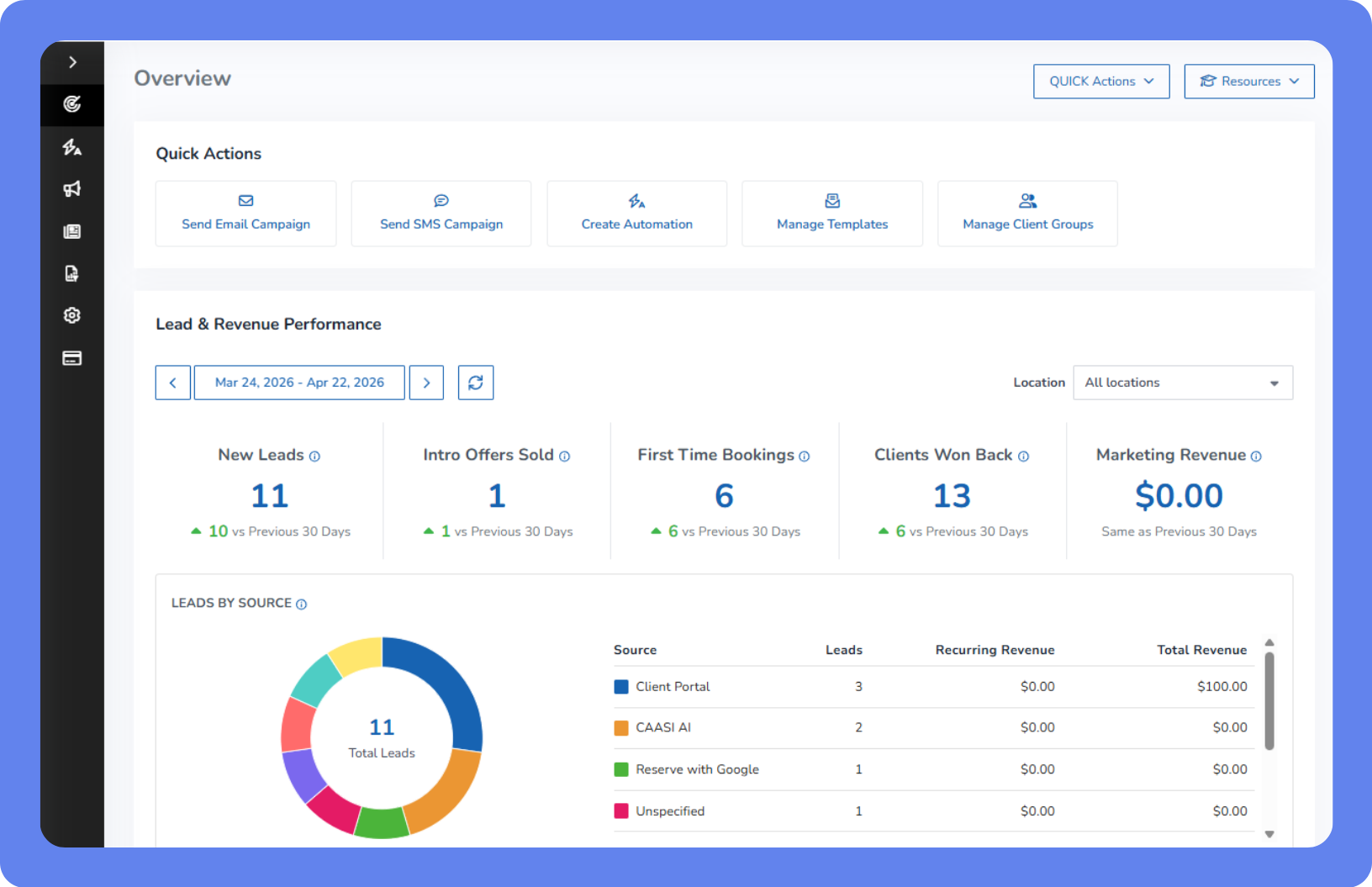
Monitor performance – See how your campaigns and automations are performing from a single Overview page.
Before you begin
Before using the Marketing Suite, complete these setup steps:
Subscribe to the Marketing Suite – If it’s not included with your WellnessLiving subscription, sign up for the Marketing Suite. For more information, see Manage your Marketing Suite subscription.
Verify your email domain – Ensures your marketing emails are sent from your business's own email address rather than a generic no-reply address, which significantly improves deliverability and builds trust with your clients. For instructions, see Set up your business email settings.
Set up Message Center and 2-way SMS – Message Center is WellnessLiving's 2-way SMS platform that lets your clients text you back. It's required to send SMS campaigns or use SMS steps in automations. Plans start at $19/month. Once subscribed, you'll also need a dedicated phone number assigned to your account. For more information, see Manage your Message Center subscription.
Collect the info you need from your sign-up forms – Review your lead capture form settings to make sure they're capturing the right information, such as phone numbers, email, and how the lead heard about you. This helps you track which marketing channels are bringing in new business. For more information, see Add a new lead and manage the add lead form.
Use the Marketing Suite to grow your business
Once you're set up, here's how to get the most out of every feature.
Capture and convert leads
You can automatically track where every new lead comes from and follow up with them the moment they enter your system, so none fall through the cracks.
Add a lead capture widget to your website – When a visitor fills in your sign-up form, they're automatically added as a lead in WellnessLiving with their source recorded. Combined with a lead nurture automation, new leads immediately start receiving follow-up automations without any manual effort on your part. For more information, see Lead Capture Widget.
Track lead stages – Move leads through stages (New, Warm, Hot, Won, Lost) manually or automatically based on client group criteria. For example, when a lead purchases a membership, their stage can update to Won automatically.
Monitor your pipeline – The Lead Management Report shows you all your leads in one place, with booking rates, show rates, signed rates, and revenue. For more information, see Lead Management Report.
Send campaigns to your clients
Campaigns let you reach your entire client base, or a specific segment, with a targeted email, SMS, or push notification.
Use templates – Save time by building a library of reusable messages for common scenarios like promotions, announcements, and re-engagement. For more information, see Manage your templates.
Schedule campaigns – Send campaigns in advance so they go out at the right time, and use resend to unopened to automatically follow up with clients who didn't open your first email. For more information, see Manage your marketing campaigns.
Track performance – See open rates, click rates, and click-to-open rates for every campaign you send. For more information, see Manage your marketing campaigns.
Automate your follow-ups
Once activated, marketing automations run in the background and send the right message to the right client at the right time, so you never have to manually track who needs a follow-up.
Get started with pre-built automations
Don't have time to build marketing from scratch? You don't have to. Marketing Suite includes a library of pre-built automations written by marketing professionals, proven across thousands of successful business owners, and personalized for your business using AI. From lead nurture sequences to win-back campaigns and no-show follow-ups, just activate one and it runs on autopilot.
See what automations can do for your business
Automations do the follow-up work for you. Here are a few ways businesses use them:
Welcome new leads – When a new lead is created, automatically send a welcome email followed by a booking invitation a few days later.
Win back inactive clients – When a client hasn't visited in 60 days, send a personalized re-engagement offer.
Follow up after a no-show – When a client misses an appointment, automatically send a message making it easy to rebook.
Prompt pass repurchase – When a client has only two visits left on a session pass, send a timely reminder with a repurchase link.
Announce new classes – When a new class is added to your schedule, automatically notify clients who have attended that class before.
Create follow-up tasks for staff – When a lead books their first trial, automatically assign a task to a staff member to reach out personally within 24 hours.
For more information, see Manage your marketing automations.
Monitor your marketing performance
The Marketing Suite Overview page gives you a snapshot of how your marketing is performing – recent leads, recent campaigns, and campaign metrics – all in one place. For more information, see Marketing Suite Overview page.
Next steps
Now that you know what the Marketing Suite can do, here's where to go next:
What's changed with your marketing automations?