
Knowing what Marketing Suite includes - and what changes without it - helps you make the most of your marketing tools. This article covers what's included with an active subscription, what changes if your subscription ends, and which tools work alongside Marketing Suite but aren't part of it.
To view your current subscription status:
Open the App Drawer > View All > Marketing Suite
Open the App Drawer > View All > Setup > Add-ons > Marketing Suite
Key tips before you begin
Without an active Marketing Suite subscription, bulk emails are limited to 50 recipients.
SMS campaigns require a separate Message Center subscription regardless of your Marketing Suite plan.
What's included with an active Marketing Suite subscription
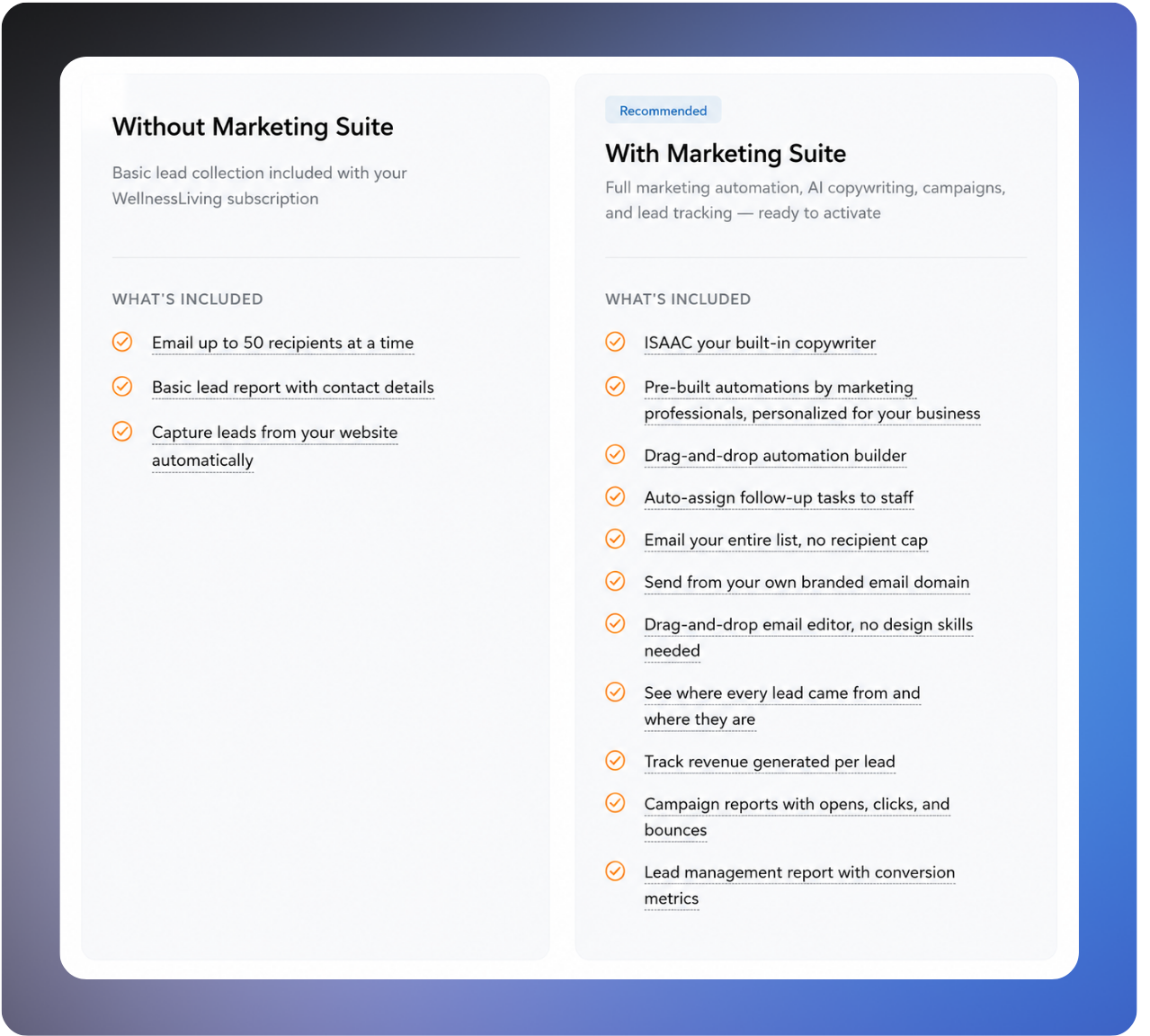
With an active Marketing Suite subscription, you have access to the following features.
Campaigns
Send one-time email, SMS, and push notification campaigns to your entire client base or a specific segment. With an active subscription, bulk email campaigns have no recipient limit.
Campaign scheduling and one-click resend to unopened recipients
Campaign Performance Reports, including open rate, click rate, and click-to-open rate
Automations
Set up multi-step workflows that run automatically when clients take specific actions. Automations fire instantly based on real client behavior, so your follow-ups go out at exactly the right time without any manual effort.
Available triggers include Lead Created, Booking Made, Visit Attended, Purchase Made, membership expiring, and client becoming inactive.
Pre-built automations created by marketing professionals, ready to activate
Full control over messaging, timing, delays, goals, and exit conditions within each automation
Templates
Unlimited email and SMS templates
Visual email editor with drag-and-drop content blocks, including a video content block for YouTube and Vimeo links
ISAAC AI writing assistant for drafting and refining message content
Lead management
The full Lead Management Report includes the following information for each lead:
Date created
Lead name
Stage
Lead source
Added by
Free Purchase Option
Referred by
Phone number
Email
Last contacted
Last visit
Upcoming booking
Won/lost date
Lead revenue
Lead source tracking covers all connected sources, including Lead Capture Widgets, CAASI, ClassPass, Wellhub, Reserve with Google, and manually added leads. Lead stages (New, Warm, Hot, Won, Lost) can be updated manually or automatically based on client group criteria.
Email setup
Email domain verification so your campaigns send from your own business email address rather than a generic address
What changes without a Marketing Suite subscription
If your Marketing Suite subscription ends or is cancelled, the following changes apply. Your core booking, scheduling, and client management tools are not affected.
Automations pause but are not deleted. At the end of your billing period, all automations stop running. This includes nurture flows, rebooking reminders, win-back sequences, and widget-triggered journeys. Your automations, their content, and their logic are fully preserved in your account. If you resubscribe, they're available to reactivate.
Lead Capture Widgets continue collecting leads, but automated follow-ups stop. Widgets still work and still add leads to your system with their source recorded. No automated messages will send when a new lead comes in until you have an active subscription again.
The Lead Management Report becomes limited. Without an active subscription, the report shows the following information only:
Date created
Lead name
Stage
Lead source
Added by
Free Purchase Option
Referred by
You lose access to fields including last contacted, last visit, upcoming booking, won/lost date, and lead revenue.
Lead source visibility becomes restricted. Lead sources are limited to leads coming in through Lead Capture Widgets and CAASI only. Leads attributed to partners such as ClassPass, Wellhub, and Reserve with Google are no longer visible as lead sources.
Bulk email campaigns are limited to 50 recipients. You can still send bulk email, but each send is capped at 50 recipients.
What's changed with your marketing automations?
How your existing automations were migrated and what's new in the builder
If you had automations running before Marketing Suite launched, the good news is they're exactly where you left them and they just got a major upgrade. Your existing automations were automatically migrated into the new Marketing Suite builder, which means you can now add multiple steps, set time delays, define exit criteria, and more. Nothing was deleted, and everything is ready for you on the Automations page.
What happened to your automations
When Marketing Suite launched, WellnessLiving automatically migrated all of your existing automations into the new builder, regardless of how many steps they had. Your automations kept the same names, the same message content, the same recipient targeting, and the same timing. Active automations stayed active, and inactive ones stayed inactive. No reconfiguration needed.
In the new builder, your migrated automations appear as single-step flows. You can leave them running as-is, add steps to extend them, or use them as a starting point for something new. For more information, see Manage your marketing automations.
If you don't have an active Marketing Suite subscription, you won't be able to access your automations, send bulk email campaigns to more than 50 recipients, or use the pre-built automation library.
To find your migrated automations, open the App Drawer > View All > Marketing Suite > Automations.
What's new in the builder
The new automation builder gives you more control than before. You can now:
Add multiple steps to a single automation, with time delays between them
Set audience filters to narrow which clients enter the flow
Set exit criteria so clients leave the flow when it's no longer relevant
Don't want to build from scratch? Marketing Suite includes a library of pre-built automations written by marketing professionals and personalized for your business using AI. The library includes lead nurture sequences, win-back campaigns, no-show follow-ups, and more. You can activate one in minutes and it runs on autopilot.
Tools that work alongside Marketing Suite
The following tools connect with Marketing Suite but are separate products with their own subscriptions. They're not gated behind Marketing Suite and work independently of it.
Message Center and SMS
Message Center is WellnessLiving's 2-way SMS platform. It's required to send SMS campaigns or include SMS steps in your automations, but it's a separate subscription from Marketing Suite.
If you already have Message Center active, your Marketing Suite automations can use SMS right away with no additional setup.
For more information, see Manage your Message Center subscription.
CAASI
CAASI is WellnessLiving's AI chat assistant. It's an optional add-on that can capture leads from your website and feed them directly into your Marketing Suite automations, but Marketing Suite runs at full capability without it.
CAASI-generated leads enter your automations through the Lead Created trigger the same way any other lead does.
For more information, see CAASI overview.
Lead Capture Widgets
Lead Capture Widgets live in Setup > Website Widgets and are available to all WellnessLiving accounts regardless of Marketing Suite subscription status. Widgets collect leads, record their source, and add them to your system automatically.
With an active Marketing Suite subscription, a new lead coming through a widget can trigger an automation immediately. Without one, the lead is still captured but no automated follow-up runs.
For more information, see Manage your Lead Capture Widgets.
Next steps
Now that you know what's included, you're ready to set up your automations, send your first campaign, or review your lead pipeline. Use the links below to get started.