
CAASI and the Marketing Suite are designed to work as a team. CAASI focuses on capturing leads and converting them in the moment, 24/7, without staff involvement. The Marketing Suite picks up where CAASI leaves off, nurturing those leads through automated follow-up until they convert, and continuing to engage them even after they do.
Together, they create a hands-off lead generation and conversion engine that only prompts human involvement when it's truly needed.
How it works
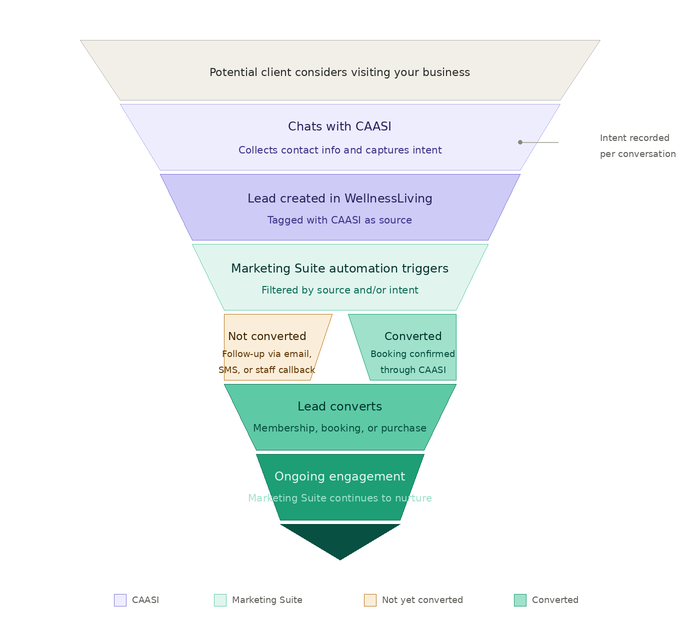
Step 1 — CAASI captures the lead
When a potential client chats with CAASI, CAASI's first priority is capturing their contact information. Once it has enough to identify them, a lead is automatically created in WellnessLiving with CAASI tagged as the lead source.
Subscribe to CAASI
To subscribe to CAASI:
Open the App Drawer
 then click View All > Setup > Add-Ons. Under CAASI - AI Agent, click Get started.
Follow the prompts to start your 30-day free trial or subscribe. For more information, see Manage your CAASI subscription.
Step 2 — CAASI records their intent
As the conversation continues, CAASI records what the lead was looking for. This intent is stored alongside the lead and is visible in your CAASI analytics, so you can see exactly what brought each lead to your business.
Check your lead intents
To check your lead intents:
Open the App Drawer
then click View All > CAASI.
Click Open CAASI Communication Hub, then click Analytics.
Click the Overview page to see a breakdown of conversation categories and how leads are distributed across intents.
For a full breakdown of your analytics, see CAASI analytic reports.
Step 3 — CAASI tries to convert them
If the lead is ready to take action, CAASI can help them book a service, answer questions, or direct them to the next step. For businesses on the Chat Agent subscription, CAASI can complete bookings and process cancellations directly in the chat without staff involvement. For a full breakdown of what's included in each tier, see the subscription comparison table.
Configure CAASI
To configure CAASI:
Configure how CAASI promotes your services and communicates with clients. See Customize CAASI's personality.
Add knowledge sources so CAASI can answer questions about your business accurately. See Add knowledge sources to CAASI.
To unlock booking capabilities via voice, upgrade to the Phone Agent subscription. See Manage your CAASI subscription.
Step 4 — The Marketing Suite takes over
Whether or not the lead converted through CAASI, the Marketing Suite gets involved:
If they didn't convert, an automation can trigger immediately, sending follow-up emails or SMS messages, or assigning a task to a staff member to reach out personally.
If they did convert, the Marketing Suite can continue nurturing them after their first booking, keeping them engaged and driving repeat visits.
Because CAASI records the intent behind every conversation, you can tailor your automations to match what each lead was actually looking for. For example, you may choose to:
Send an email highlighting your membership tiers and a limited-time offer to leads tagged with a Pricing Inquiry intent.
Send a direct link to your schedule and a prompt to complete their booking to leads tagged with a Booking intent.
Route leads tagged with a Billing Inquiry intent to a staff task for a personal follow-up instead of an automated message.
You can apply a single automation to all CAASI leads regardless of intent, or build out separate flows for each intent to create a more targeted experience. Pre-built automations for new leads are available as a starting point and can be customized to be CAASI-specific.
Set up your Marketing Suite automations
To set up your Marketing Suite automations:
Subscribe to the Marketing Suite. See Manage your Marketing Suite subscription.
Create a new automation or open an existing one for new leads. See Manage your marketing automations.
Open the automation's trigger settings and configure the following:
Under Trigger type, select Lead created.
Under Lead source, select Specific lead source, then select CAASI from the list.
Under CAASI intents, select Any to trigger the automation for all CAASI leads regardless of intent, or choose specific intents to create a more targeted flow.
Finish building your automation, then click Save or Save & Activate.
In practice
Here's how the CAASI and Marketing Suite workflow plays out in two common scenarios.
A lead who doesn't convert
A potential client chats with CAASI late at night, asks a few questions about membership pricing, and leaves their email before ending the conversation. CAASI creates a lead tagged with the Pricing Inquiry intent. Because you've set up a Marketing Suite automation to target that intent, the next morning they automatically receive an email highlighting your membership tiers and a limited-time offer with a link to book a free trial class.
A lead who converts through CAASI
A potential client asks CAASI about your class schedule and books a spot directly in the chat through the Chat Agent subscription. CAASI creates a lead tagged with the Booking intent and the booking is confirmed without any staff involvement. The Marketing Suite's automation kicks in after the class, sending a follow-up email and inviting them to purchase a membership.
Key tips
A lead is only created if CAASI captures enough contact information to identify the person. If a visitor asks questions but doesn't share their name, email address, or phone number, no lead is created and no automation is triggered.
Automations follow a cadence and don't fire the moment a lead is created. Timing is built into the automation flow.
Pre-built automations for new leads are available and can be customized to target CAASI leads specifically. You can filter by lead source, intent, or both.