
Release 71 is here! 🚀
Running a business takes focus—and Release 71 is here to make it easier. This update brings you more control, flexibility, and time back in your day.
With upgrades across WellnessLiving—like the new Key Metrics dashboard, flexible product sharing, dynamic barcodes, and simpler lead creation—you can work more efficiently, serve clients better, and stay confidently in control.
Behind every feature is a story. Meet the customers who inspired many of the updates in this release.
Here’s what’s new!
What's New
CAASI Communication Hub enhancements
Redesigned: Appointment Widget
Schedule when Purchase Options go live
Simplified lead creation & centralized lead settings
Dynamic client barcodes for more secure check-in
Expanded payroll details for more accurate staff pay
Client profile attachments now available in the Achieve App
Smarter staff scheduling across locations in the Elevate App
Track projected and earned revenue in the Elevate App
Reset client passwords directly from the Elevate App
Smarter sales & revenue reporting for payments on account
Reuse Client Emails from Closed Franchise Locations
Seamless sign-up across multiple businesses
New permission to control unpaid recurring bookings
More Updates
Coming Soon
Friction-free booking for guests, families & groups
Clearer product links: Product Details vs. Direct Checkout
What’s New
CAASI Communication Hub enhancements
What is it?
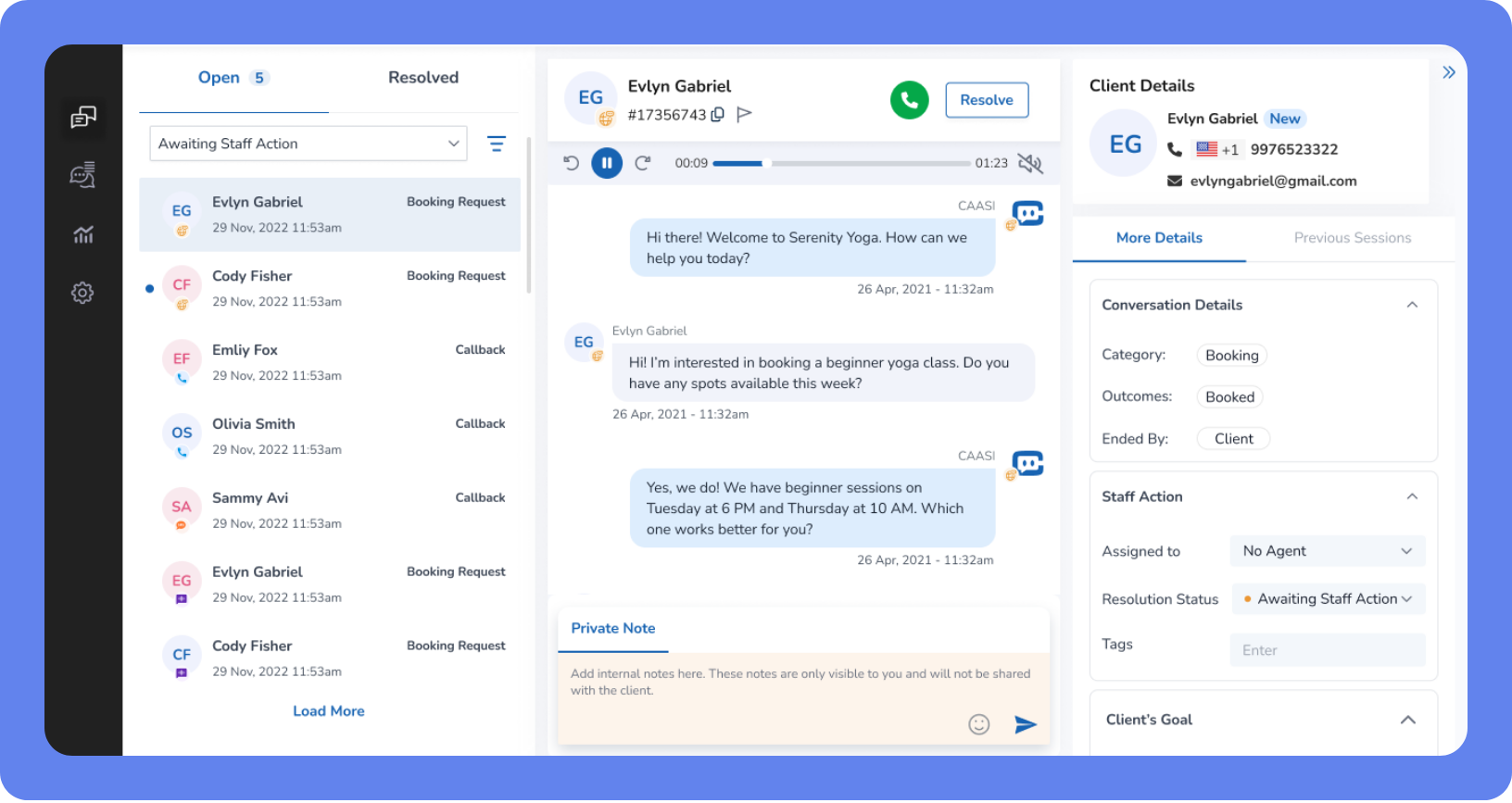
CAASI just got a major upgrade—making it easier for your team to manage client conversations without changing how you work today. The Communication Hub is now faster, clearer, and it’s easier to stay on top of messages.
The result– fewer missed calls, less staff interruption, and faster responses for clients.
Key features
One-click resolution – Mark conversations as handled instantly with the new Resolve button.
Clearer statuses – Simple, standardized labels—Staff Informed, Staff Addressed, and Resolved by CAASI—make it easy to see what needs attention at a glance.
Flag for follow-up – Flag any conversation, whether open or resolved, so nothing slips through the cracks.
Smarter tabs & filters – Quickly view Open, Resolved, Flagged, or Assigned to Me conversations, with advanced filtering by status, trigger type, and read/unread state.
CAASI daily exports – Download easy-to-read summaries of CAASI’s activity directly from the new Exported Reports section.
📍 To subscribe to CAASI head to App Drawer, then click on CAASI to view subscription options.
New Key Metrics Dashboard
What is it?
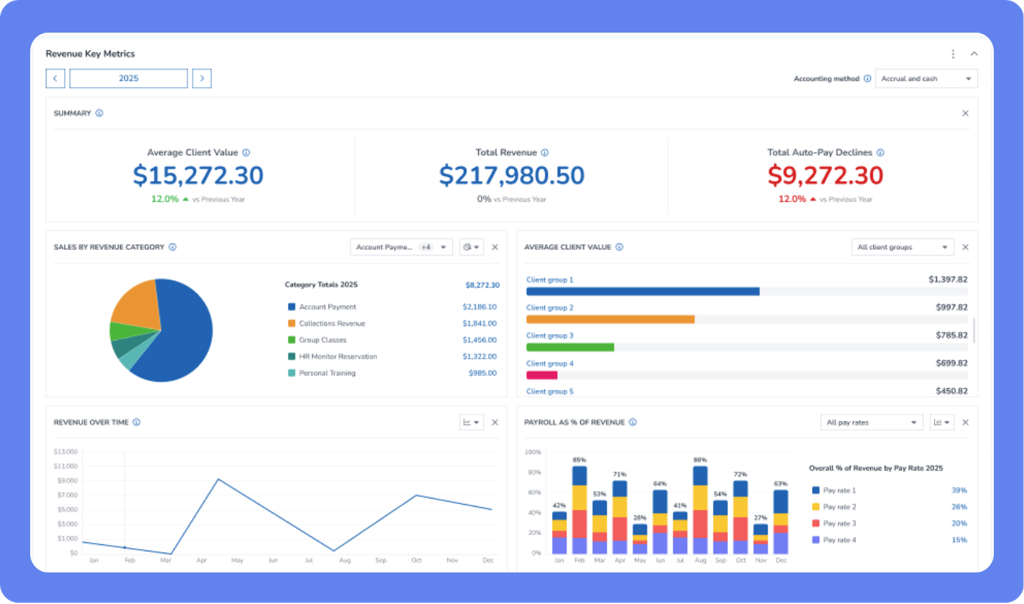
Running a service-based business means knowing what’s working—without digging through dozens of reports. Instead of jumping between multiple reports to check sales, memberships, and leads, the new Key Metrics Dashboard brings your most important numbers into one clear, customizable view. That means faster check-ins, fewer clicks, and more confident decisions.
Key features
Your KPIs, your way – Choose which metrics to display, filter them by date range and location, and quickly see what’s driving growth or needs attention.
Instant insights – Click any metric to jump straight into the full report, already filtered—no rebuilding views or second-guessing your numbers.
Visual trends & clean data – Each metric includes clear charts or visuals, so you can spot patterns at a glance and take action faster.
A starting set of key metrics (with room to grow) – Track essentials like total revenue, sales by revenue category, new memberships, new leads by source, at-risk members, active clients, first visits, and intro offers sold—with more metrics available over time as your reporting needs grow.
📍 To access your dashboard, go to App Drawer, then click on Dashboard > Key Metrics, customize your view, and start tracking the numbers that matter most to your business.
Redesigned: Appointment Widget
What is it?
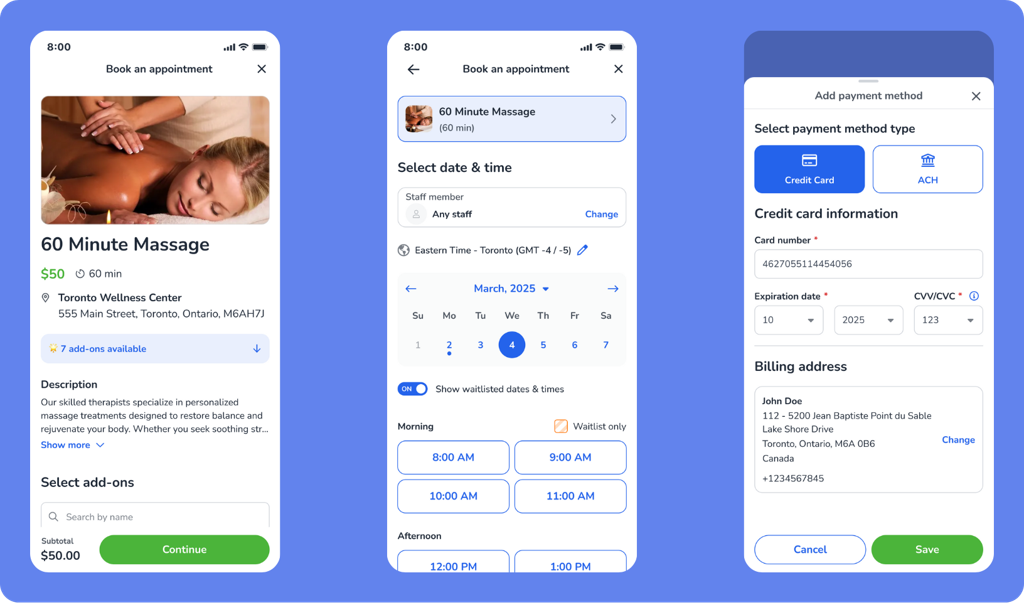
The Appointment Widget has been fully redesigned to deliver a smoother, faster booking experience—especially on mobile. Clients can now book multiple appointments for themselves or others in a single flow, making it easier to fill schedules and increase conversions with fewer clicks.
Key features
Guest booking policy – When enabled, clients can book without creating an account or setting a password.
One-Step Service Booking – Clients go straight to the booking screen after selecting a service, no extra click needed. If Multiple Appointment Booking is enabled, they can book several appointments in the same flow.
Built-in add-ons – Clients can easily browse and select add-ons without disruptive pop-ups.
Easy to use on any phone or tablet – A responsive, mobile-friendly interface with always-visible special instructions for better clarity.
Clear review screen – Clients can double-check and edit service details at any point in the flow.
📍 To start using the new widget, go to App Drawer, then click Setup > Widgets > Appointment Widget.
Schedule when Purchase Options go live
What is it?
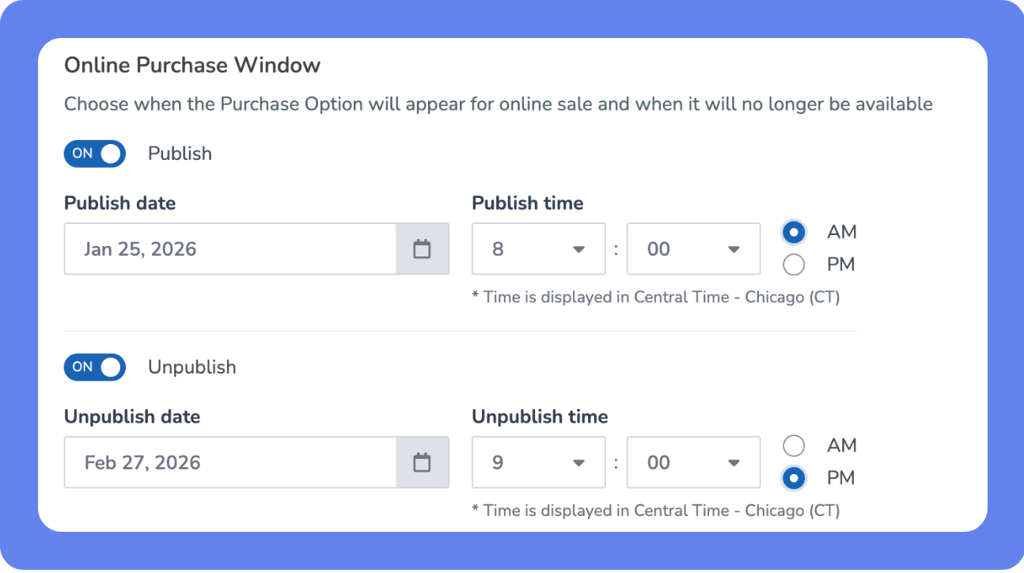
You can now control exactly when Purchase Options appear to clients with new Publish and Unpublish settings—just like you do with class and event schedules. This removes the need to manually enable or disable Purchase Options at the last minute and makes it easy to run seasonal offers, limited-time deals, or registration-based passes automatically.
Key features
Set it and forget it – Choose a start and end date/time for each Purchase Option’s visibility. It’ll appear and disappear right on schedule.
Smarter online store – Your store stays current with active offers only, ideal for seasonal promos or early-bird pricing.
Cleaner client experience – Clients only see what’s available, reducing confusion or attempts to purchase expired offers.
Full access for staff – Your team can still view and manage all Purchase Options at any time, no matter their visibility status.
📍 To schedule visibility, select Clients can buy online under Purchase Restrictions in your Purchase Options. Then, set the Publish/Unpublish dates for your Online Purchase Window.
Simplified lead creation & centralized lead settings
What is it?
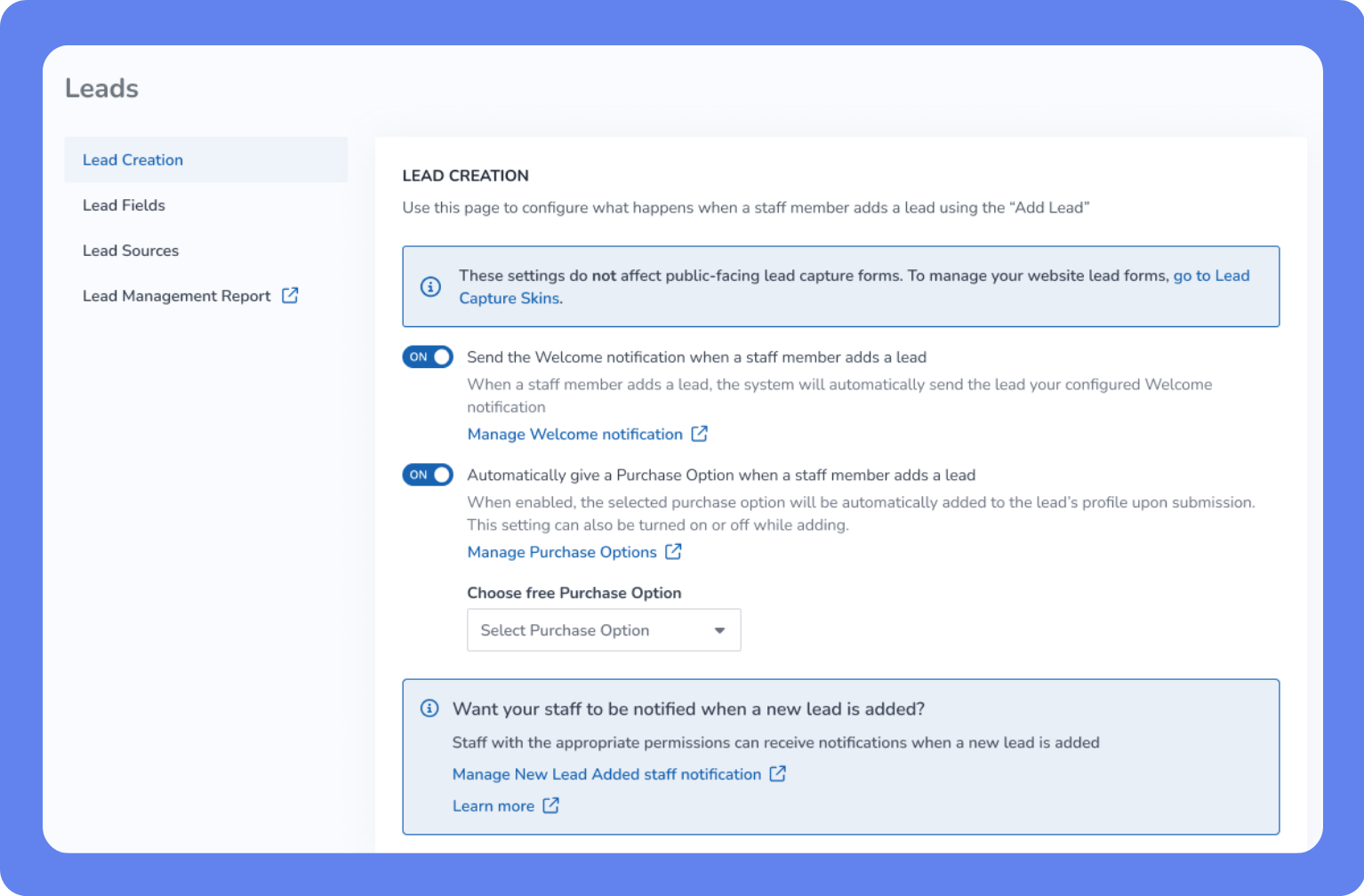
We’ve made it easier than ever for staff to add leads and manage lead settings—all without needing to configure a widget first. The new Add Lead overlay reuses fields marked Show on Sign Up, making it easy to collect just the essentials. Leads are automatically tagged with their source, and any welcome emails can be managed with a new setting. All lead-related setup—fields, sources, and reporting—is now managed from a single Lead Settings page.
Key features
Add leads instantly – The Add Lead button is always available to staff, even without a Lead Capture Widget.
Streamlined add flow – A unified overlay simplifies adding leads or clients, with smart defaults preselected.
Centralized settings – Configure lead fields, sources, and welcome emails from one easy-to-access section.
Smart default fields – Only fields marked Show on Sign Up appear, so staff collect the right info every time.
Automatic source tagging – Leads added by staff are clearly labeled with the source Added by staff.
📍 To manage lead settings, open the App Drawer, then click Setup > Leads.
Dynamic client barcodes for more secure check-in
What is it?
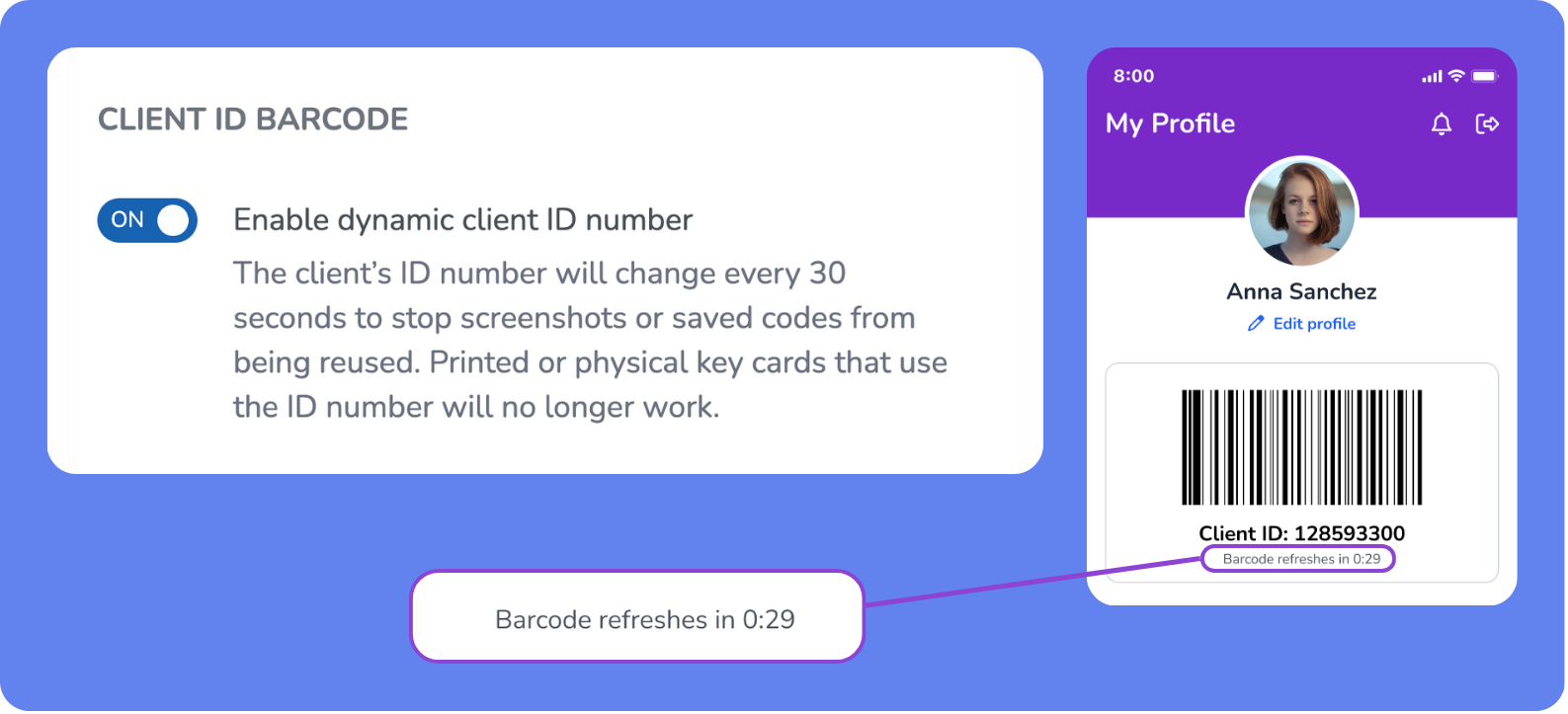
Client barcodes are now dynamic and can be automatically refreshed every 30 seconds. This helps prevent barcode sharing or reuse (such as screenshots), while keeping the existing check-in experience fast and fully compatible with current hardware.
Key features
Auto-refreshing barcodes – Each client’s barcode refreshes every 30 seconds with no action required.
Improved security – Time-limited barcodes reduce the risk of unauthorized access or shared screenshots.
No workflow changes – Barcodes still identify the same client and trigger the existing check-in process.
Hardware-compatible – Works with all WellnessLiving-supported barcode scanners and Passport Technologies door access readers.
Staff Back Office validation – Expired barcodes are automatically rejected once their time window ends.
Quick Auto Check-In: When Quick Auto Check-In is enabled static barcodes will not work.
📍 To enable dynamic barcodes, open the App Drawer, then go to Setup > Business > Business Policies > Security and turn on Client ID Barcode.
Expanded payroll details for more accurate staff pay
What is it?
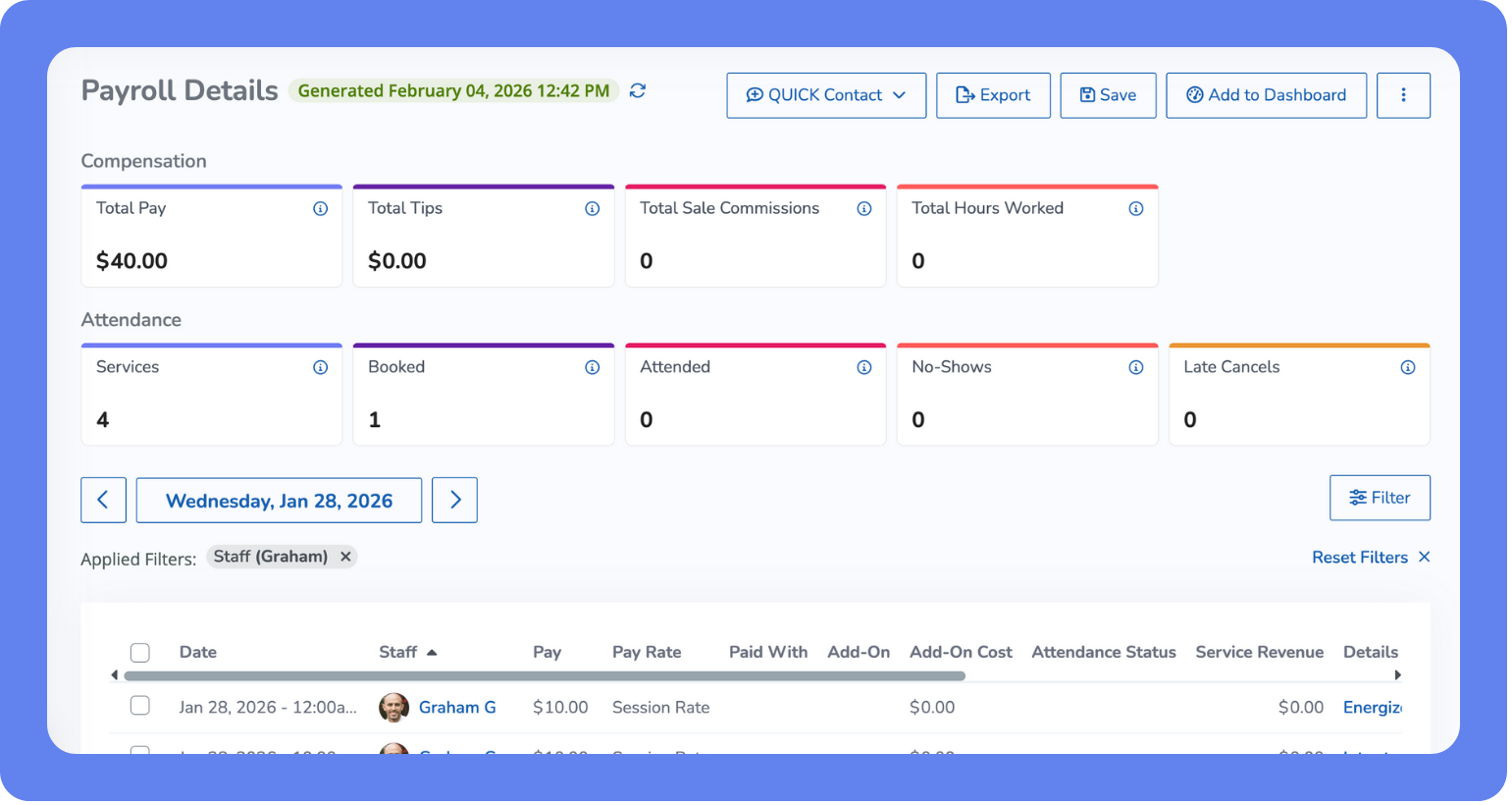
We’ve added new insights to the Payroll Details and Payroll Summary reports to help you calculate staff pay with greater accuracy. From understanding how services were paid to tracking appointment outcomes, everything you need to manage payroll is now in one place—clear, customizable, and exportable.
Key features
See how appointments were paid – The new Paid With column shows the Purchase Option used—or flags it as Not Paid.
Track add-ons and their cost – Quickly spot any add-ons applied to appointments, even when multiple are used.
Understand service revenue – View revenue per service in Payroll Details, and total revenue per staff member in Payroll Summary.
Check attendance status – Know if an appointment was completed, cancelled, or a no-show—critical for payroll accuracy.
Customize and export – All new columns are hidden by default but easy to add and include in your exports.
📍 Find these improvements in Reports > Staff > Payroll Details or Payroll Summary.
Client profile attachments now available in the Achieve App
What is it?
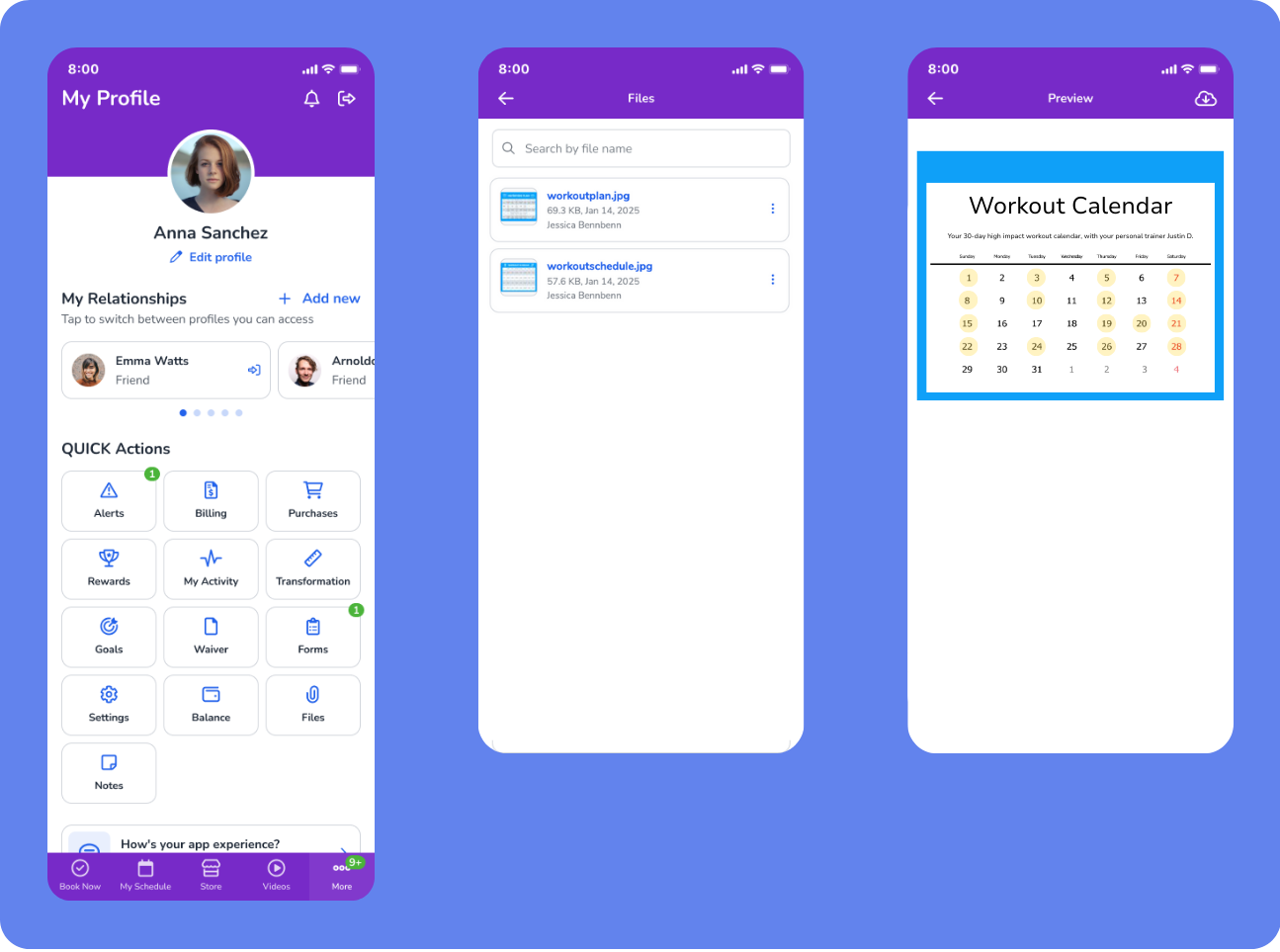
Clients can now view and download documents shared on their profiles directly from the Achieve App (including White Label versions). This makes important resources—like workout plans and post-appointment materials—accessible where clients engage most: on mobile.
Key features
New files section in the app – A dedicated Files section appears in the client’s Profile tab within the Achieve App.
View & download attachments – Clients can tap to open or download supported file types, including PDF, JPG, and PNG.
📍 Available in the Achieve App and White Label apps, no setup required beyond uploading files to the client profile.
Smarter staff scheduling across locations in the Elevate App
What is it?
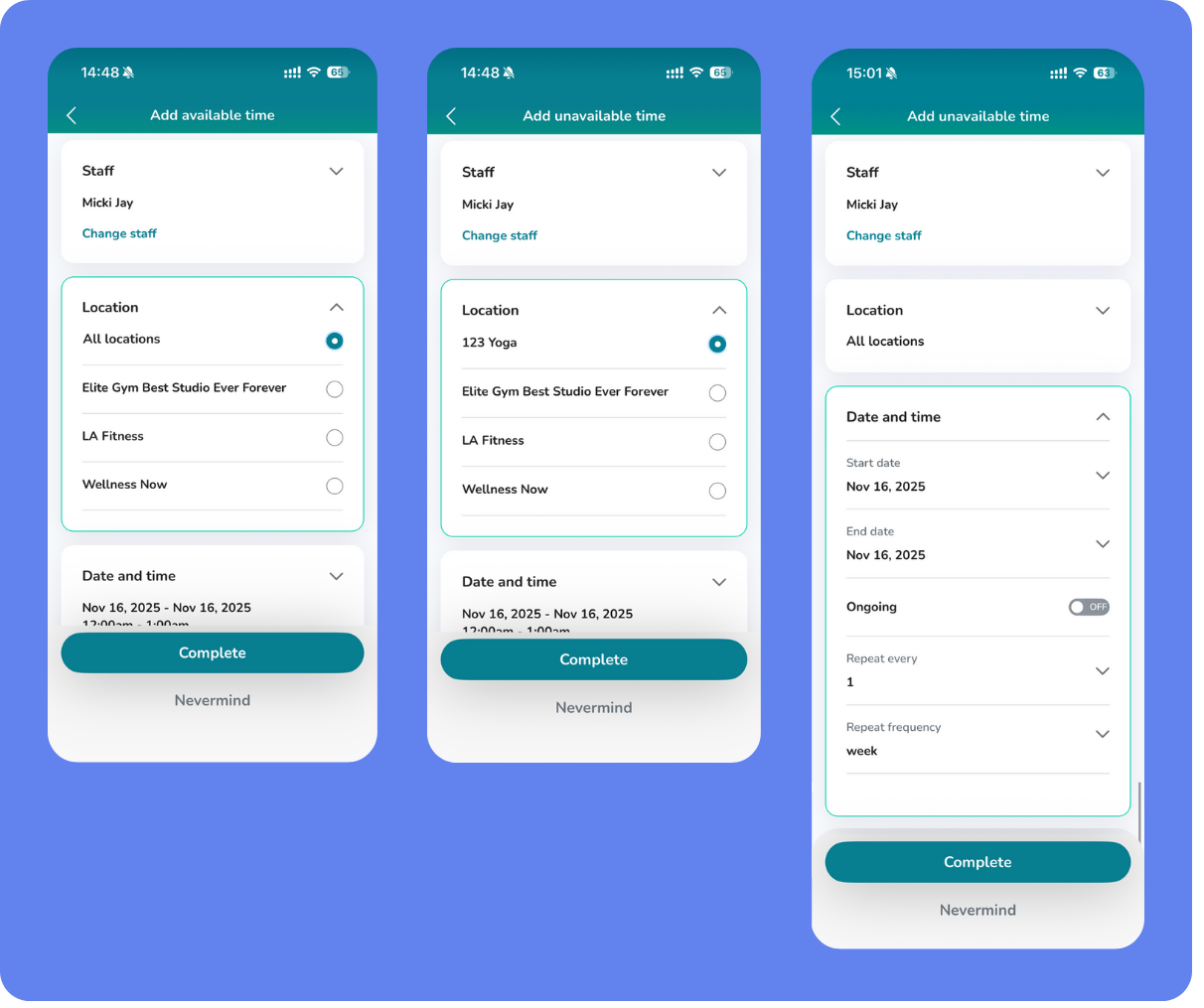
Managing staff availability just got easier—both in the Staff Back Office and on the go. You can now block off staff unavailability across all assigned locations in one step, while Closed Days now appear directly in the Elevate Staff App, giving teams a clearer, more consistent view of schedules.
Key features
Set staff working hours across locations – Use the new All Locations option to apply the same time block everywhere a staff member works.
One action, full coverage – The system automatically creates matching unavailability or availability records for each assigned location.
Now visible in Elevate – Closed Days configured in the Staff Back Office now appear in both List View and Calendar View of the Elevate Staff App.
Clear conflict messaging – If a conflict exists at one location, the system still allows the action and flags it with helpful guidance.
📍 To update staff availability, open the App Drawer, then go to Setup > Staff Members > Working Hours > Add available/unavailable time.
Track projected and earned revenue in the Elevate App
What is it?
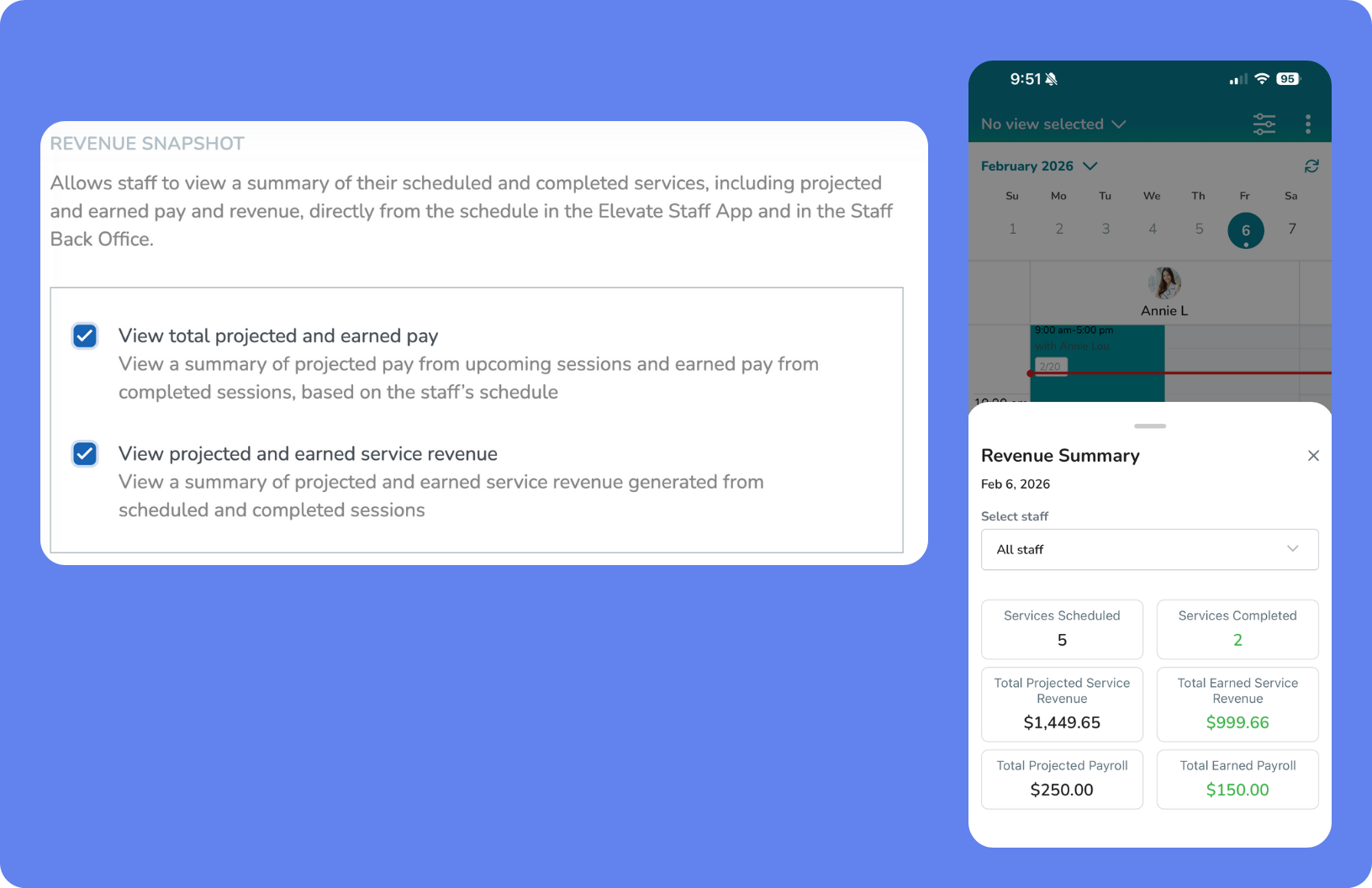
Business owners and staff can now see projected and earned revenue directly in the Elevate Staff App, without logging into the Staff Back Office. This gives your team real-time visibility into upcoming earnings, completed session revenue, and workload—making it easier to hit compensation goals, spot schedule gaps, and plan ahead.
Key features
Projected weekly revenue at a glance – See how much revenue is expected from upcoming booked sessions.
Earned revenue visibility – Track revenue from completed sessions in real time.
Permission-based access – Revenue data is available only to staff via the new Revenue Snapshot staff permissions.
These permissions are OFF by default except for business owners.
📍To enable this feature open the App Drawer, then click Setup > Staff > Staff Roles > Revenue Snapshot. Enable View total projected and earned pay and/or View projected earned service revenue.
Reset client passwords directly from the Elevate App
What is it?
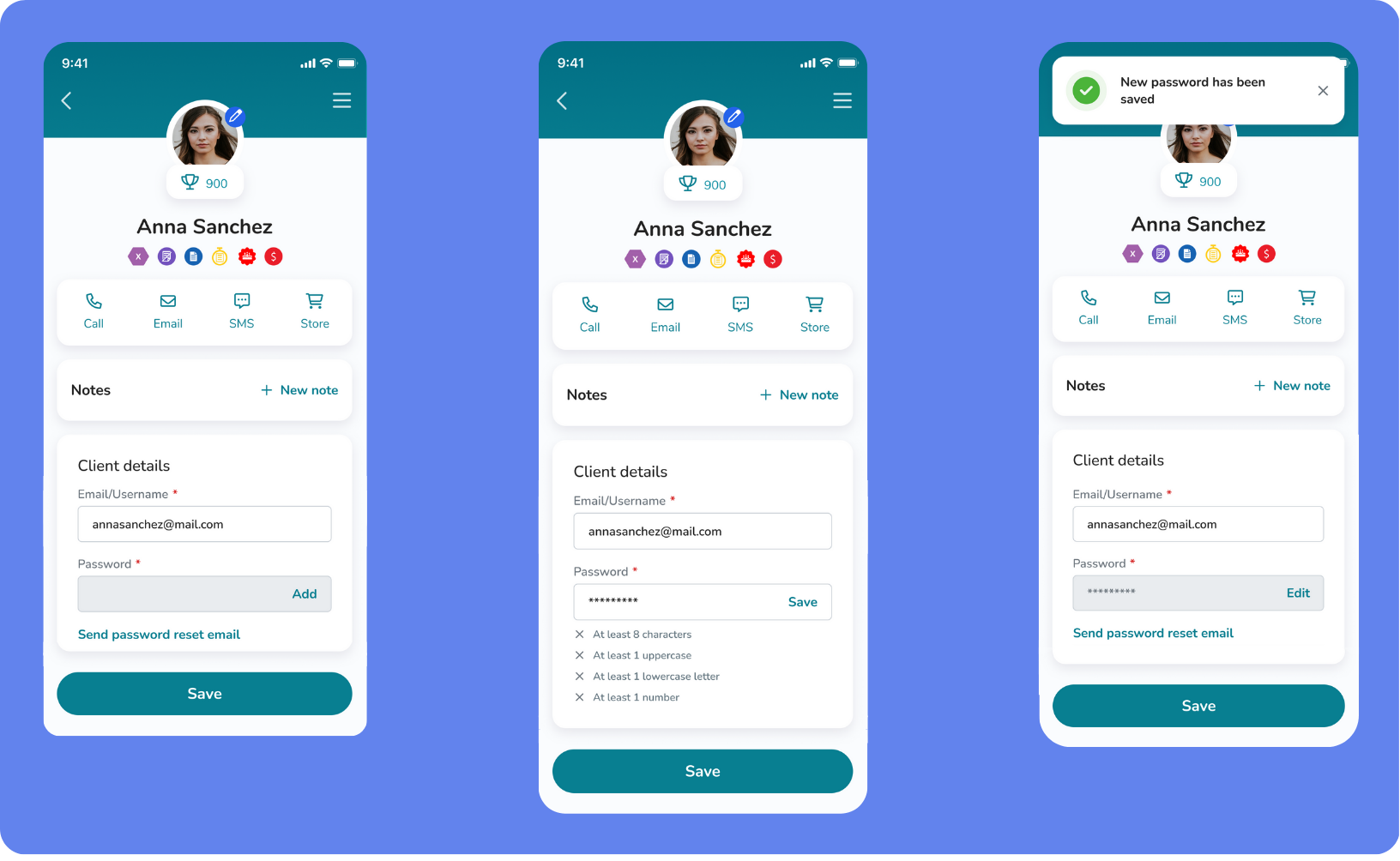
Now, when a client forgets their password during an in-person visit, staff can help on the spot. With this update to the Elevate Staff App, you can reset or help clients set their passwords right from their profile—no need to switch platforms or send clients elsewhere.
Key features
Support smoother onboarding – From the Elevate client profile, staff can resend welcome emails or help clients set or reset their password on the spot.
Smart permissions – If password editing is disabled, staff can still send a reset email. If enabled, they can update it directly.
Instant confirmation – See a success message the moment a reset or update goes through.
Built-in safeguards – Password changes are blocked for clients shared across multiple businesses to protect account access.
📍 Go to the Elevate Staff App, then open the Client Profile to access password reset options.
Smarter sales & revenue reporting for payments on account
What is it?
We’ve enhanced how Payments on Account are reflected in Sales and Revenue reports—especially for businesses using Cash Basis accounting. Payments are now correctly attributed to the original purchase items using FIFO (first-in, first-out) logic, leading to cleaner records, accurate tax reporting, and a clearer picture of revenue performance.
Key features
Payments that match purchases – Payments on Account are now applied directly to the purchase items they cover, eliminating mismatches in revenue categories.
Clear item view – Each item shows the original price, discount, tax, and amount paid—perfect for businesses that need precision under Cash Basis accounting.
Summarized transaction view – Even when a payment covers multiple items, Transaction View rolls it into a single clean entry.
Split payment support – Mixed payments (e.g., part card, part account) are handled accurately with correct FIFO splits across purchases.
Client profile clarity – The Purchases and Transactions tabs now clearly show where account payments have been applied.
📍 These updates apply to All Sales, Sales Summary by Location, Sales Details by Revenue Category, Client Transactions, Client Purchases, and Cost of Goods Sold reports.
Reuse Client Emails from Closed Franchise Locations
What is it?
Franchise locations using Travel mode can now register clients using email addresses previously tied to closed locations—without support intervention. This update removes a major bottleneck for onboarding, helping businesses create full client profiles right away.
Key features
No more support requests – Emails tied only to closed locations can now be reused automatically.
Create full profiles instantly – The system will no longer assign a travel profile when the email only exists in a churned location.
Faster onboarding for new clients – Staff can register new members without delay, even if they had a past profile at a closed location.
Improved enterprise experience – Specifically supports Curves and non-Curves setups using Travel mode.
📍 This behavior is applied automatically during client creation—no setup required.
Seamless sign-up across multiple businesses
What is it?
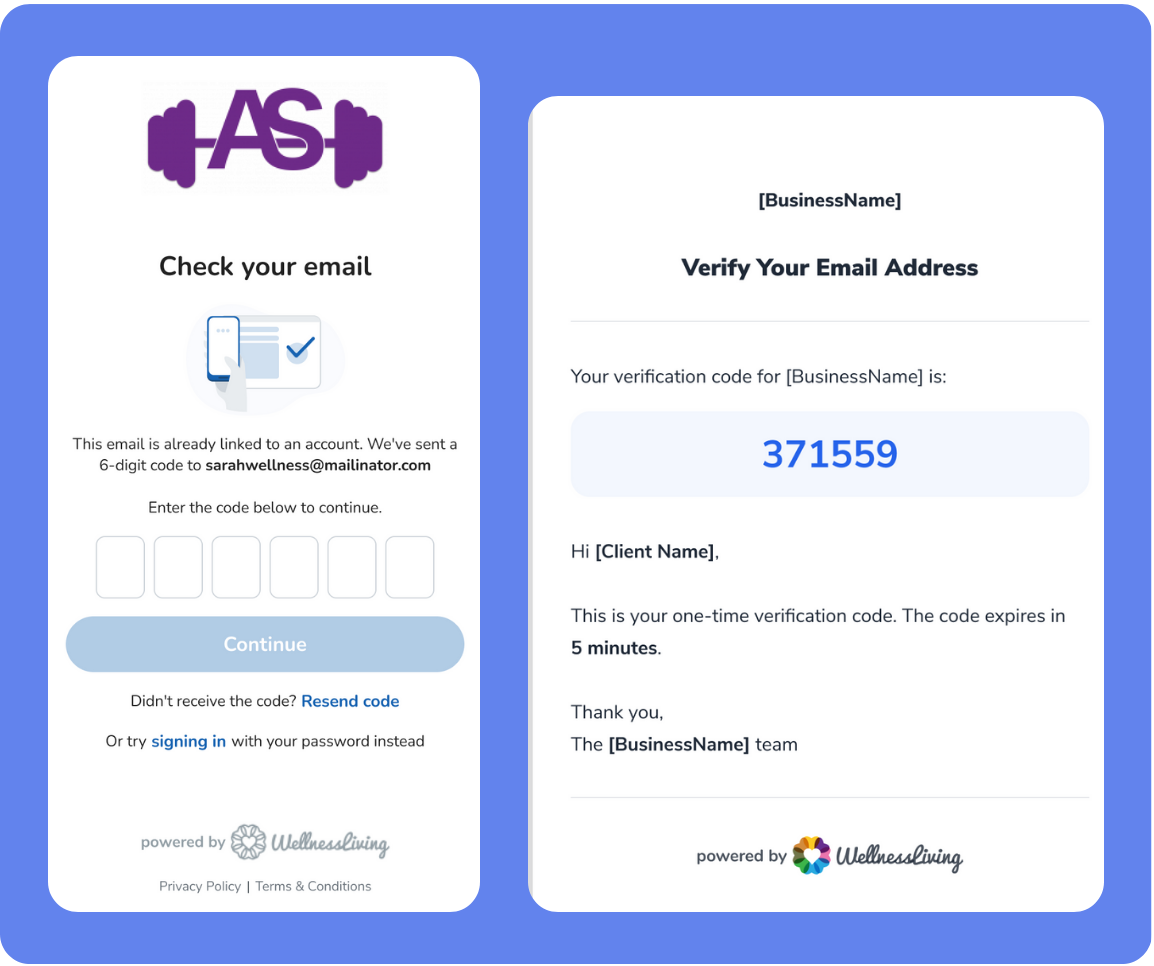
We’ve improved the sign-up experience for clients who belong to more than one business using WellnessLiving. Now, instead of seeing an error when trying to sign up with an existing email, users will be guided through a secure email verification process—making it easier to join multiple businesses with the same login.
Key features
Secure ownership verification – A one-time email code confirms the user owns the email before linking accounts.
Unified client identity – Accounts are automatically linked to a single global user ID, keeping profiles consistent.
Streamlined login and access – After verification, clients are signed in and connected to the new business right away.
Intuitive fallback from sign-in – If an email isn’t found during sign-in, users are redirected to the sign-up page with their email pre-filled.
New permission to control unpaid recurring bookings
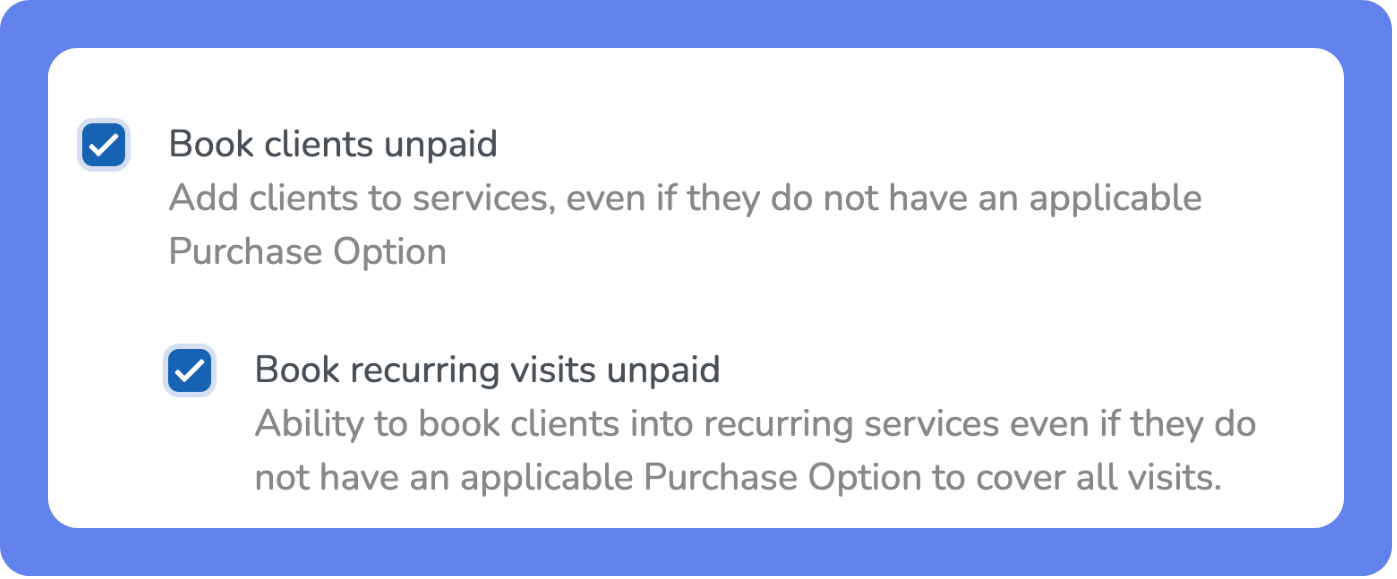
What is it?
We’ve added a new permission to help you manage how staff handle recurring bookings when a client’s Purchase Option doesn’t cover all visits. This ensures you can prevent accidental unpaid bookings while maintaining flexibility for your team.
Key features
New staff permission: Book recurring visits unpaid – Lets you decide whether staff can create recurring bookings that include uncovered visits.
Smarter booking checks – When this permission is ON, the system pre-checks coverage and alerts staff if visits exceed a client’s Purchase Option.
Clear booking guidance – Staff see a red error message if coverage is insufficient: “The selected client does not have an applicable Purchase Option to cover all visits. Please adjust the frequency of the recurring booking.”
Streamlined store experience – Only applicable Purchase Options are shown during checkout, reducing confusion at the point of sale.
Preserves existing behavior – This new permission is off by default and dependent on the “Book clients unpaid” permission, so nothing changes unless you enable it.
📍Open the App Drawer, then click Setup > Staff > Staff Roles > Services and schedules to enable this new permission.
More Updates
Other time-savers and fixes you’ll love.
Forms
Smarter image markup – Forms now remember your last-used markup tool and color on both Web and the Elevate Staff App.
Staff Back Office
Redesigned Location tab – The Location tab now features a refreshed look with clearer navigation.
Centralized add-ons management – Find, review pricing, and manage add-ons from a single App Drawer > Add-ons page, with staff permissions respected.
Coming Soon
COMING SOON - The new Marketing Suite 2.0
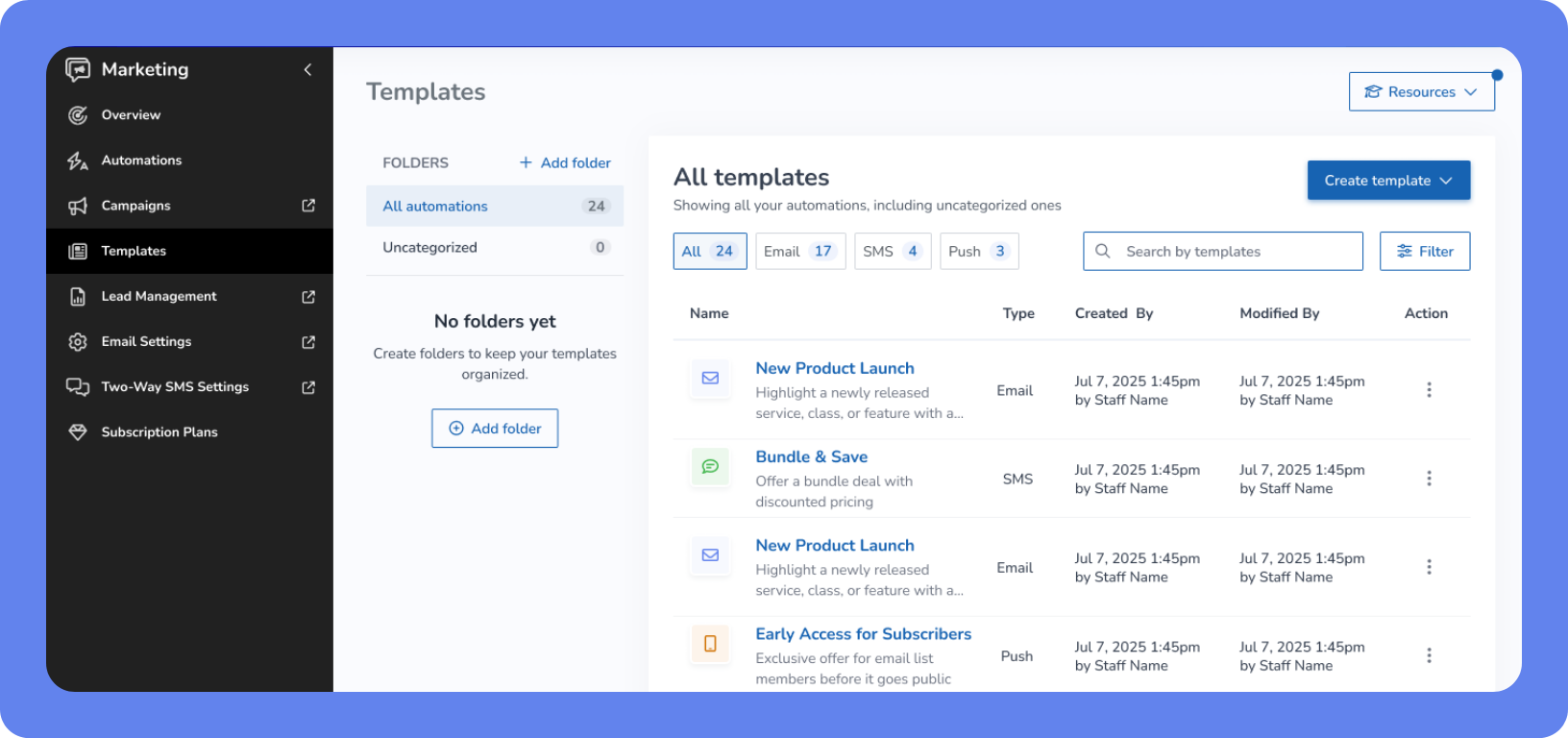
The upgraded Marketing Suite 2.0 brings your marketing tools into one organized, results-driven place—so following up with leads and clients feels manageable, not overwhelming. It’s designed to help you stay consistent, respond faster, and turn interest into bookings without adding more work to your day.
At the center of this update is the new Automation Builder. It quietly takes care of routine follow-ups in the background, so prospects and clients hear from you at the right time—even when your team is busy. You’ll also find clearer Lead Management, easier Campaign tools, and simple email domain verification to help your messages land where and when they should.
Key features
Automation Builder – Set up simple, step-by-step follow-ups using ready-made templates. You can create unlimited steps using email, SMS, and push notifications—at your own pace, and only when it makes sense for your business.
Lead Management – Track lead sources and gain better visibility into your pipeline.
Upgraded Campaigns – Schedule and send campaigns more easily, then check opens and clicks to see what’s resonating.
Email domain verification – Verify your branded email to improve deliverability and help clients recognize and trust your messages.
COMING SOON - Friction-free booking for guests, families & groups
What is it?
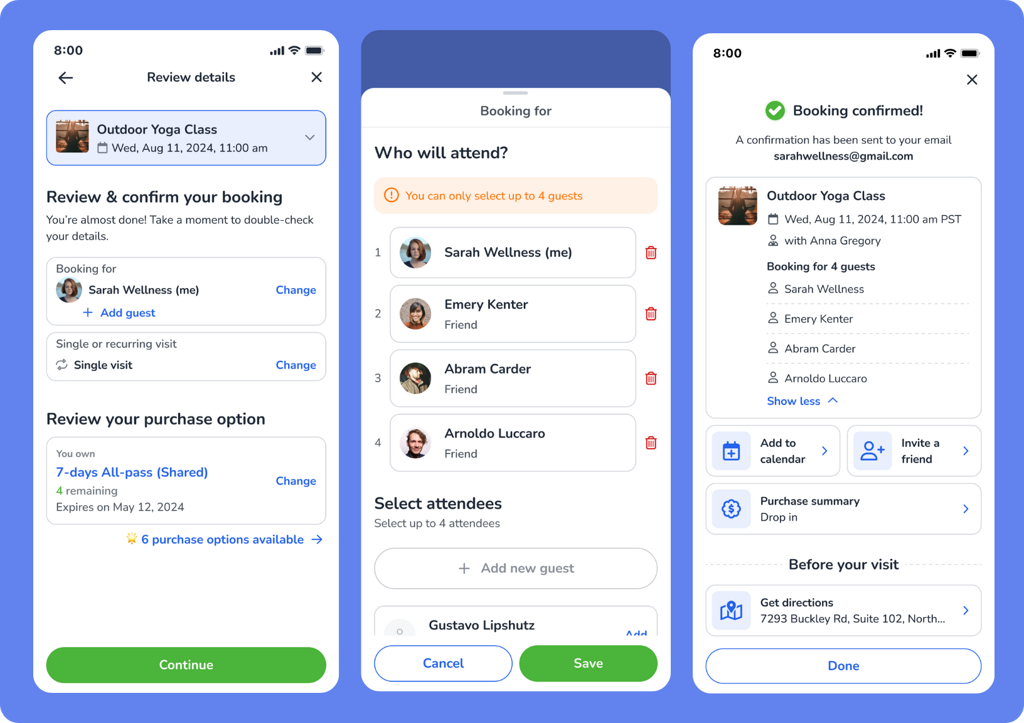
The Schedule and Event Widgets now make booking easier for everyone—from first-time guests to members booking for family or friends. Clients can skip account creation, add multiple attendees in one flow, and complete bookings faster, helping you fill spots with fewer drop-offs.
Key features
Book without logging in – Guests can book with just the required details and email verification—no account setup needed.
Easy group booking – Clients can add family members or friends during checkout, all in one smooth flow.
Built-in eligibility checks – The system automatically handles capacity limits, restrictions, and duplicate bookings to prevent issues.
Flexible payments & offers – Group credits can be shared when available, bookings can remain unpaid if allowed, and guests can still use Intro Offers and earn rewards.
📍Enable guest booking settings in the Booking section of your Business Policies to allow group booking for classes and events.
COMING SOON - New GoHighLevel integration
What is it?
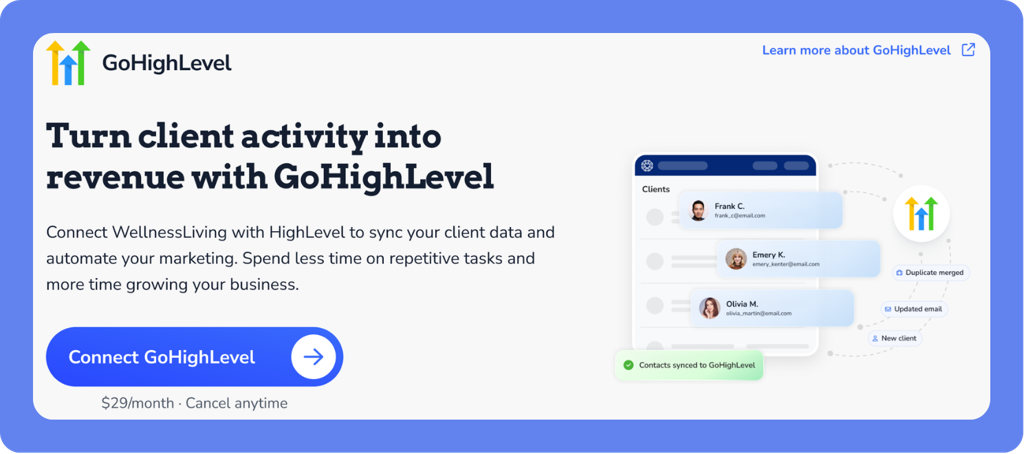
The new GoHighLevel (GHL) integration helps you stay connected with leads and clients—without extra manual work. Information automatically stays in sync between WellnessLiving and GHL, so you can follow up, send the right messages, and keep conversations moving forward. WellnessLiving continues to be where you manage scheduling, purchases, and attendance.
Key features
Automatic updates – Client information stays up to date in both systems, so you don’t have to re-enter details or worry about mismatches.
Better audience grouping – Client Types and Client Groups from WellnessLiving connect to GHL, making it easier to send the right message to the right people at the right time.
Quick client snapshots – See helpful details like membership status, recent purchases, and booking activity in GHL to guide your follow-ups.
Easy setup, one location at a time – Each location can connect its own GHL account from a simple setup page, with clear options to connect or disconnect when needed.
📍 To get started, open the App Drawer, then click Setup > Integrations > GoHighLevel and connect your account to start syncing client data and driving smarter marketing workflows.
COMING SOON - Clearer product links: Product Details vs. Direct Checkout
What is it?
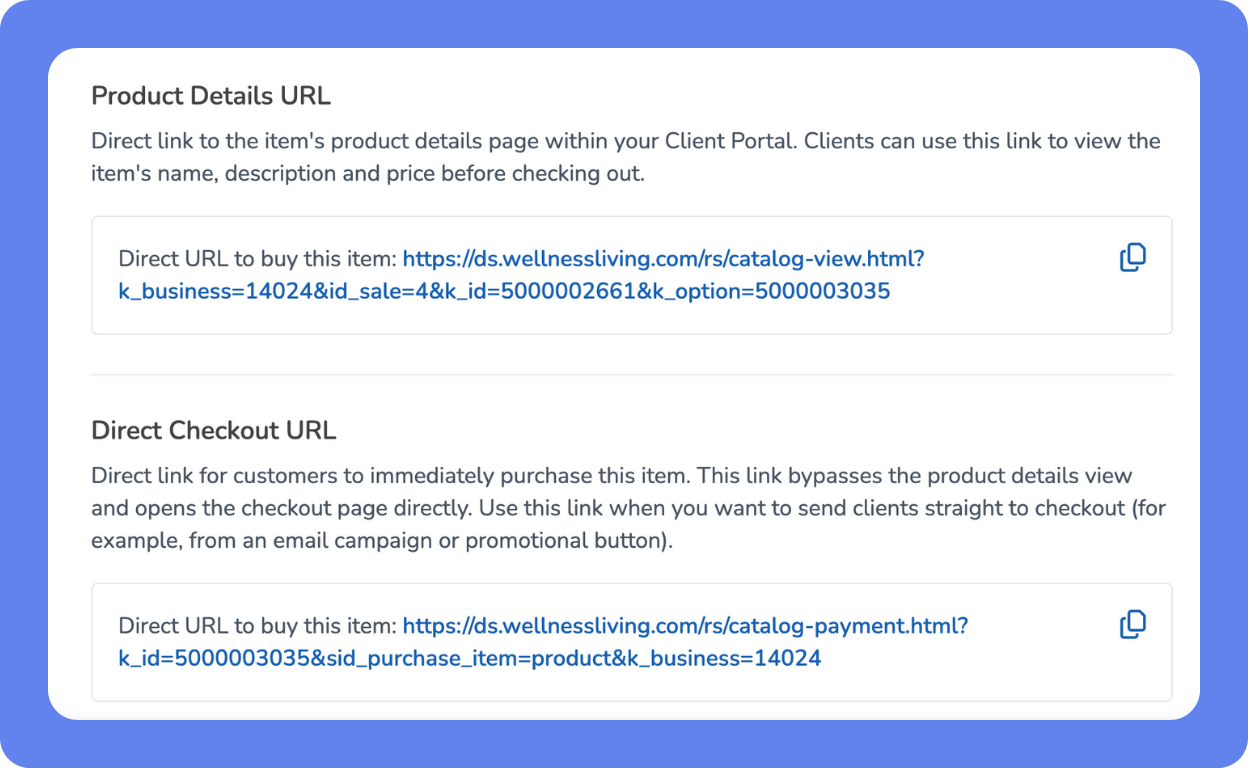
Product links are now clearer and more flexible. The old Direct Buy URL has been renamed to Product Details URL for clarity, and a new Direct Checkout URL has been added—so staff can now choose whether to send clients to a product info page or straight to checkout to speed up conversions with fewer steps.
Key features
Renamed for clarity – Direct Buy URL is now Product Details URL, which opens a page where clients can view details and purchase options before checkout.
New direct checkout URL – A Direct Checkout URL takes clients straight to checkout with the product already in their cart, skipping the details page entirely.
Improved sharing experience – These URLs can be used on websites, emails, or social posts to match marketing goals.
Quick access – A new button at the top of the product setup page lets staff jump straight to the links table for easy copying.
📍 Available in the product setup page, no additional configuration required.
We’d love to hear what you think about this release—share your feedback in our Community Forum!