
Release 26.72 is here! 🚀
Running a business takes focus—and Release 26.72 is here to make it easier. This release focuses on clearer insights, smarter automation, and a smoother client experience.
From improved reporting and payroll visibility to enhanced marketing automations, booking clarity, and calendar integrations, these updates help you communicate better with clients, reduce manual work, and manage your business with greater confidence.
Behind every feature is a story. Meet the customers who inspired many of the updates in this release.
Here’s what’s new!
What's New
Drive more revenue with the all-in-one Marketing Suite 2.0 (Rolling Out Now)
Allow clients to book services for a guest in booking widgets (Rolling Out Now)
Invite friends to join your booking with one click
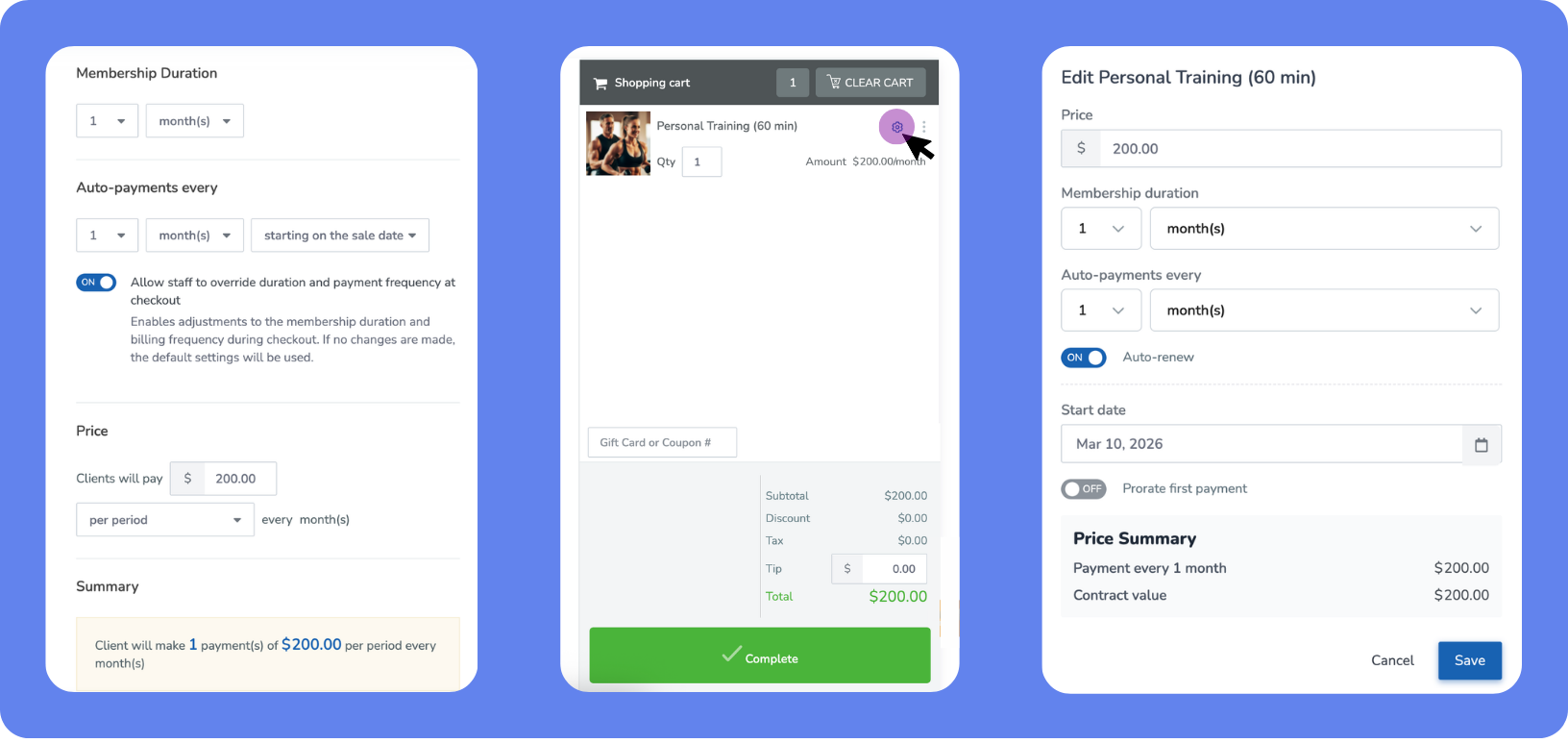
Customize memberships directly at checkout
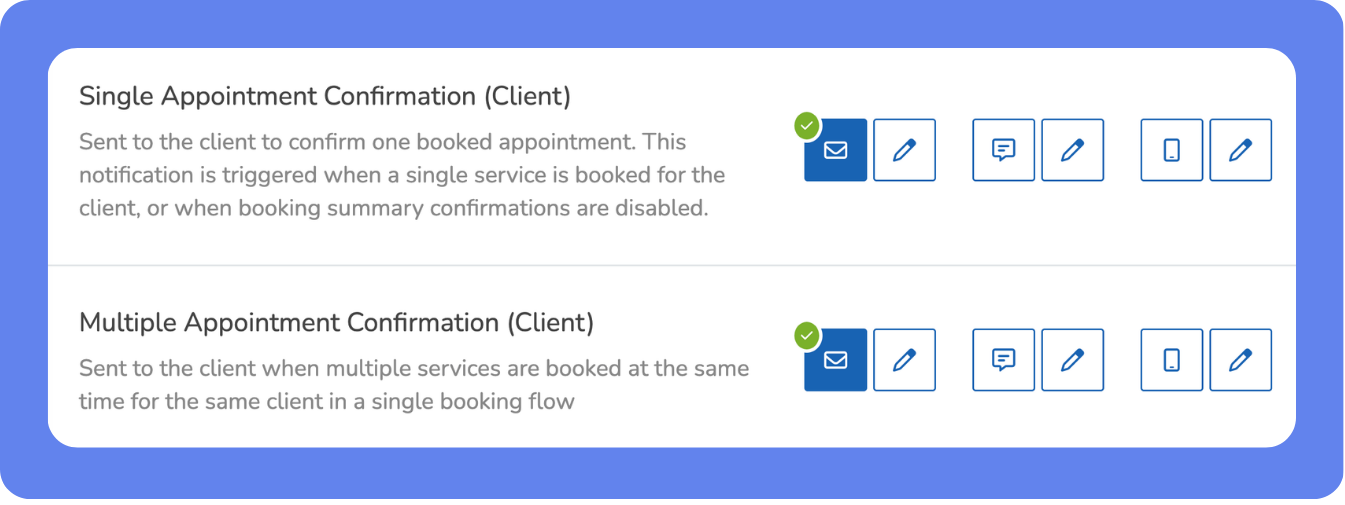
Combine multiple appointment confirmations
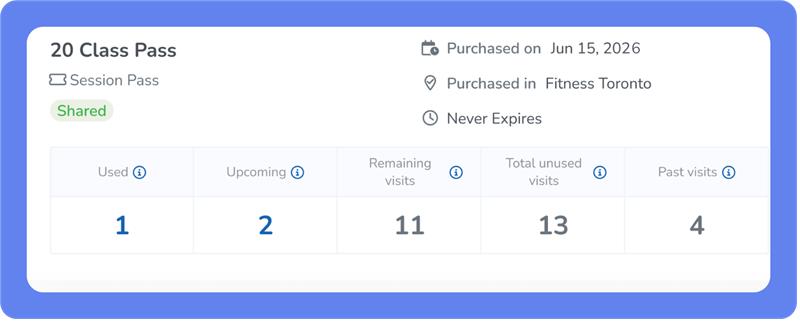
Unified view of upcoming and remaining visits
COMING SOON: Prevent overlapping bookings and waitlists
COMING SOON: Customize your lead capture experience from start to finish
More Updates
What’s New
Drive more revenue with the all-in-one Marketing Suite 2.0 (Rolling out now)
What is it?
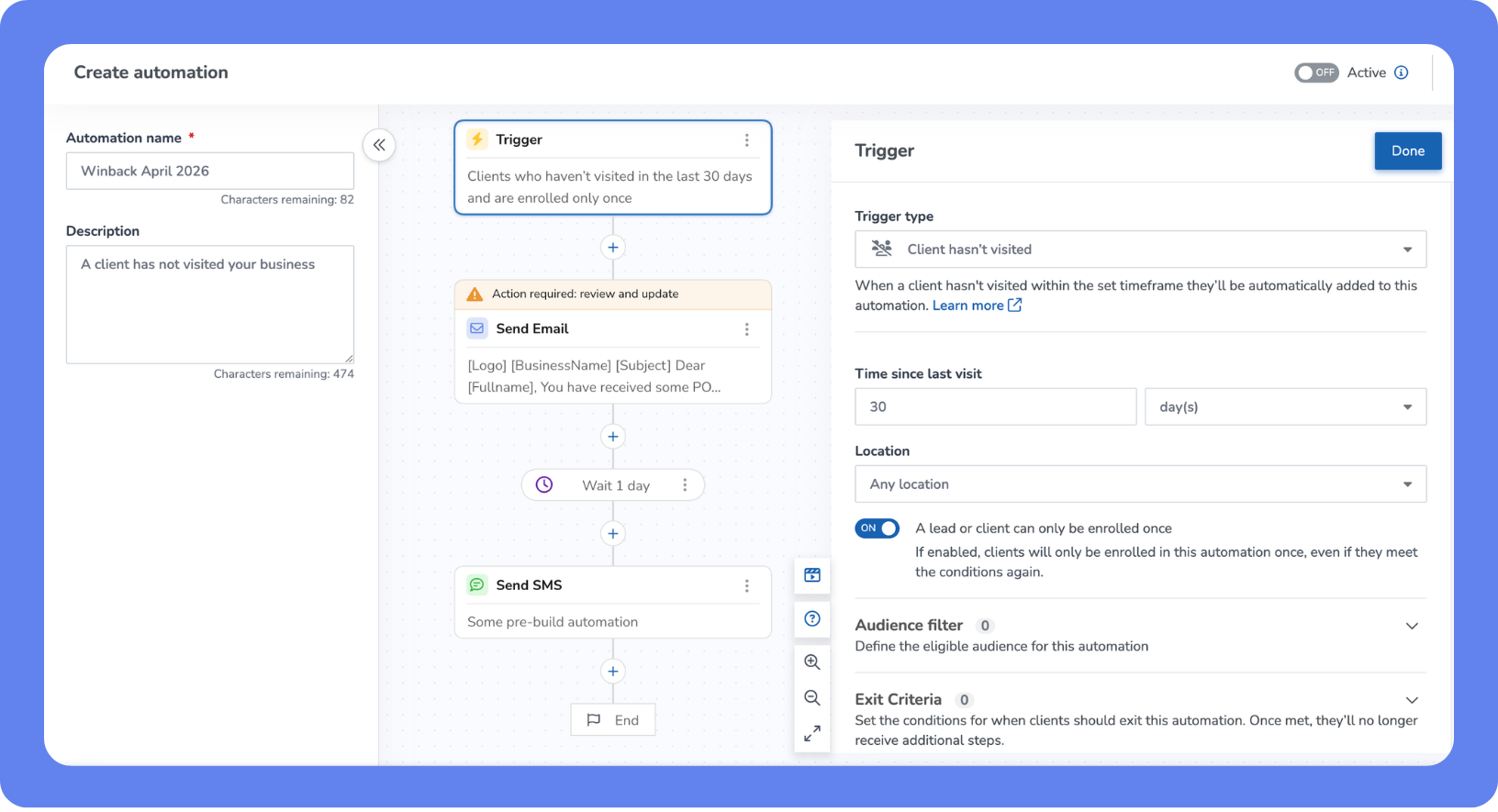
Marketing Suite 2.0 brings your campaigns, automations, and performance insights together in one powerful workspace. From launching targeted campaigns to automatically following up with leads and tracking results, you can manage your entire marketing strategy more efficiently and turn more prospects into loyal clients.
Key features
Centralized marketing dashboard – View campaign performance, recent activity, and key metrics in one place so you can quickly understand what’s driving results
Launch campaigns faster – Use Quick Actions to send email or SMS campaigns, create automations, manage templates, and organize client groups without switching screens
Automate client engagement – Set up workflows that automatically follow up with new leads or reconnect with inactive clients using email and SMS
Ready-to-use workflows – Get started instantly with proven automations like Lead Nurture and Client Win-back to drive bookings and retention
Expanded automation triggers – Create more personalized journeys with triggers based on bookings, cancellations, attendance, purchases, expiring memberships, and new leads
Visual workflow builder – See each automation as a clear timeline with triggers, delays, and messages so you always know how it runs
Guided onboarding experience – Follow a built-in quick start flow to set up your marketing and launch your first automations with confidence
Improved email customization – Easily edit default templates and verify your email domain with a simplified setup experience
📍Open the App Drawer, then click Marketing to launch the all new Marketing Suite 2.0.
New Key Metrics Dashboard
What is it?
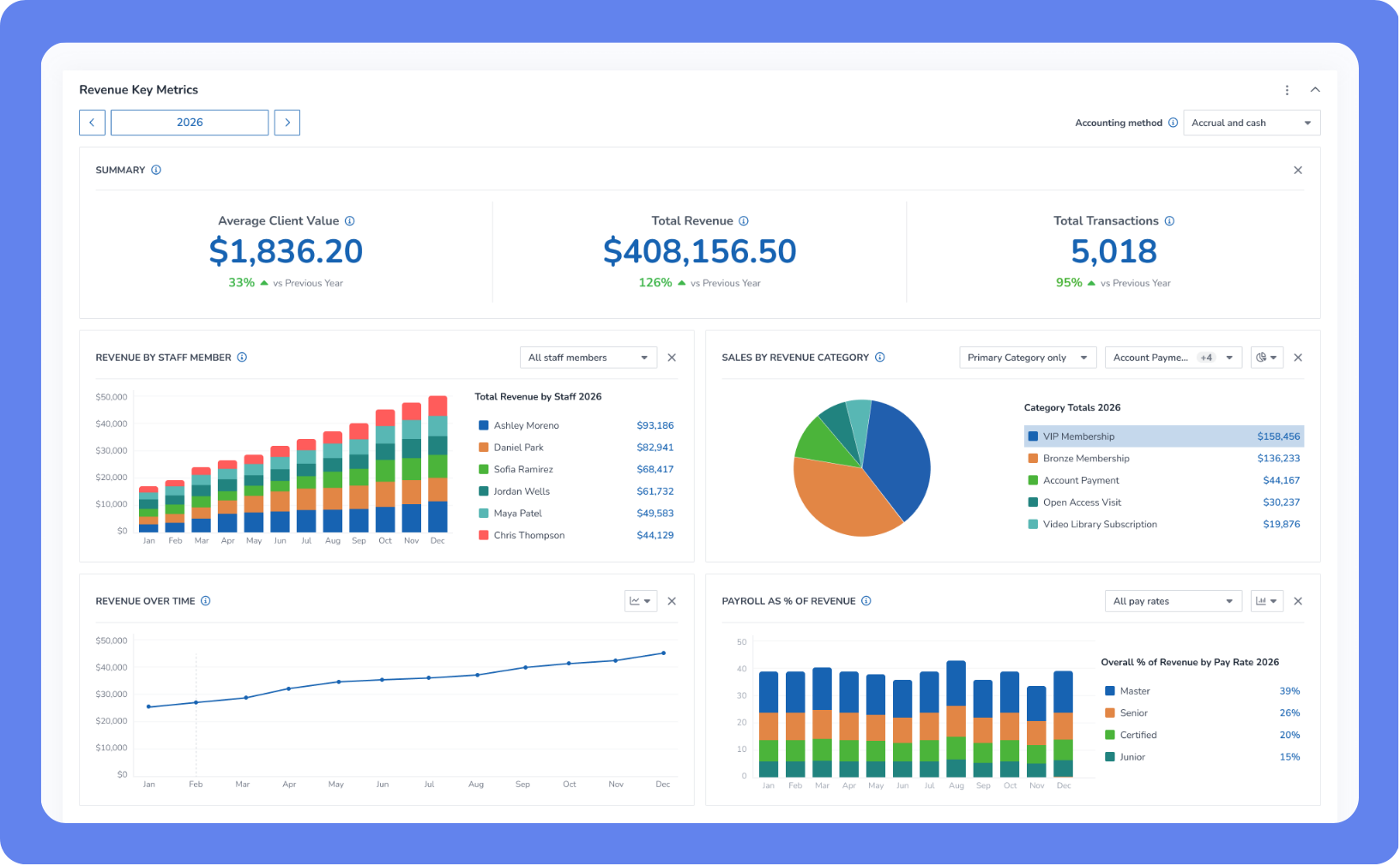
Running a service-based business means knowing what’s working—without digging through dozens of reports. Instead of jumping between multiple reports to check sales, memberships, and leads, the new Key Metrics Dashboard brings your most important numbers into one clear, customizable view. That means faster check-ins, fewer clicks, and more confident decisions.
Key features
Your KPIs, your way – Choose which metrics to display, filter them by date range and location, and quickly see what’s driving growth or needs attention.
Instant insights – Click any metric to jump straight into the full report, already filtered—no rebuilding views or second-guessing your numbers.
Visual trends & clean data – Each metric includes clear charts or visuals, so you can spot patterns at a glance and take action faster.
A starting set of key metrics (with room to grow) – Track essentials like total revenue, sales by revenue category, new memberships, new leads by source, at-risk members, active clients, first visits, and intro offers sold—with more metrics available over time as your reporting needs grow.
📍 To access your dashboard, open the App Drawer, then click on Dashboard > Key Metrics, customize your view, and start tracking the numbers that matter most to your business.
Allow clients to book services for a guest in booking widgets (Rolling out now)
What is it?
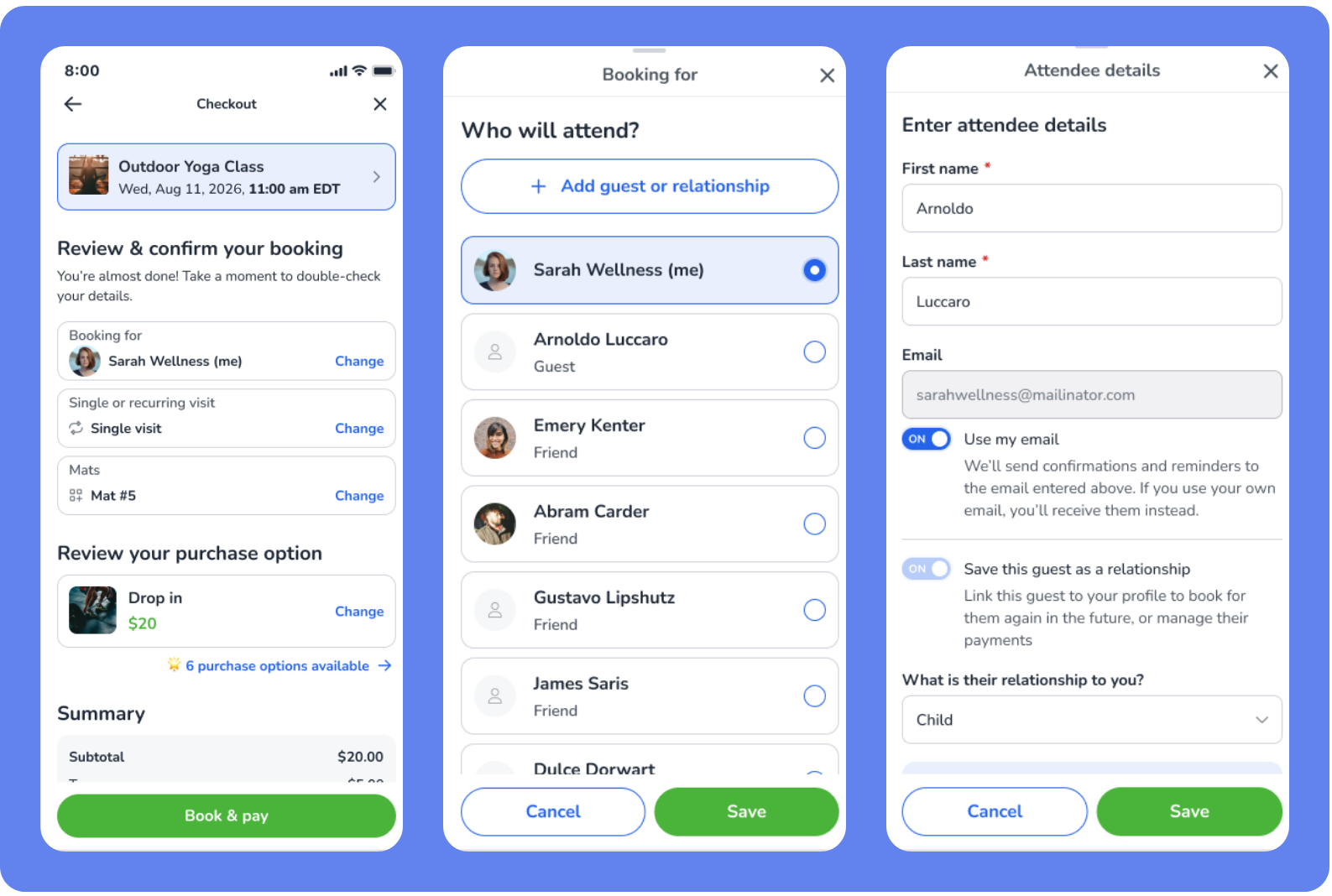
Clients can now book services for a guest directly through the booking widgets when the Allow clients to book for a guest business policy is enabled. During the booking process, clients can enter guest details and complete the booking on their behalf. The system automatically verifies service eligibility and ensures the guest receives confirmation and account access if needed.
Key features
Automatic eligibility checks – If a service has restrictions, such as age requirements, the widget prompts for the guest’s date of birth and verifies eligibility before confirming the booking.
Independent guest profiles – Guest bookings are created as separate client profiles and are not linked to the person making the booking.
Automatic confirmations and welcome emails – The guest receives the booking confirmation, and if they are new to the business, they also receive a welcome email to access their account.
Waiver signing – If the Require clients to agree to the online waiver upon registration setting is enabled, a waiver will also be included for the guest to sign.
📍Open the App Drawer, then click Setup > Business > Business Policies > Booking to allow clients to book for a guest.
Invite friends to join your booking with one click
What is it?
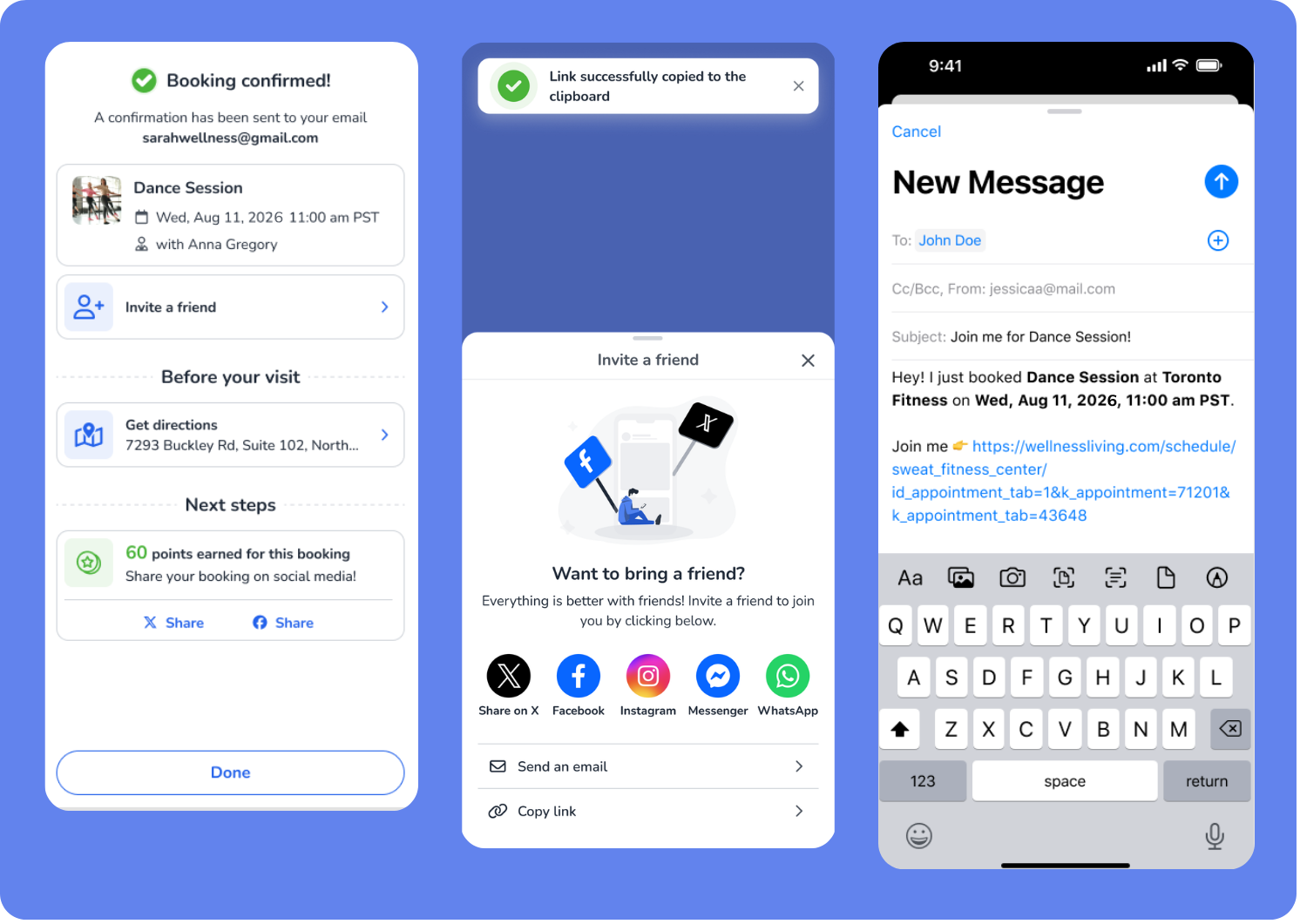
Clients can now invite friends to join their classes or events directly from the booking confirmation screen. The new Invite a Friend button lets clients quickly share their booking through email, messaging apps, or social media. Each invite includes a unique referral magic link, so if a friend signs up or books through the link, the referral is automatically tracked and can trigger rewards when referral programs are enabled.
Key features
Automatically include booking details – The invite message dynamically includes the service name, business name, date, time, and booking link so friends know exactly what they’re being invited to.
Auto-fill referral attribution – When a new client signs up through the invite link and the Referred By field is enabled, the referring client is automatically recorded.
📍Clients can use the Invite a Friend button on the booking confirmation screen after booking a service through a booking widget.
Customize memberships directly at checkout
What is it?
You can now customize certain membership settings directly at checkout. A new setting in the Purchase Option setup page allows staff to adjust details like price, start date, billing frequency, or membership duration at checkout. Your original membership structure stays intact, but you gain more flexibility to create personalized packages for clients.
Key features
Turn memberships into flexible templates – Enable the Allow staff to override duration and payment frequency at checkout setting in Purchase Option setup page to allow staff to adjust membership details at checkout without changing the original purchase option.
Adjust key membership settings – Modify items such as membership duration, price, start date, auto-renew behavior, proration settings, and attendance restrictions.
Smart settings based on membership configuration – Options like Convert to another purchase option, Prorate first payment, and Don’t bill until start date automatically appear based on the membership’s existing setup.
Contracts and forms stay accurate – Any overridden values are automatically reflected in the membership contract and required forms.
📍Open the App Drawer, then click Setup > Store Configuration > Purchase Options to enable Point of Sale configuration for eligible memberships.
Combine multiple appointment confirmations
What is it?
When clients book multiple services at the same time, they will now receive a single combined confirmation message instead of separate confirmations for each appointment. This gives clients one clear summary of everything they booked, reduces inbox clutter, and creates a smoother booking experience.
Key features
Send one confirmation for multiple bookings – When clients book several services in the same transaction, the system sends a single confirmation notification that lists all their appointments.
Automatically list appointment details – The [ServiceList] variable displays the service name, staff member, start time, and location for each booked appointment.
Support service-specific confirmations – If a service uses its own confirmation template, that confirmation will still send separately while other services appear in the combined message.
📍To enable the combined confirmation template, open the App Drawer, then click Setup > Notifications.
Unified view of upcoming and remaining visits
What is it?
You can now easily understand how many visits are booked, available, and unused across the Client Profile and Visits Remaining Report. With clearer labels, helpful tooltips, and a new total calculation, you get a complete and accurate view of client usage without needing to cross-reference multiple areas.
Key features
Clear visit breakdown – See Used, Upcoming (Booked), and Remaining (Unbooked) visits with clear definitions so you always know what each value represents
New total unused visits calculation – Total unused visits (Upcoming + Remaining) removes guesswork and shows how many sessions a client actually has left
Consistent experience – The same visit logic and display is now available across the Client Profile, Passes & Memberships, Client Portal, and Achieve App
Improved reporting visibility – The Visits Remaining Report now includes Upcoming visits alongside Remaining visits for more complete insights
Smarter report columns – Updated column names and tooltips make it easier to understand visit data at a glance
Enhanced CSV exports – CSV exports include the new columns and clearer headers like Activation Date, Last visit, and Next visit, making data easier to understand outside the system
📍 To view the updated visit breakdown, open the Client Profile > Overview or open the App Drawer > Reports > Attendance > Visits Remaining and quickly see how many sessions are booked and still available.
COMING SOON: Prevent overlapping bookings and waitlists
What is it?
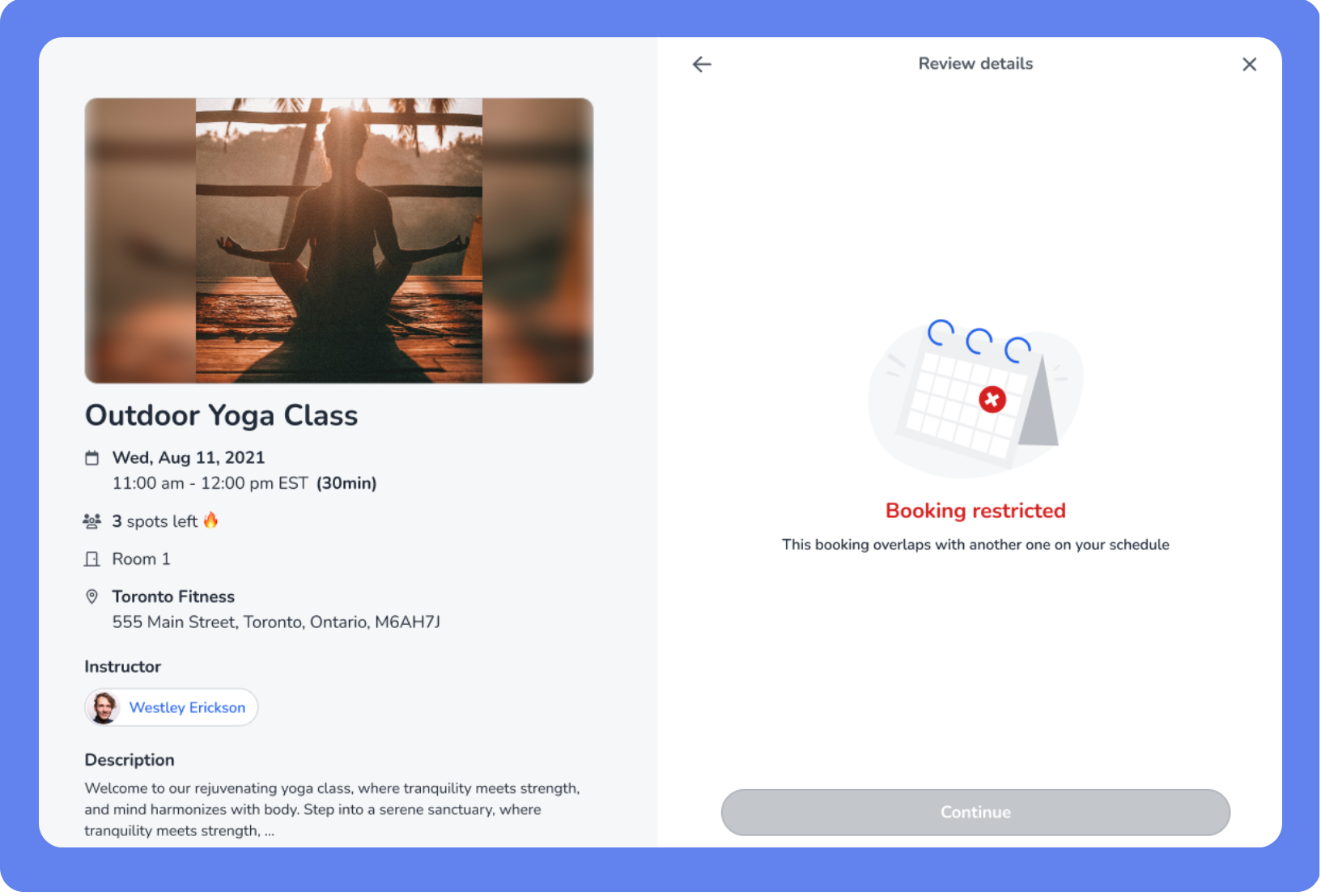
You can now prevent clients from booking overlapping classes, events, or appointments, helping ensure schedules remain realistic and fair for everyone. New settings in Business Policies allow you to automatically block bookings and waitlists that conflict with an existing service. This reduces double bookings, keeps waitlists accurate, and improves the overall booking experience for both staff and clients.
Key features
Consistent enforcement across all booking channels – These rules apply when bookings are made online, through the Achieve App, or by staff in the Staff Back Office.
Clear client messaging – If a booking conflict occurs, clients see a clear message explaining that they are already booked for another service during that time.
New Business Policies settings - Two new Overlapping Booking Restrictions settings.
📍Enable overlapping booking restrictions by opening the App Drawer then clicking Setup > Business Policies > Booking.
COMING SOON: Customize your lead capture experience from start to finish
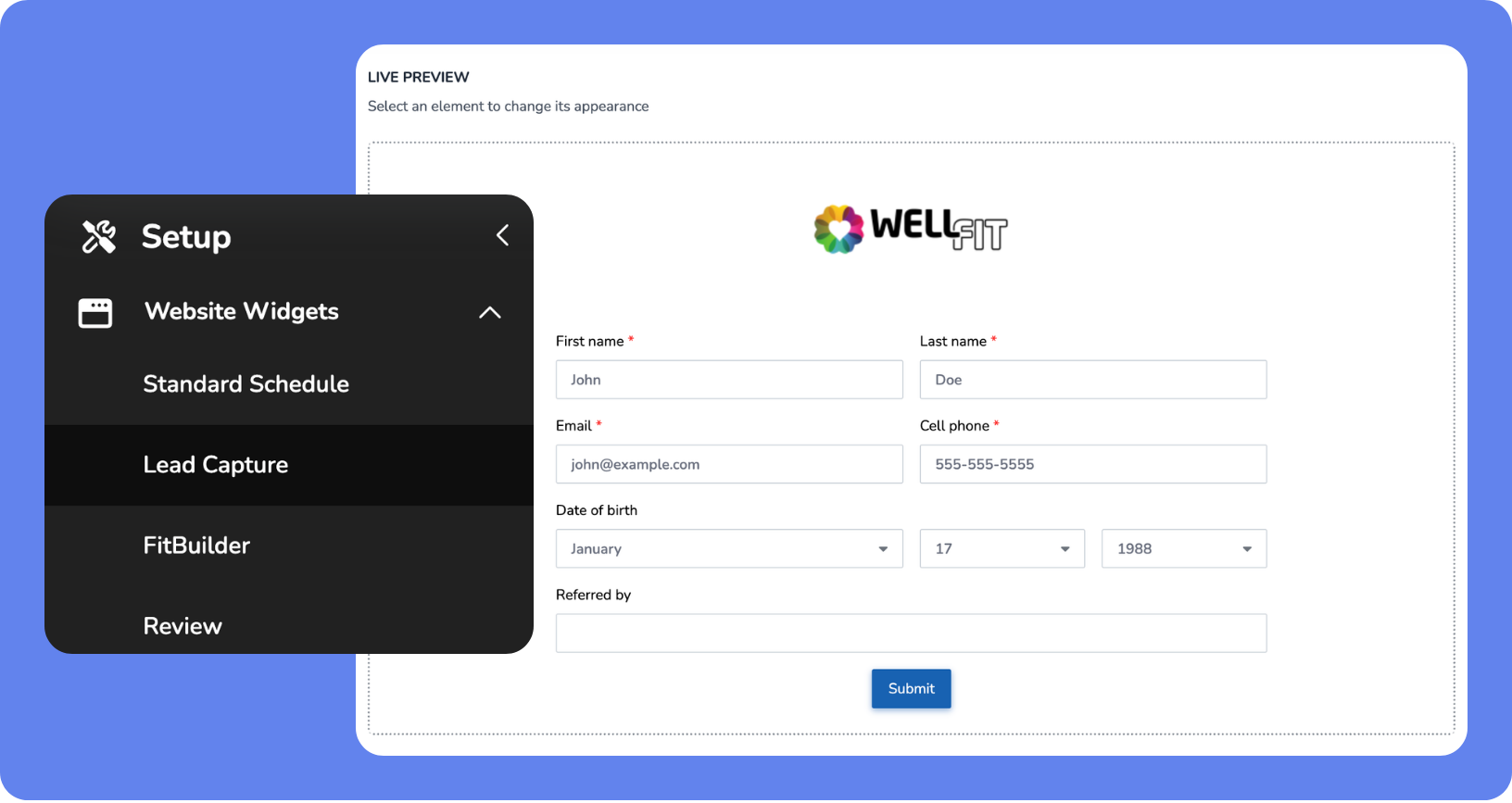
What is it?
Your lead capture forms now bring your Staff Back Office setup to life in the client experience, giving you greater control over how your forms look and function. This helps you create a polished, on-brand experience while collecting the right information more efficiently.
Key features
Confirmation page after submission – Show a dedicated confirmation page after a lead submits their booking, giving clients clear next steps and reassurance
Required field enforcement – Configure required and optional fields, improving data accuracy
Consistent visual styling – The lead capture form automatically matches the styling of your booking widget.
📍Open the App Drawer, then click Setup > Website Widgets > Lead Capture to to customize your forms.
More Updates
Business Settings
Clearer booking policy settings – Global booking policies and service-specific booking policies now appear on separate pages with clearer descriptions.
Dashboard 2.0
Collapsible metric sections in dashboards – Dashboards now include expandable sections for Revenue, Members, Attendance & Booking, and Marketing to help you focus on the metrics that matter most.
Elevate
Clearer tracking for remaining and booked visits – Client profiles now show a Total unused visits value that combines Upcoming (Booked) and Remaining (Unbooked) visits.
Enterprise
Merge duplicate client profiles across locations – Enterprise HQ staff can now merge duplicate client profiles across locations while Travel Mode is enabled.
Notifications
Calendar attachments for event confirmations – Event booking confirmations now include a downloadable calendar attachment so clients can easily add bookings to Google Calendar, Outlook, or Apple Calendar.
Online Store
Improved messaging for restricted store items – Clients who are not eligible to purchase a store item will now see the item page with a clear restriction message instead of a generic error.
Purchase Options
Automatic proration when converting memberships – When converting a package-based membership to a standalone membership using Convert Now and Charge Client Now, the system now automatically applies proration for unused time.
Reports
Account payments mapped to purchased items – Payments made toward an account balance are now automatically allocated to purchased items and categorized correctly in sales reports. For payments applied to purchases on account made prior to December 16, 2025, the associated item name may not be displayed in the Account Balance History and sales reports.
Client names added to appointment waitlists – The Wait List report now shows the names of clients waiting for appointment or asset services.
Separate Base Pay and Bonus Pay in payroll reports – Payroll Summary and Payroll Details reports now support separate Base Pay and Bonus Pay columns, with the existing Pay column renamed to Total Pay.
Clearer visit tracking in client profiles and reports – Client profiles and the Visits Remaining Report now include clearer labels for Used, Upcoming, and Remaining visits, plus a Total unused visits value.
Staff management
View-only access for services – Staff can now view classes, events, appointments, and assets without needing full service management permissions.
Service session fields locked for staff without permissions – Key service session fields such as Duration, Price, Capacity, and Special Instructions are now locked for staff without the Manage services permission.
Website Widgets
Improved calendar events for group and relationship bookings – Calendar events now show all attendees for group bookings and clearly identify relationship bookings, while preventing duplicate calendar entries.
Clearer messaging when booking multiple appointments – Checkout now clearly shows when a Purchase Option already included in the cart applies to additional appointments.
Age restrictions shown earlier for event bookings – Age requirements now appear directly on the Events widget and event details page, helping clients see eligibility before starting the enrolment process.
Clearer location selection indicator in the Schedule widget – The Schedule widget now better indicates when multiple locations are selected.
We’d love to hear what you think about this release—share your feedback in our Community Forum!