
🚀 Release 26.76 is here!
Release 26.76 tightens up the details that are easy to get wrong by hand: billing, membership counts, and client info. It also makes CAASI’s conversations with your members feel more natural. You’ll spend less time fixing things behind the scenes, and your members get a smoother, more professional experience.
Let's dive in!
✨ What's new
Automated statements now match your manual settings
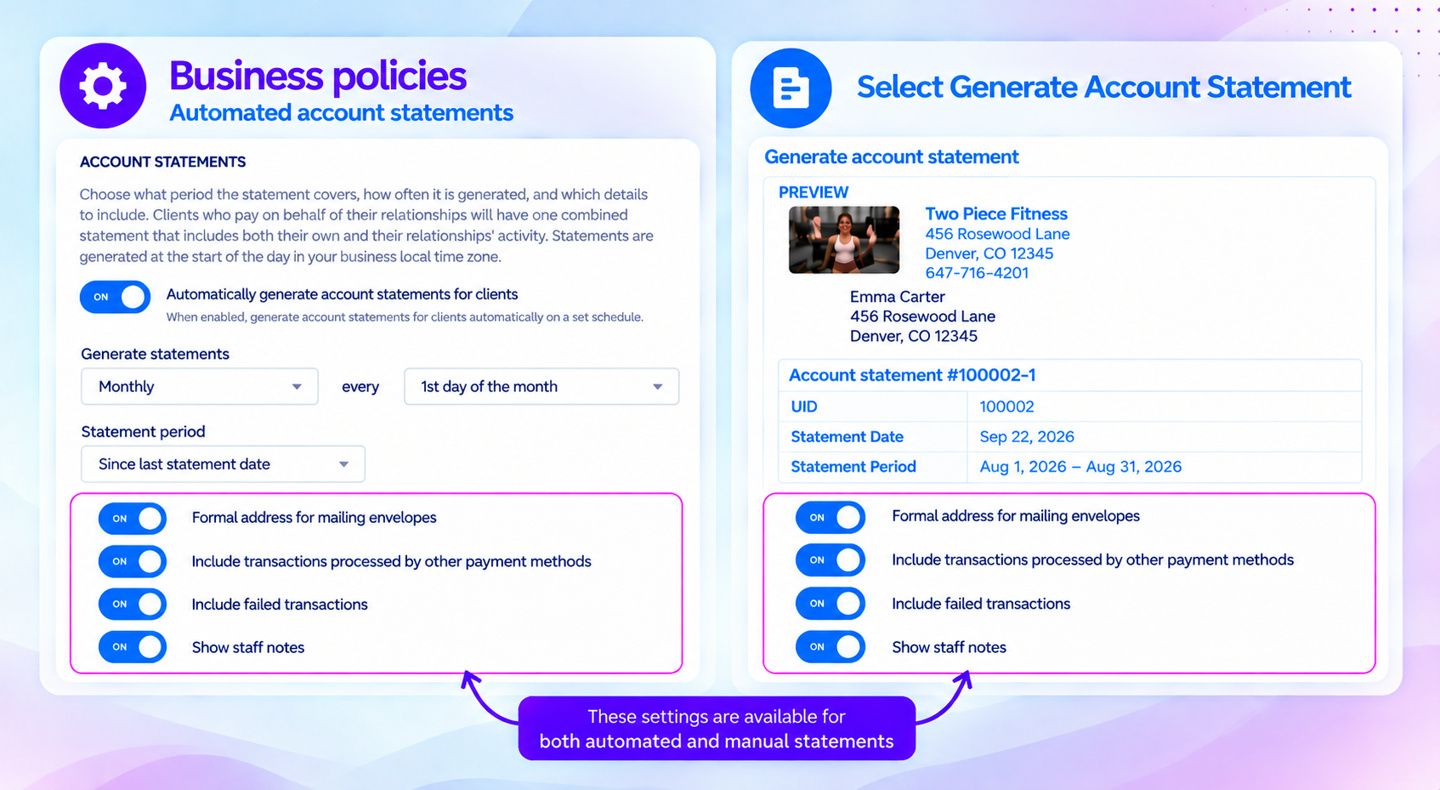
Customize every statement with the details that matter
You can now set the level of detail for automated and manual account statements. It can include additional content beyond balance-affecting transactions—such as credit card/ACH purchases, failed transactions, or staff notes—so clients have a complete record of their activity with your business. The final three toggles let you choose whether to include this additional content, helping automated and manual statements stay consistent while reducing manual corrections.
Key features
One set of rules for both workflows – Whatever you configure for automated statements also applies to manual statements, which are turned on by default.
Nothing changes until you choose it – Your statements look exactly the same as today until you update the settings yourself.
No retroactive surprises – New settings only affect statements generated going forward, never past ones.
📍 Find it under App Drawer > Setup > Business Policies > Payments & Statements > Account Statement settings.
Sync every sale to QuickBooks Online overnight
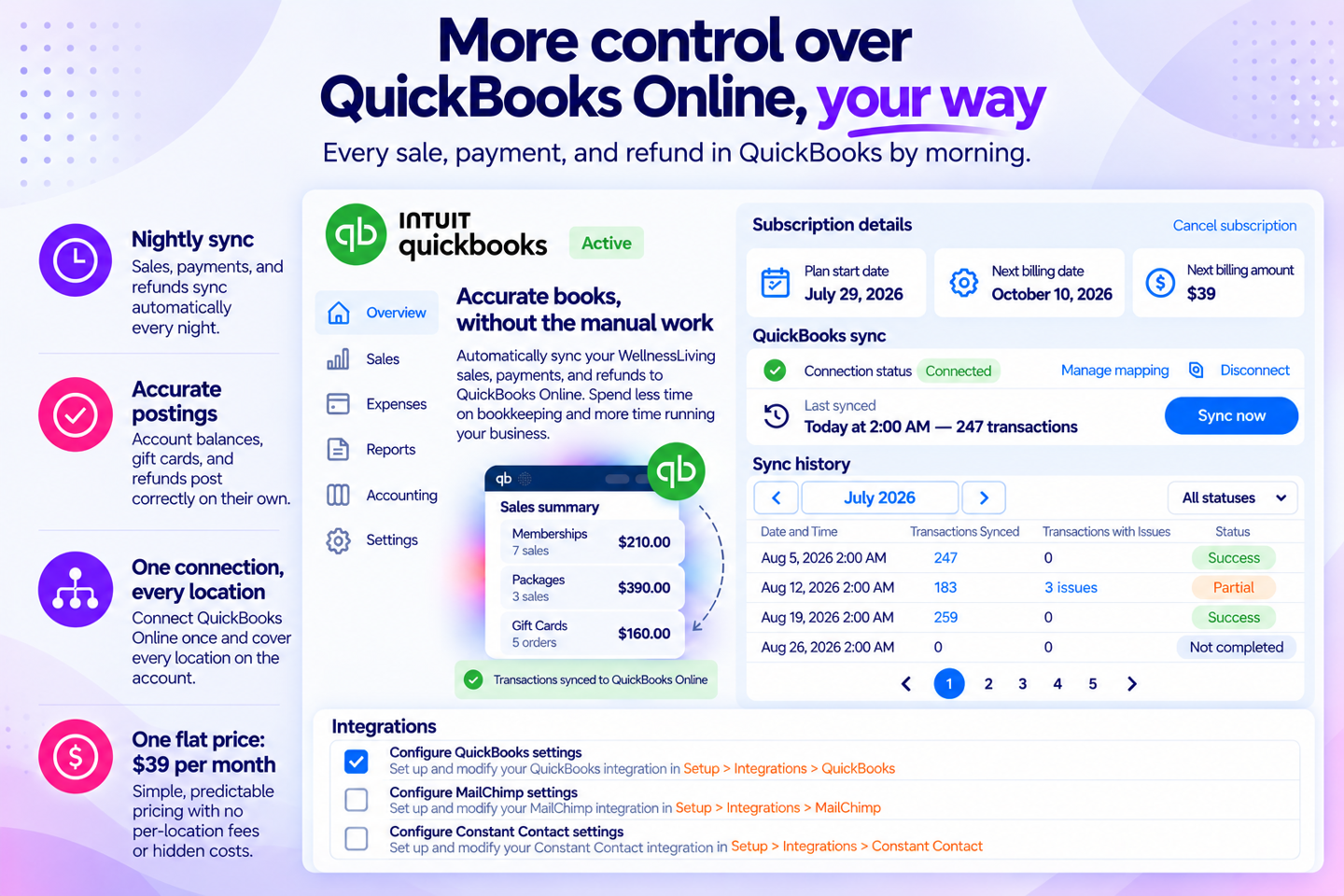
Connected once, synced every night. Flat $39/month, no matter how many locations.
Re-entering sales, payments, and refunds into QuickBooks by hand costs you and your bookkeeper hours every month — and one missed gift card or refund can throw off the whole P&L. You can now connect WellnessLiving directly to QuickBooks Online, syncing every transaction overnight so your books are right without anyone touching a spreadsheet.
Key features:
Nightly sync – Automatically sync your sales, payments, and refunds every night while you sleep.
Accurate postings – Get clean, accurate books with properly categorized transactions in QuickBooks Online.
One connection, every location – Sync all of your locations through a single, seamless connection - no extra setup needed.
Ongoing sync – New membership types and payment methods stay synced without extra setup.
One flat price – $39/month, whether you run one studio or twenty. No tiers, no per-location fee.
Simpler setup – Clearer permissions mean you decide exactly who on your staff can connect and manage QuickBooks.
📍 Turn it on under App Drawer > Setup > Integrations > QuickBooks Online.
Guest passes that work at any location in a region
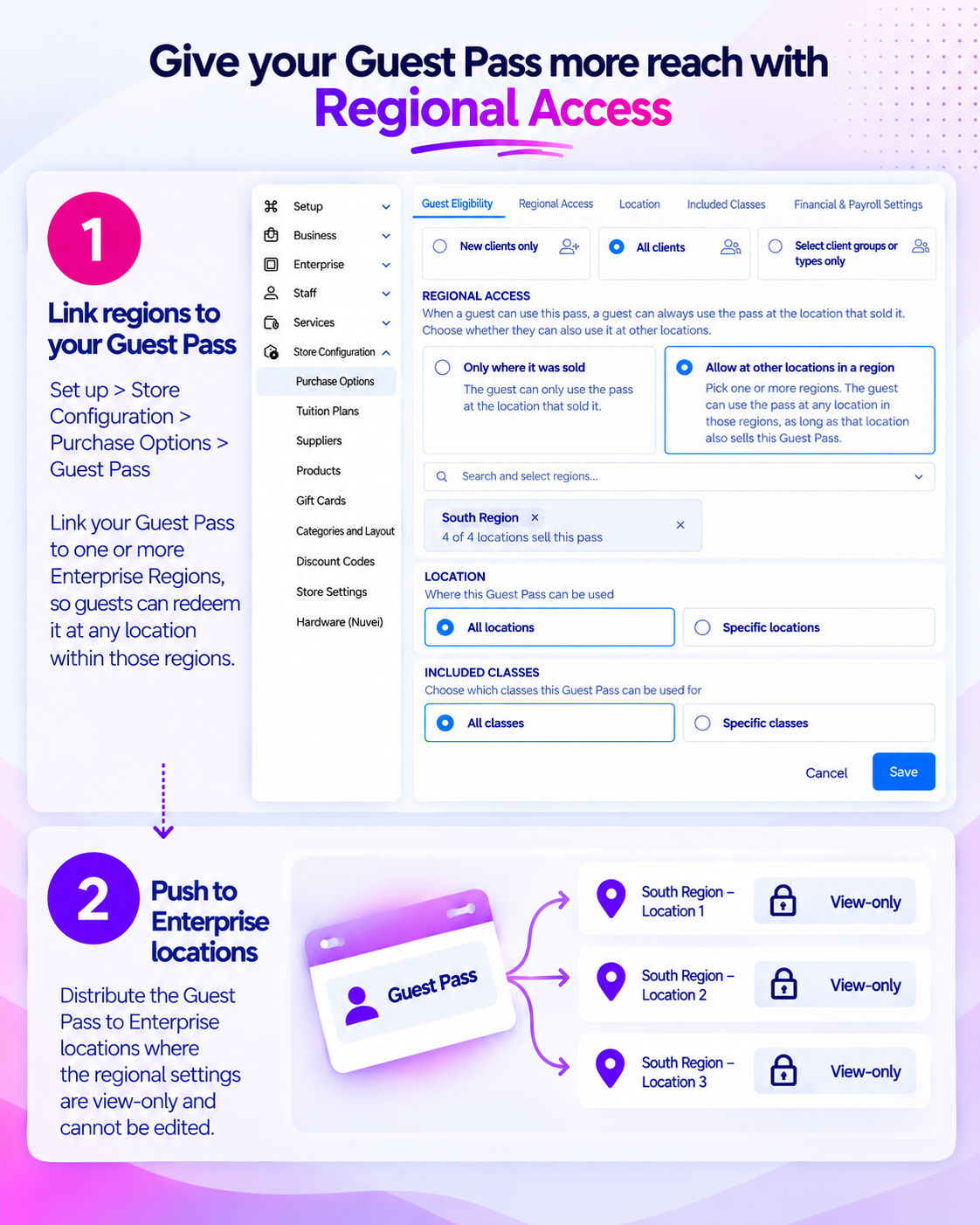
One guest pass, redeemable at any location in the region
If you run several locations your guest passes can now be redeemed at any location in the same region. Guests get more ways to try you out, and you get one balance and one report to track.
Key features
One pass, any location in the region – Guests can redeem a pass anywhere in the issuing region.
No double-tracking balances – The pass draws from a single shared balance no matter which location redeems it.
Nothing changes unless you turn it on – Existing and new guest passes keep today's single-location behavior by default.
Reporting that matches reality – Reports show both the issuing and redeeming location, so you can see how passes actually move.
📍 Turn it on from the Guest Pass purchase option. Off by default.
This feature is available for Enterprise accounts only.
Good to know: A guest can only redeem the pass at another location if that location is in the selected region and has the Guest Pass pushed/configured.
Set up your Store widget once, push it to every location
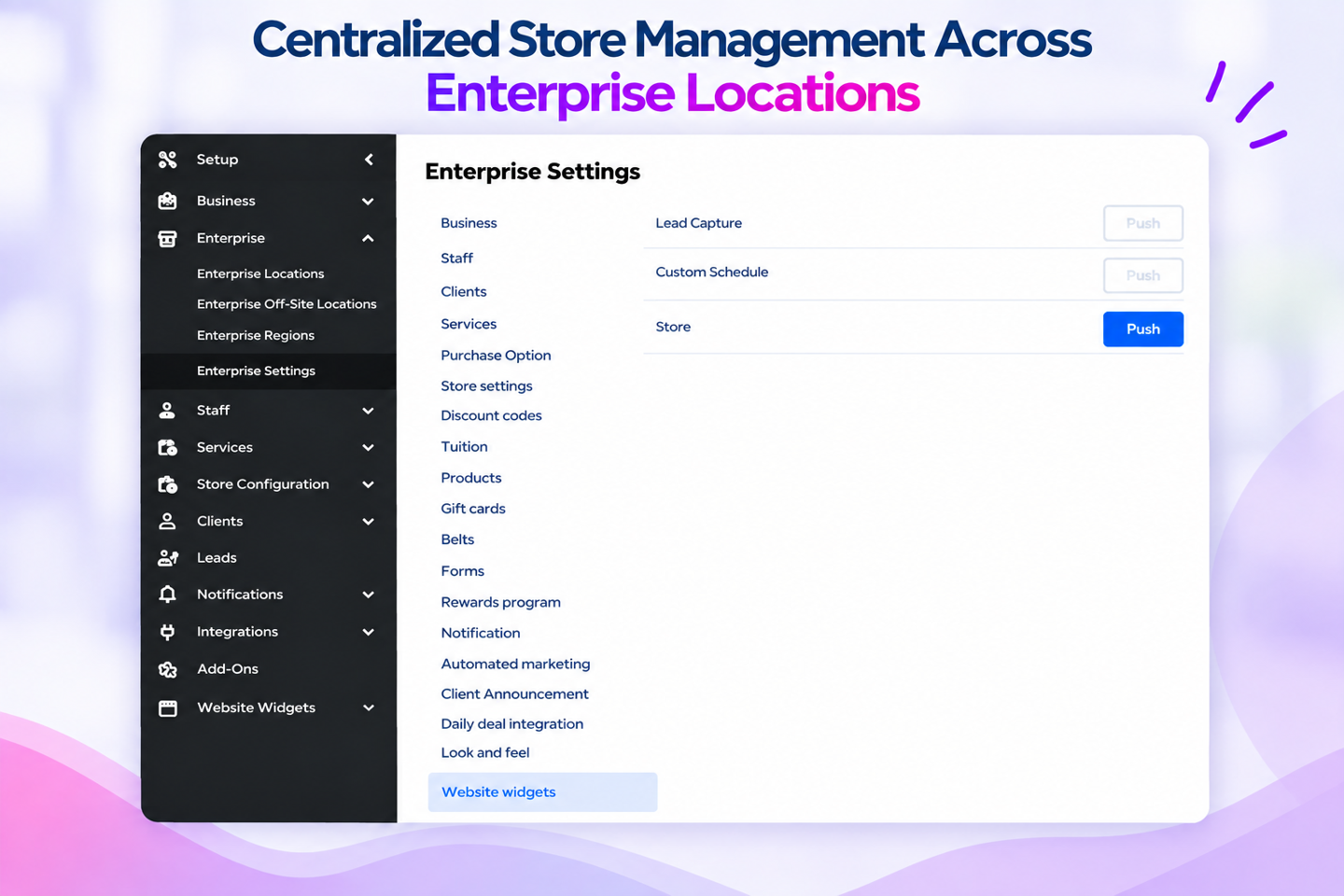
Save time with one store widget setup that works across all your locations
If you run a franchise, you can now set up your Store widget once and push it to every location. Your members won’t second-guess if they’re in the right place because they’ll see the same store, the same products, and the same look no matter which location they shop from. Configure the Store widget once and push it to selected locations, using the same familiar approach as Custom Schedule and Lead Capture widgets.
Key features
Configure once, deploy everywhere – Push one Store widget setup to any number of franchisee locations instead of rebuilding it at each one.
Catalog travels with it – Linked Products, Purchase Options, Gift Cards, and Events are created automatically at each receiving location.
Consistent with tools you already know – Uses the same push mechanics already available for Custom Schedule and Lead Capture.
📍 Find it under App Drawer > Setup > Enterprise Settings > Website Widgets.
This feature is available for Enterprise accounts only.
Get an email the moment a client hits a key step
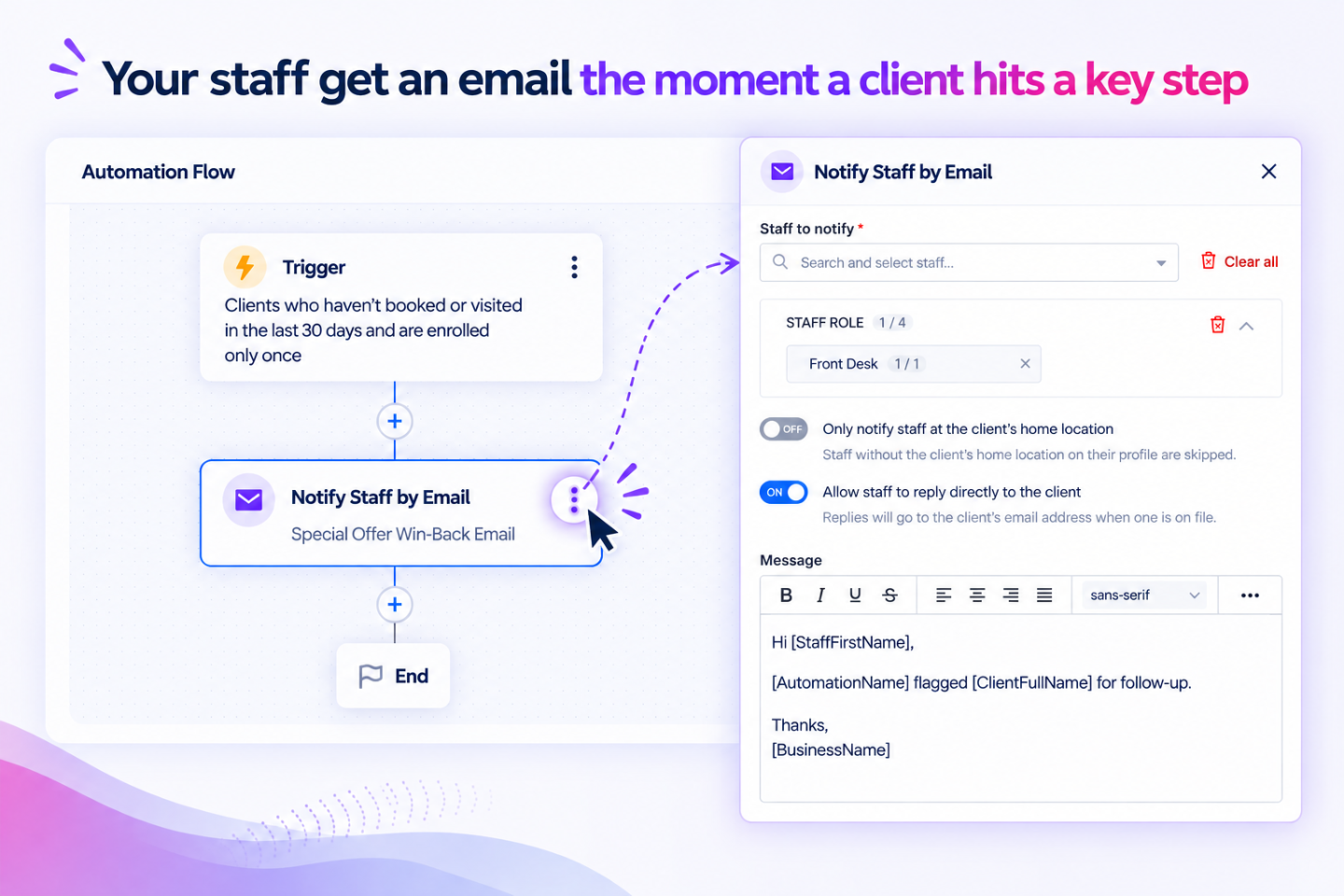
Keep your team informed and ready to act
Your staff can now get an email the moment a client reaches a key step in a marketing flow, like finishing a trial or going quiet for 30 days. No one has to remember to check.
Key features
Follow-up that doesn't rely on memory – Staff get notified the moment a client hits a key step.
The right person hears about it – Alerts can reach individual staff members, entire roles, or a mix, so follow-up goes to the right people.
Your client’s flow keeps moving – The email to your staff never delays the next step for the client.
📍 Find it under App Drawer > Marketing Suite > Automations > Flow Builder.
Note: Notifications for this feature are available by email only.
Set up lead stages that match how you sell
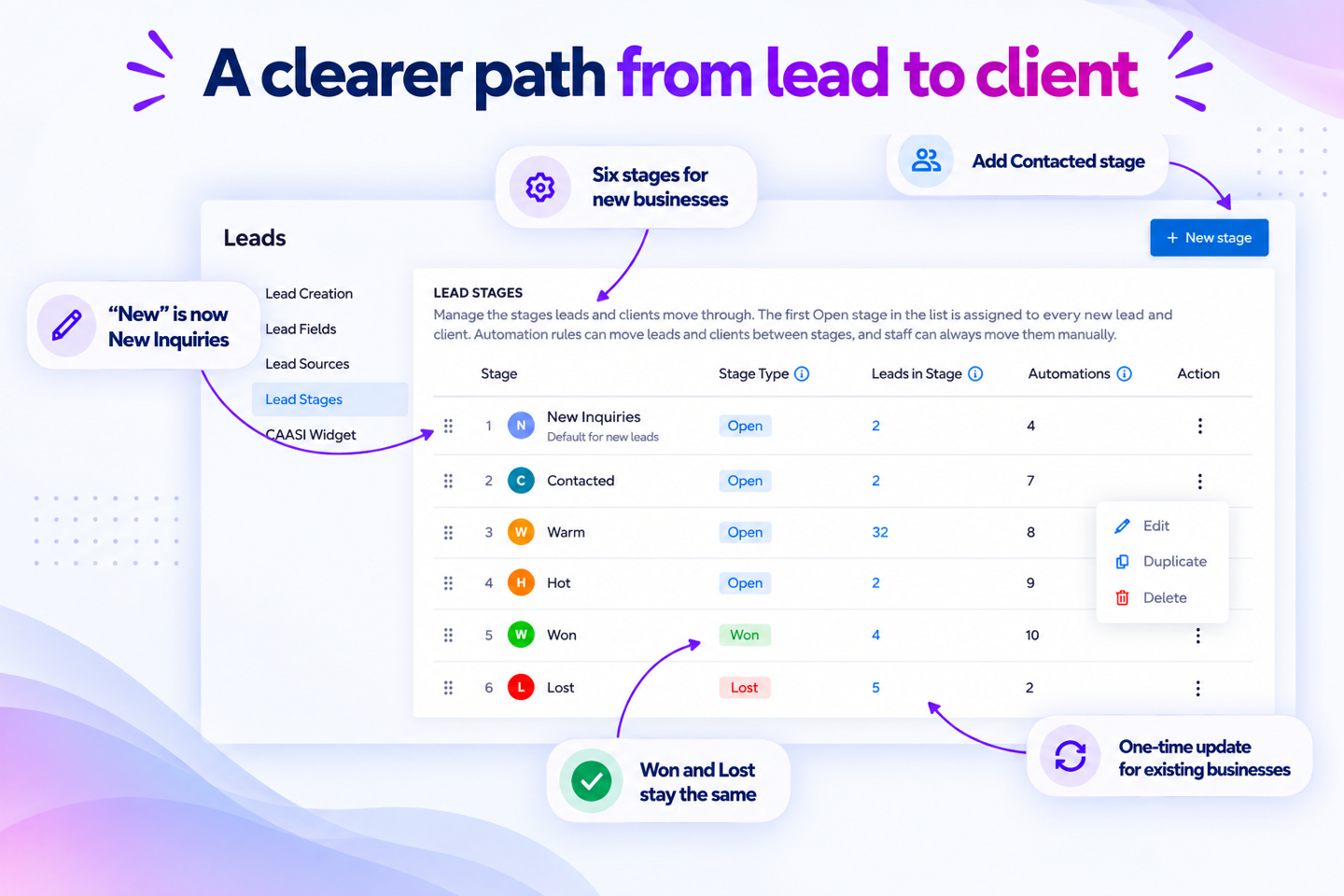
Name your stages your way
Your lead stages are no longer a fixed list. You can now add, rename, reorder, duplicate and delete stages, and give each one its own icon and color — so the list matches how your team actually sells, whether that's trial bookings, fitness consultations or membership agreements.
The update also renames 'New' to 'New Inquiries' and assigns an icon. Warm, Hot, Won, and Lost keep their names. Leads, clients, and automations remain in their current stages.
Key features
Build a stage list that fits your process — Add, rename, reorder, duplicate or delete stages, and pick an icon and color for each one so they're easy to spot in your reports.
Stages that stay meaningful — Every stage has a type: Open, Won or Lost. Reports count by type, not by name, so you can use your own names (like "Trial Converted" and "Annual Contract") and your conversion rates stay consistent.
Your stages show up everywhere you look — Custom stages appear automatically in the Lead Management report, the stage dropdown, filters and the summary cards.
Automate the moment a stage changes — Use the new Lead stage updated trigger in Automations to start an email or SMS sequence the instant a lead moves stages.
📍 Find it under App Drawer > Setup > Leads > Lead Stages.
Heads up: The type is set when you create the stage and can't be changed after. Every account keeps at least one Open, one Won and one Lost stage, and stages can only move within their own group. Client Groups still move clients to the original Won or Lost stage only.
Start an automation the moment a lead changes stages
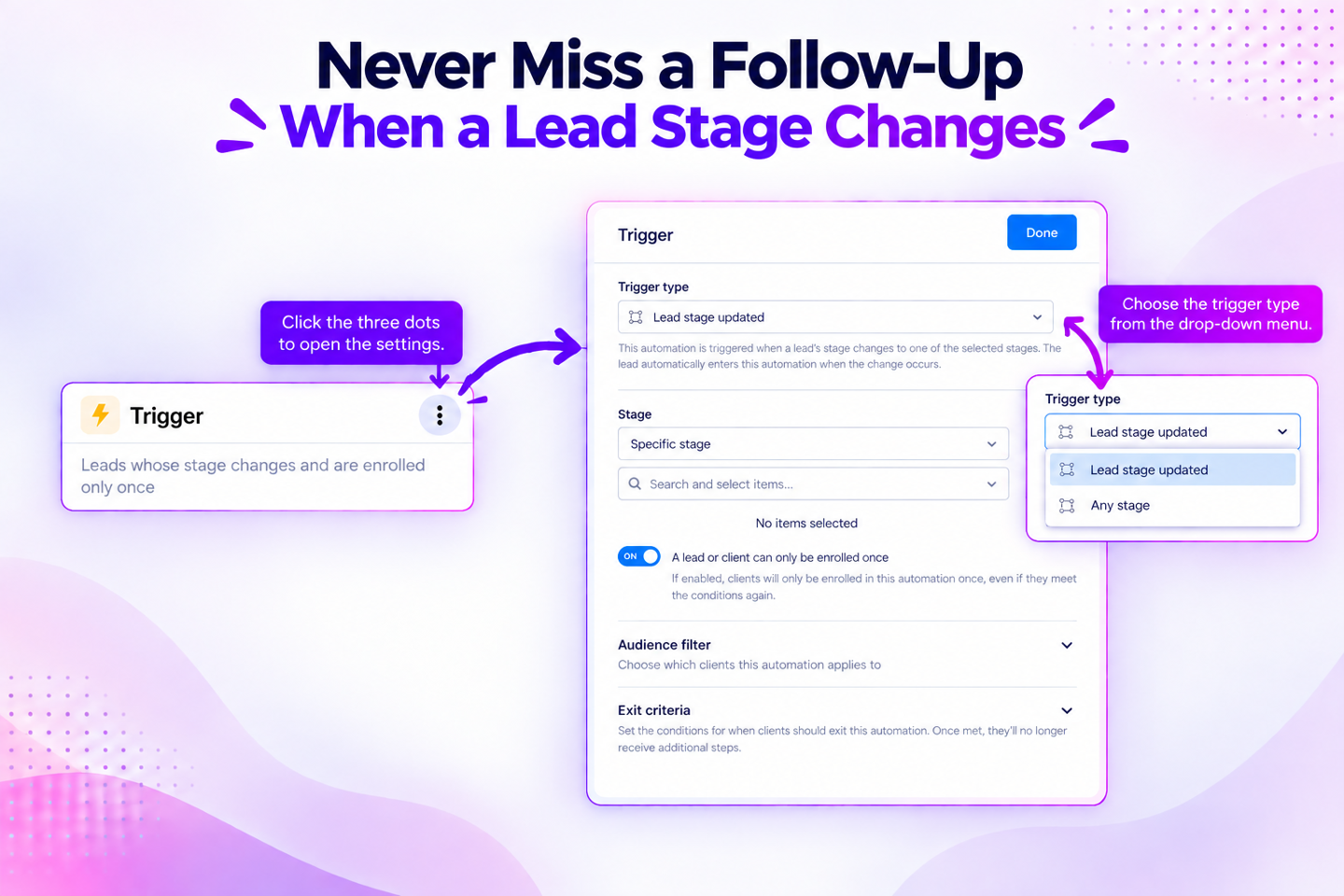
Follow-up that happens on its own
You can now automatically enroll leads and clients into marketing and nurture automations the moment their stage changes. No more relying on staff to catch the change and follow up manually. A new trigger, Lead stage updated, starts an automation as soon as a lead or client moves into a stage you choose.
Key features
Trigger on any change or specific ones – Fire the automation on any stage change, or narrow it to specific stages you select.
Reacts no matter how the stage changed – The trigger fires whether the stage was updated manually by staff, automatically through an automation, or via a Client Group status change or API integration.
Control how often leads enroll – The "enrolled once" toggle is on by default, so leads don't re-enter the same sequence if they cycle between stages. Turn it off if you want them to enter each time.
Personalize the message – Two new dynamic tags, [CurrentStage] and [StageChangeDate], for Email, SMS, and Push, so each message reflects the lead's actual stage and move date.
📍 Find it under App Drawer > Marketing Suite > Automations > Create Automation > Start from scratch.
Know how every CAASI phone call ended
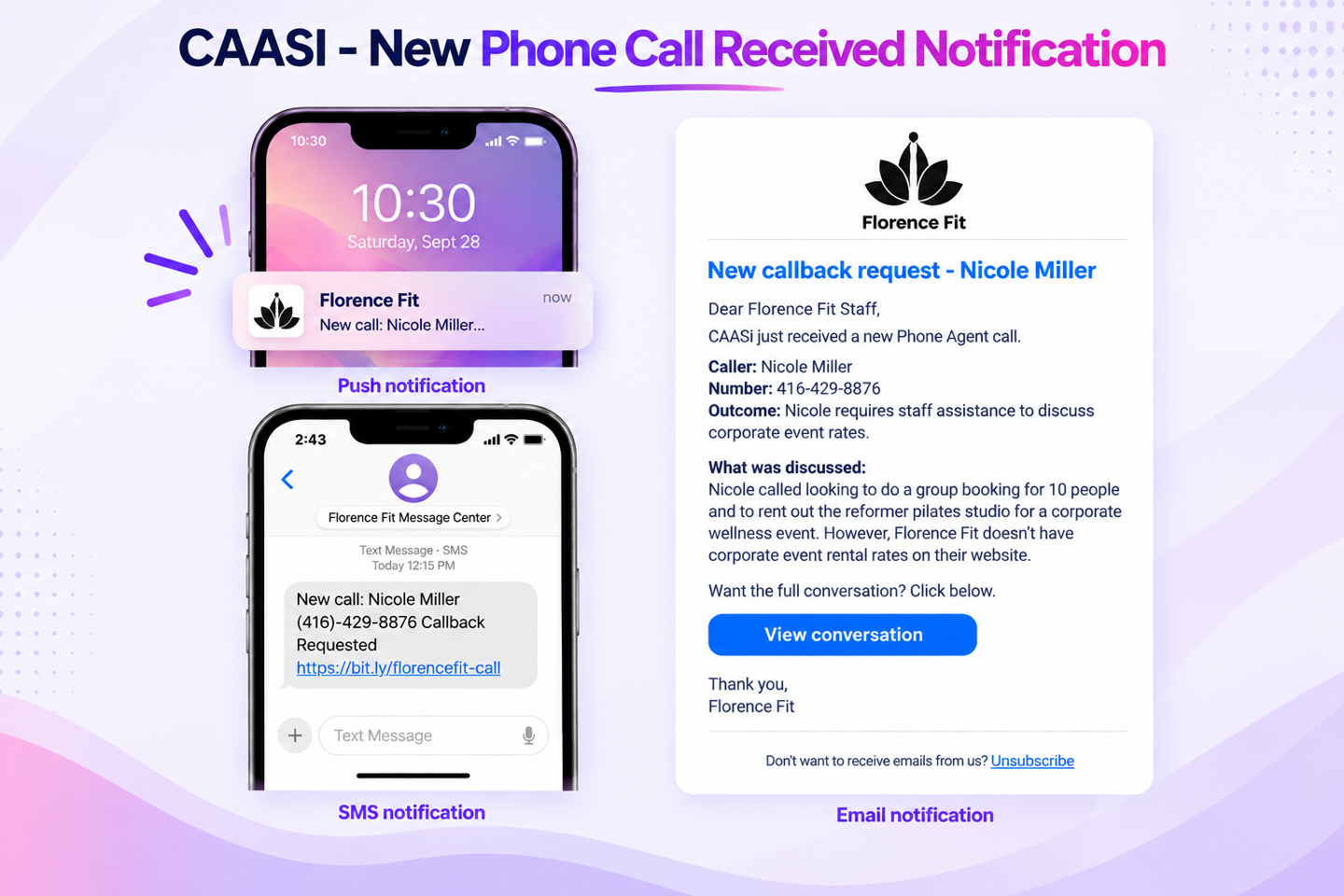
No more guessing what CAASI handled
You can now see how every CAASI phone call ended, not just the ones that need a callback. Notifications for resolved calls, live transfers, and callback requests help staff see the full picture of AI-handled conversations.
Key features
Full visibility, not just callbacks – Get notified whether CAASI resolved the call, transferred it, or logged a callback request.
Pick your channel – Email includes CAASI’s full call summary. SMS and push send a short outcome (resolved, transferred, or callback requested) so you can act fast from your phone.
Only the right staff see them – Notifications go to staff with Staff Notifications permission. Requires an active Phone Agent subscription.
📍 Find it under App Drawer > Setup > Notifications > Staff Notifications > CAASI.
In-app alerts when CAASI needs you or starts a conversation
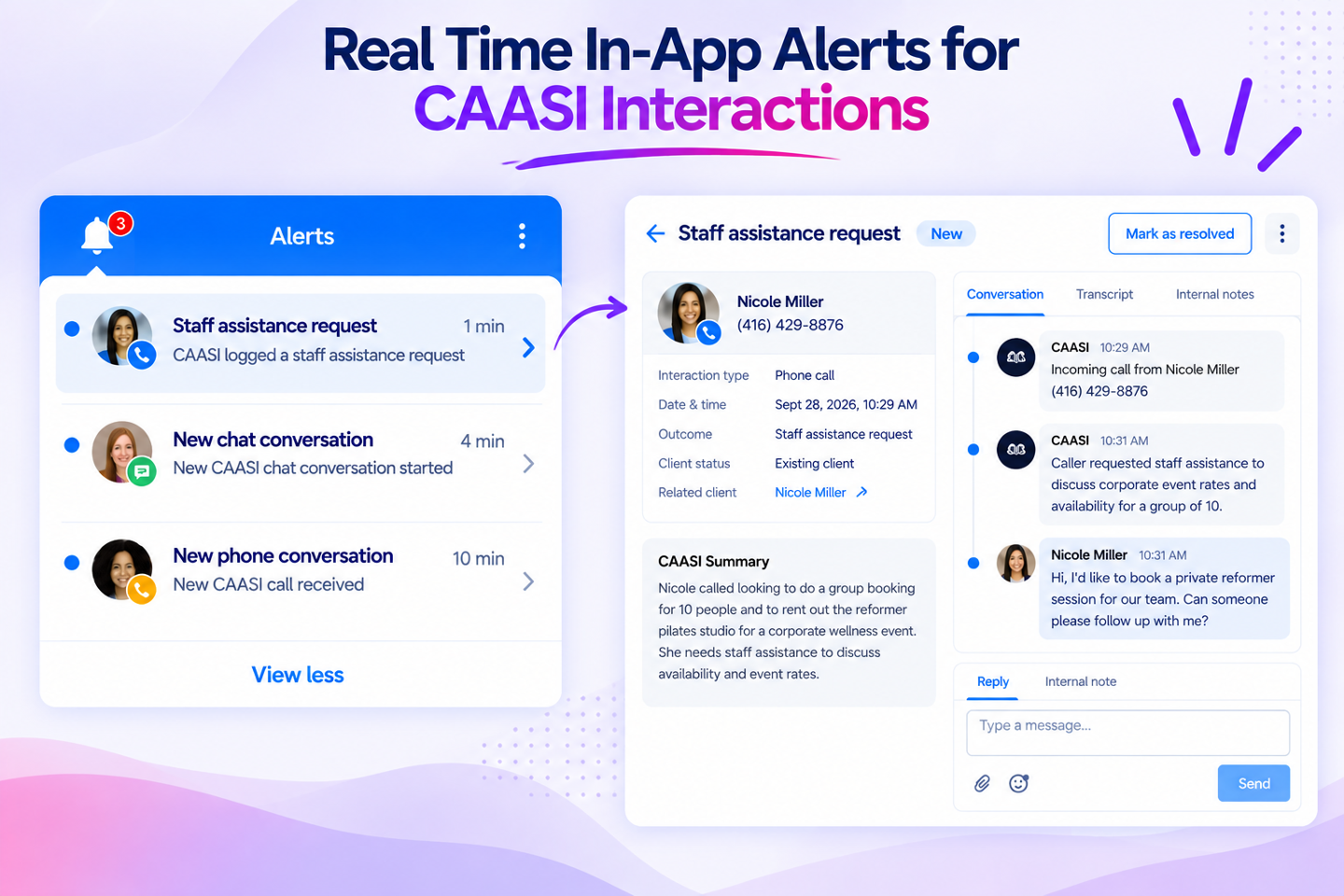
Each alert links straight to the conversation
Your staff now get an alert in the Staff Back Office when CAASI needs a human, or when a member starts a new chat or phone conversation. Each alert links straight to that conversation.
Key features
Know the moment it happens – Alerts fire in real time when CAASI logs a staff assistance request, starts a new chat conversation, or receives a new phone conversation.
Instant access to the right conversation – Each alert links directly to the related CAASI conversation, so staff can respond with context instead of searching conversation logs.
Alerts stay relevant and controlled – Notifications go only to staff whose role allows receiving in-app alerts and who've opted in.
📍 No setup needed. Alerts appear automatically after release.
Get paid faster for CAASI-booked appointments
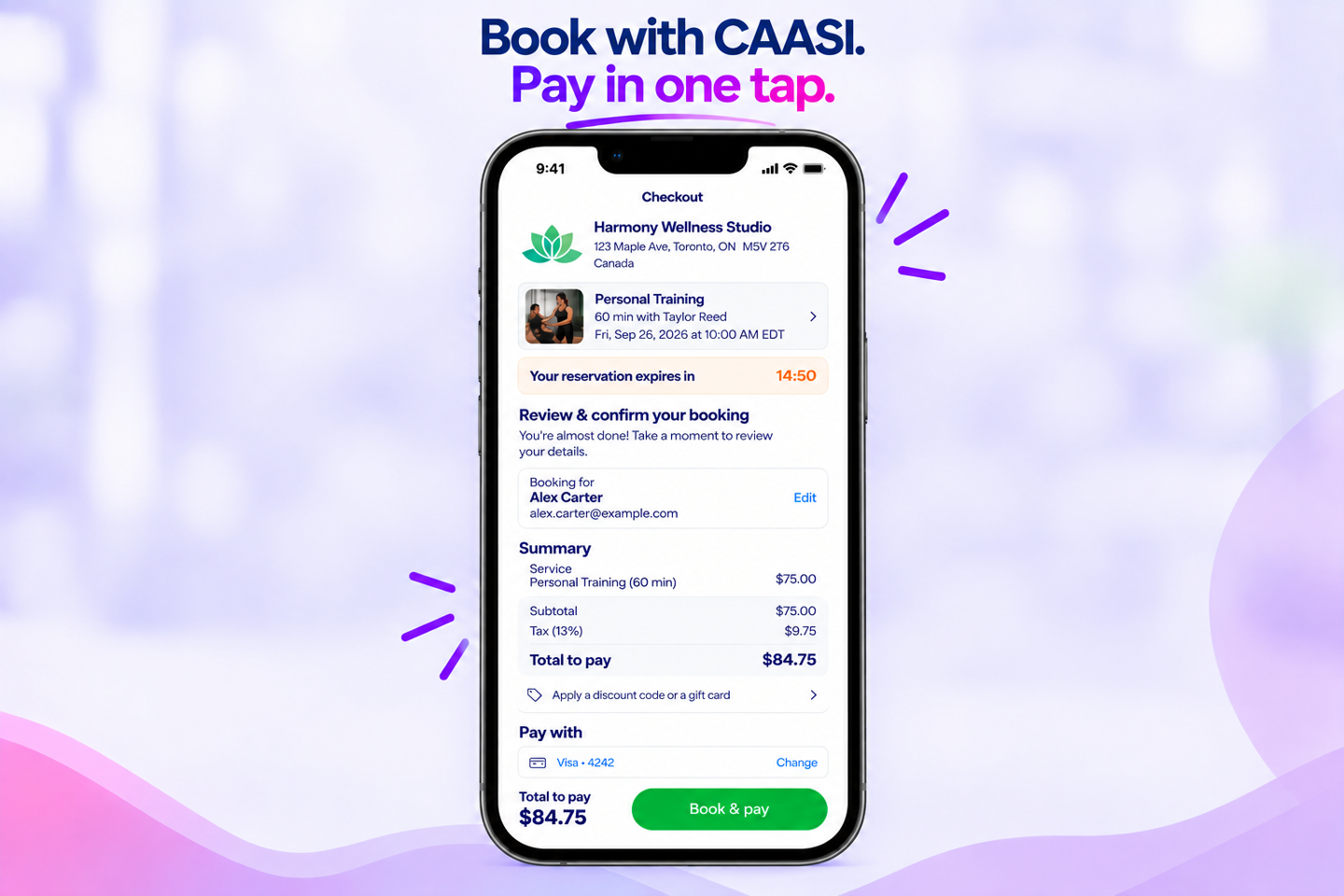
Same checkout your clients already know
When CAASI Chat Agent books an appointment for a client, they’ll get a secure link by email or text to review and pay. No login, no hunting for the app. You get paid faster and fewer bookings stall at the payment step.
Key features
Finish in one click – Clients are authenticated automatically from the confirmation link, no manual login required. Link is valid for 15 minutes.
Access limited to the booking, nothing more – The session created by the link only covers that specific booking, not the client's full account.
Feels like the rest of the platform – Uses the same checkout experience clients already see elsewhere.
📍 No setup needed. This applies automatically to bookings initiated through CAASI Chat Agent.
Faster membership check-in with QR codes
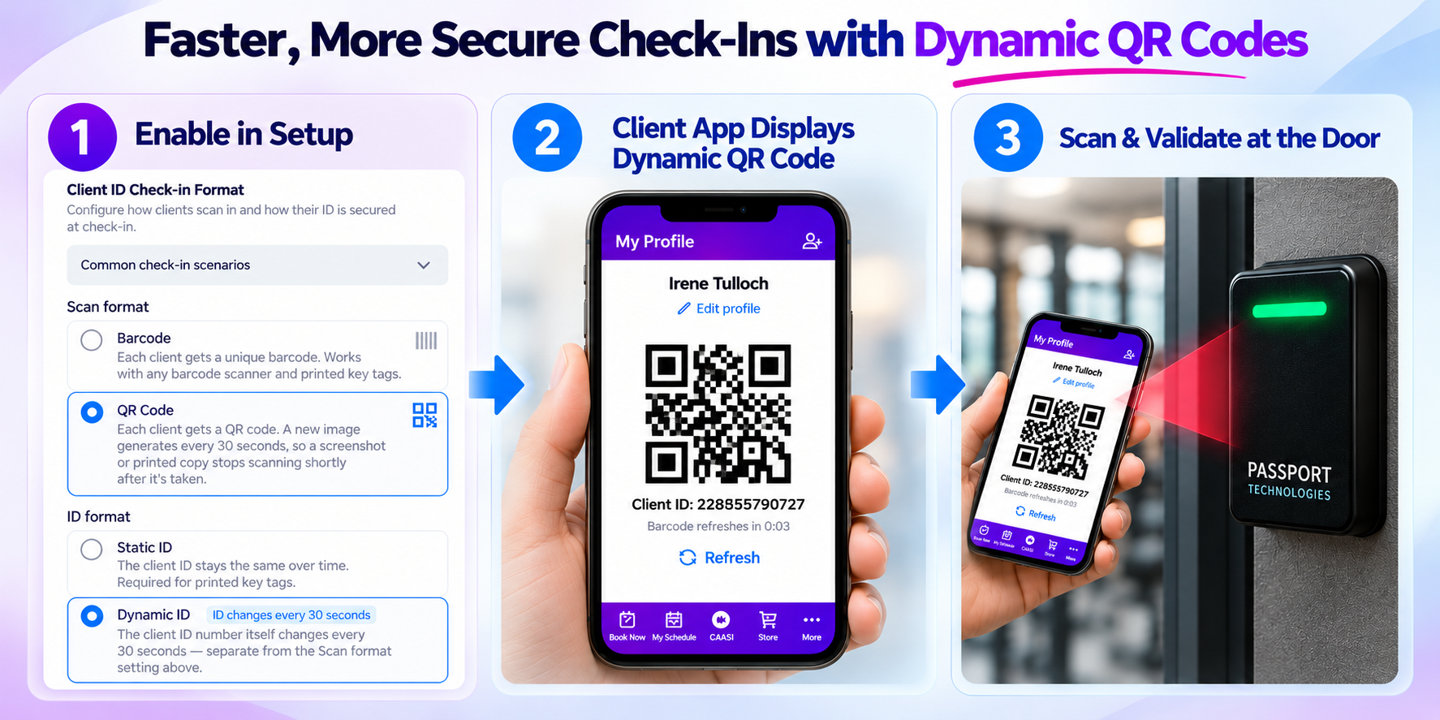
Check in members without slowing down the line
Members can now scan a QR code from their phone to check in through Passport, so the line at the front desk moves faster. The QR refreshes every 30 seconds so a screenshotted code expires. Note: existing barcodes are unchanged for products and inventory.
Key Features
Screenshot Protection: The Achieve app automatically updates the member's QR code every 30 seconds, preventing unauthorized entry via shared screenshots or printed copies.
Fast & Secure Facility Access: Works with door-access hardware like Passport, so members get through the door without a scan delay.
Manual Check-In Fallback: Clearly displays the member’s Client ID right below the QR code so front-desk staff can quickly type it in if a scanner is unavailable.
Flexible Business Settings: You choose which type - barcode or QR - fits your front desk.
Full Scanner Compatibility: Works alongside existing key tags and standard barcode scanners, ensuring the front-desk continues without disruption.
📍 Businesses will find this at App Drawer > Setup > Business > Business Policies > Check-ins.
Appointment Widget branding that better matches your website
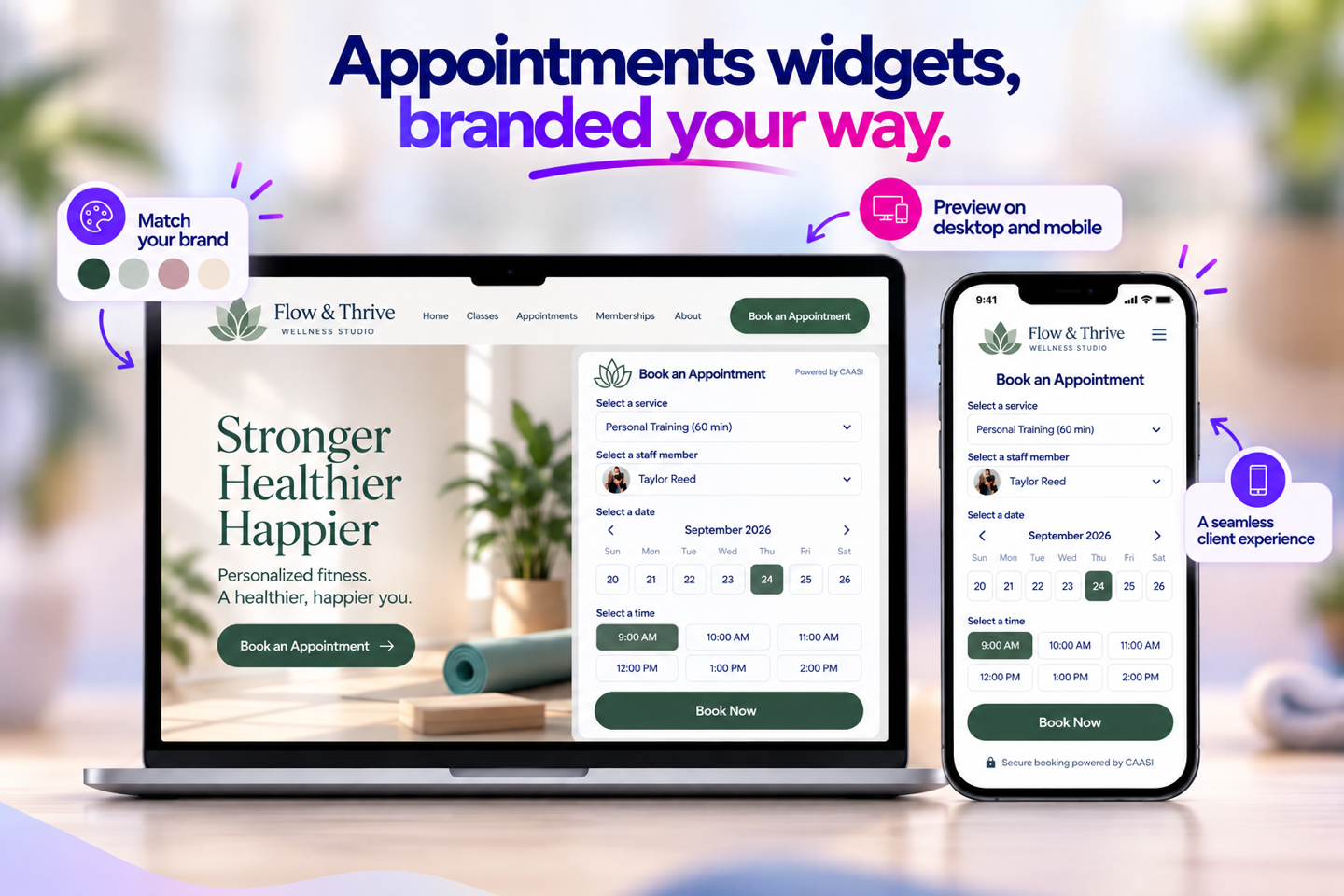
Your booking page in your colors, not ours
Your Appointment Widget will match your website. Set your colors and styling once, preview it on desktop and mobile, and publish. Clients booking an appointment will see your brand front and center, not a generic form, giving them confidence they’re booking directly with you.
Key features
Multiple branded appointment experiences – Build and manage more than one skin, each with its own branding and configuration.
More consistent look and feel – Bring appointment booking in line with your Schedule, Store, and Lead Capture widgets, with easier control over colors and styling.
Confidence before publishing – See a real-time desktop and mobile preview before making a skin live.
📍 Set it up under App Drawer > Setup > Website Widgets.
📅 Coming soon
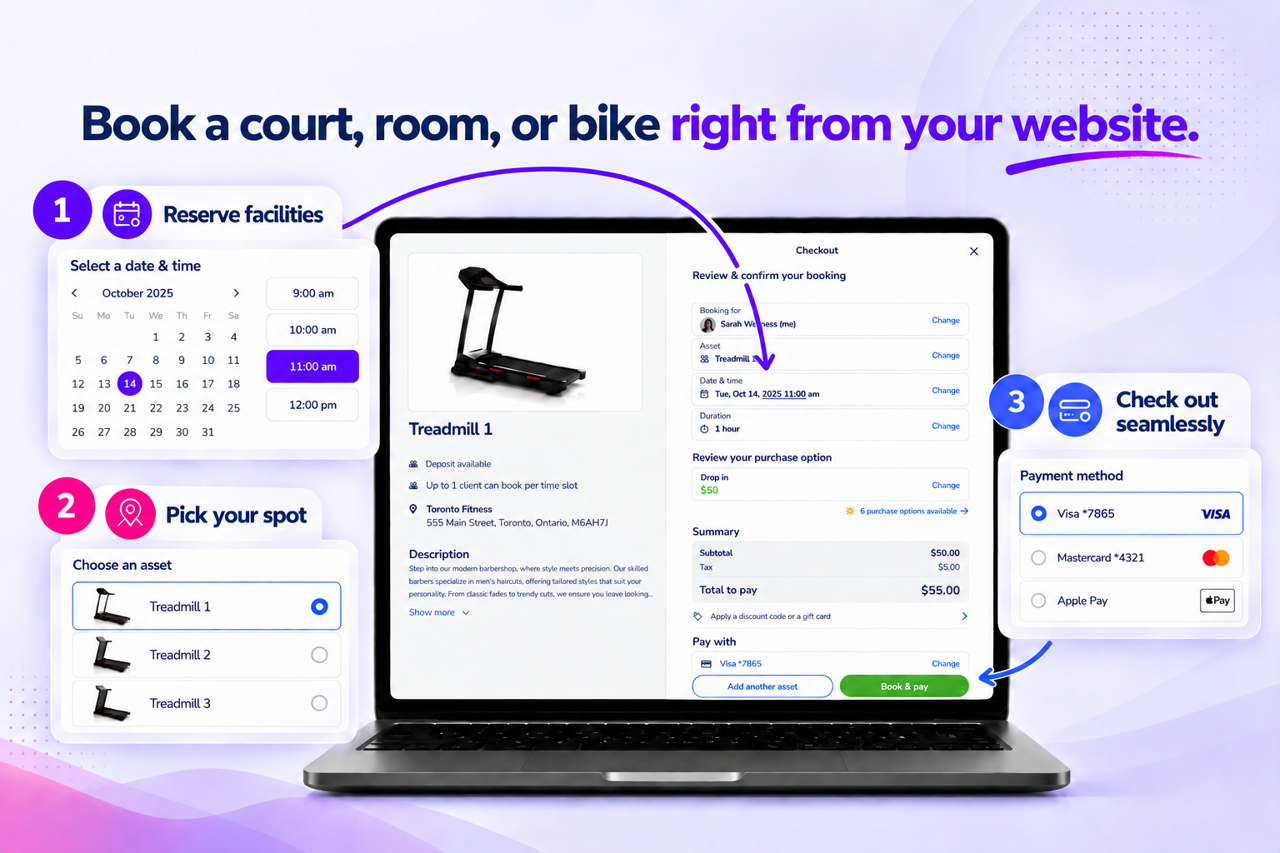
Easier asset booking from your own website
COMING SOON
Members book without leaving your site or logging into the portal
A standalone Asset Widget gives clients a dedicated way to book courts, rooms, or equipment directly from your website, without going through the Client Portal. Clients can browse availability, select a spot, and pay through a familiar booking experience while staying on your site.
Key features
Everything they need, on your site – Clients browse, see live availability, pick a court or room from a layout, and pay, all without leaving your website.
Guest browsing with secure checkout – Clients can view availability without logging in, then verify their identity or create an account when they're ready to book.
Nothing falls through the cracks – Bookings that need staff approval move into a pending state automatically, and your existing purchase options, payment rules, forms, and waivers still apply, so nothing needs to be rebuilt or double-checked.
📍 No setup needed. This will automatically appear under App Drawer > Setup > Website Widgets.
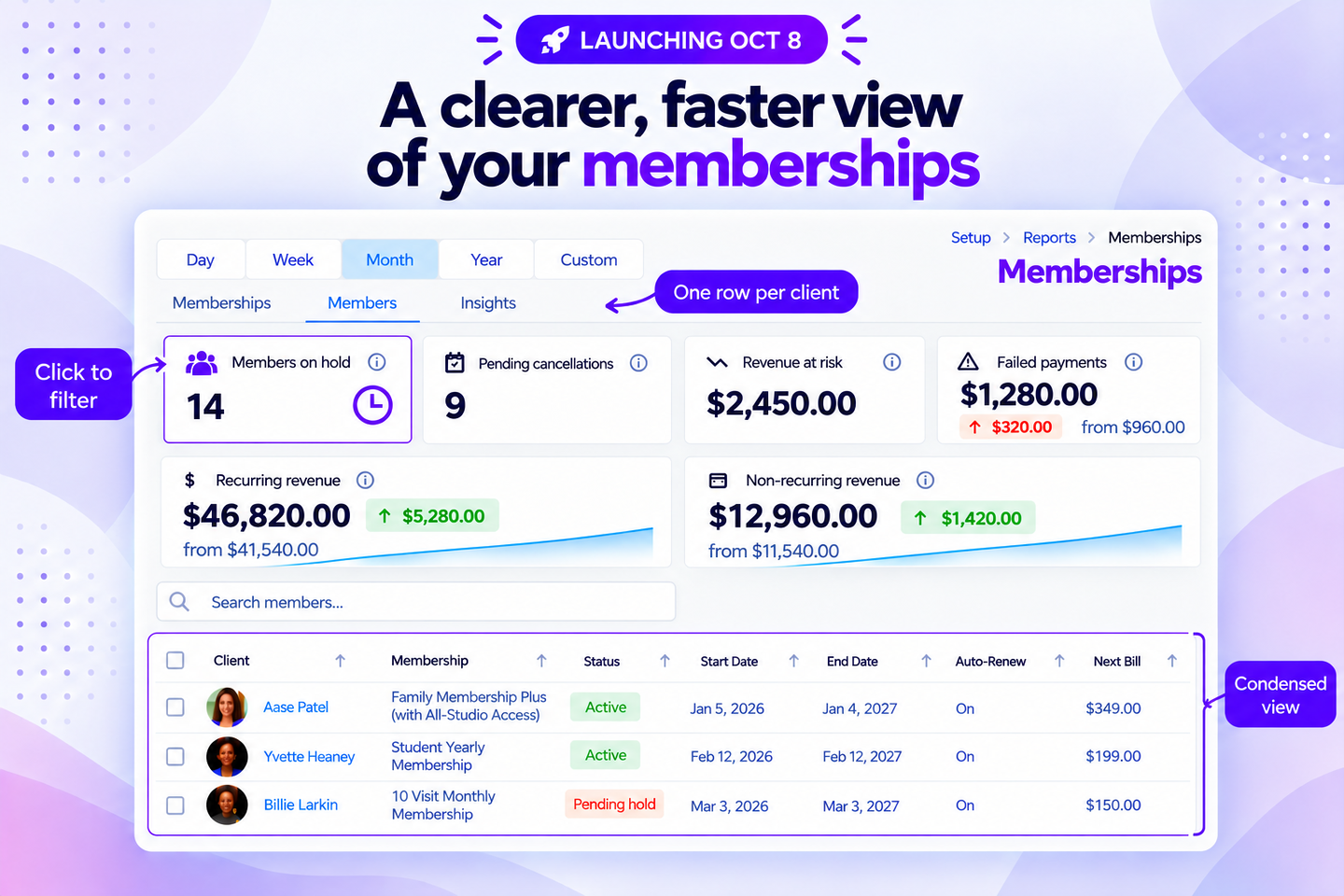
See your real member count in the Memberships Report
COMING SOON - Launch Date: October 8, 2026
One row per person, so your count is real
We rebuilt the Memberships Report around how you actually use it. A new Members view shows one row per client instead of one per membership, so your counts reflect real people rather than inflated purchase records. The report also loads instantly because it's built ahead of time, and a more condensed table means less scrolling to see what you need.
Key features
See your true member count – Members view shows one row per person, so your totals aren’t inflated by clients who hold two or three memberships.
Opens instantly – The report is ready the moment you open it instead of building itself every time.
Scroll less, see more – A condensed table view fits more rows on screen without the extra vertical space full-height rows required, and rarely-used details like cancellation and hold notes now live in a status tooltip instead of taking up table space by default — add them back anytime from Column customization.
Filter with a click – Summary cards like Pending Holds, Pending Cancellations, and Failed Payments are now clickable, filtering the report to those memberships instantly.
📍 No setup needed. Find it under App Drawer > Setup > Reports > Sales > Memberships.
✏️ More updates
For your clients
Waivers and forms on your terms for CAASI bookings – You choose whether CAASI can book a client before they’ve signed a waiver or filled out a required form. If you allow it, CAASI sends them a link to finish later while still completing the booking.
Cleaner outbound SMS messages – Outbound SMS messages now use shortened links, keeping texts cleaner and easier to read, and less likely to be flagged as spam.
For you and your staff
Add contacts faster – The Add Contact window opens as a centered pop-up with clearer button labels so you can add a client quickly, and it saves more reliably.
Leads move through your pipeline on their own – Automation Builder can now update a lead's stage for you, so your pipeline is accurate without anyone dragging cards.
Schedule campaigns ahead of time – Write a push or SMS campaign now and pick when it sends, so you can plan a week of messages in one sitting.
Faster Client Details Report – The Client Details Report now loads more quickly and reliably, so you aren’t waiting on it.
Clearer purchase option selection – When no default purchase option is set, clients now have to pick one before checkout, so you stop chasing down incomplete purchases after the fact.
Bulk-select entire categories – Choose a whole Book Now Tab category in the Custom Schedule Widget with a single click, instead of adding services one at a time. Add a new service to that category down the road, and it shows up on your widget automatically — nothing to update by hand.
❤️ Behind the Build
Behind each improvement are owners like you who took the time to tell us what would make their day easier, their teams more effective, or their businesses better.
A special thank you to Steve Panzik at Power Ten Fitness Club for asking for a complete picture of every call CAASI takes, so you can see the full picture of what CAASI handles for you.
Thank you to Charis Hennessy at Launceston Pilates for helping us make staff notifications more timely, so teams know the moment a client reaches an important step.
We're also grateful to Kelsey Copas at Copas Crew Fitness for inspiring the ability to write a campaign now and schedule it to send later, making it easier to plan communications around your business.
And thank you to Danny Parker at Breathe Vitality and Sabryna Saenz at Social Dance Studio 45 for pushing us to create a booking page that feels like an extension of your brand.
We're grateful as well to Hillari Utsler at CalVEBA, Kristen McSorley at Parkinson Association of the Rockies, Bobby Sims at Social Dance Studio 45, and Emily Weinberg at Hot Yoga Nashville for sharing ideas that continue to guide our roadmap.
To Steve, Charis, Kelsey, Danny, Sabryna, Hillari, Kristen, Bobby, Emily, and every owner who shares feedback, submits ideas, and helps us build a better WellnessLiving—thank you. Keep the ideas coming in the Community Forum. Your next suggestion could be the beginning of our next release.
Tell us what you think in the Community Forum.