
This update puts more control in your hands, from billing and payments to client experience and marketing automation. A new QuickBooks Online integration keeps your books in sync automatically, Bulk Billing lets you charge a whole group of clients in one flow, and the White Label Achieve App gets a personalized new home tab. We've also made booking widgets smarter and more on-brand, and tightened up check-in, statements, and client management along the way.
Let's dive in!
Turn your website into a growth engine with Presence
Sync your books automatically with native QuickBooks Online integration
Charge multiple clients at once with Bulk Billing
Personalize the Achieve App navigation and home page
Reach clients at the right moment with new Automated Marketing triggers
Clients can now manage their own saved cards
Fill open spots automatically when you increase class capacity
Faster checkout with SMS one-time passcodes
Manage Active Tuition Plans right from the Client Profile
Capture client photos directly in WellnessLiving
See exactly how clients check in through your door access system
Choose more flexible date ranges for statements
See more with Custom Schedule Widget upgrades
Style your booking widgets to match your brand
🚀 What's new
Turn your website into a growth engine with Presence
What is it?
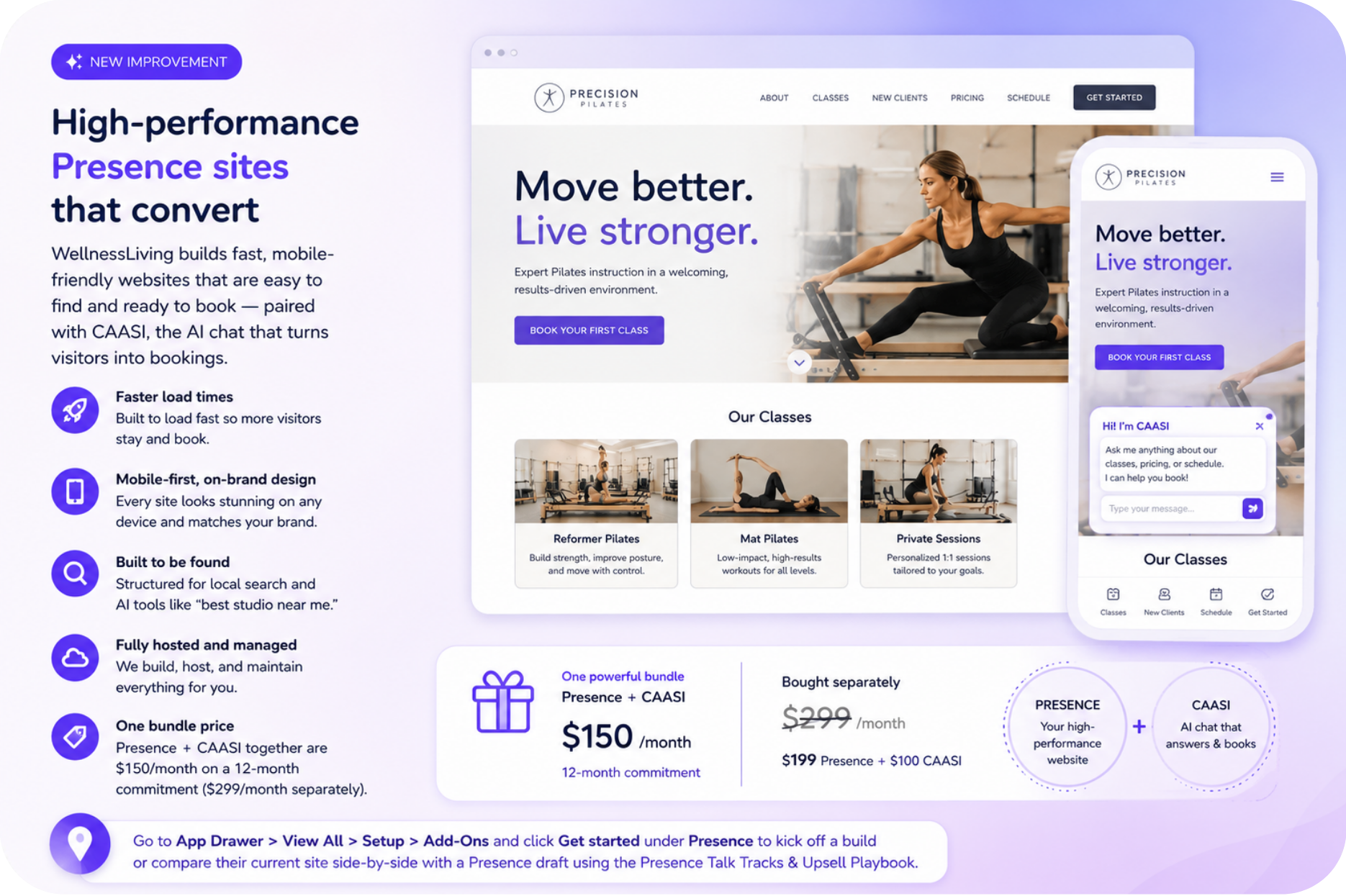
A slow, outdated, or hard-to-find website costs you bookings before clients even contact you. Just one extra second of load time can reduce conversions by about 7%, while poor mobile performance and weak search visibility send potential clients to competitors.
Presence is WellnessLiving's custom website service, built for speed, mobile-friendly by default, and optimized for local and AI search. It's fully hosted and managed, so there's nothing extra to maintain. Paired with CAASI—your AI chat assistant that answers questions and books clients instantly—Presence transforms your website from a static brochure into your hardest-working salesperson.
Key features:
Faster load times – Your pages load quickly, so visitors don't bounce before they see what you offer.
Mobile-first, on-brand design – Your site looks great on any phone and reflects your brand, not a generic template.
Built to be found – Structured to help you show up in local search and when someone asks an AI tool for the best option near them.
Fully hosted and managed – WellnessLiving builds, hosts, and maintains your site — nothing separate for you to buy or keep updated.
One bundle price – Get Presence and CAASI together for $150/month on a 12-month commitment; separately they're $299/month ($199 Presence + $100 CAASI).
📍 Go to App Drawer > View All > Setup > Add-Ons and click Get started under Presence to kick off your build.
Sync your books automatically with native QuickBooks Online integration
NOW ROLLING OUT
What is it?
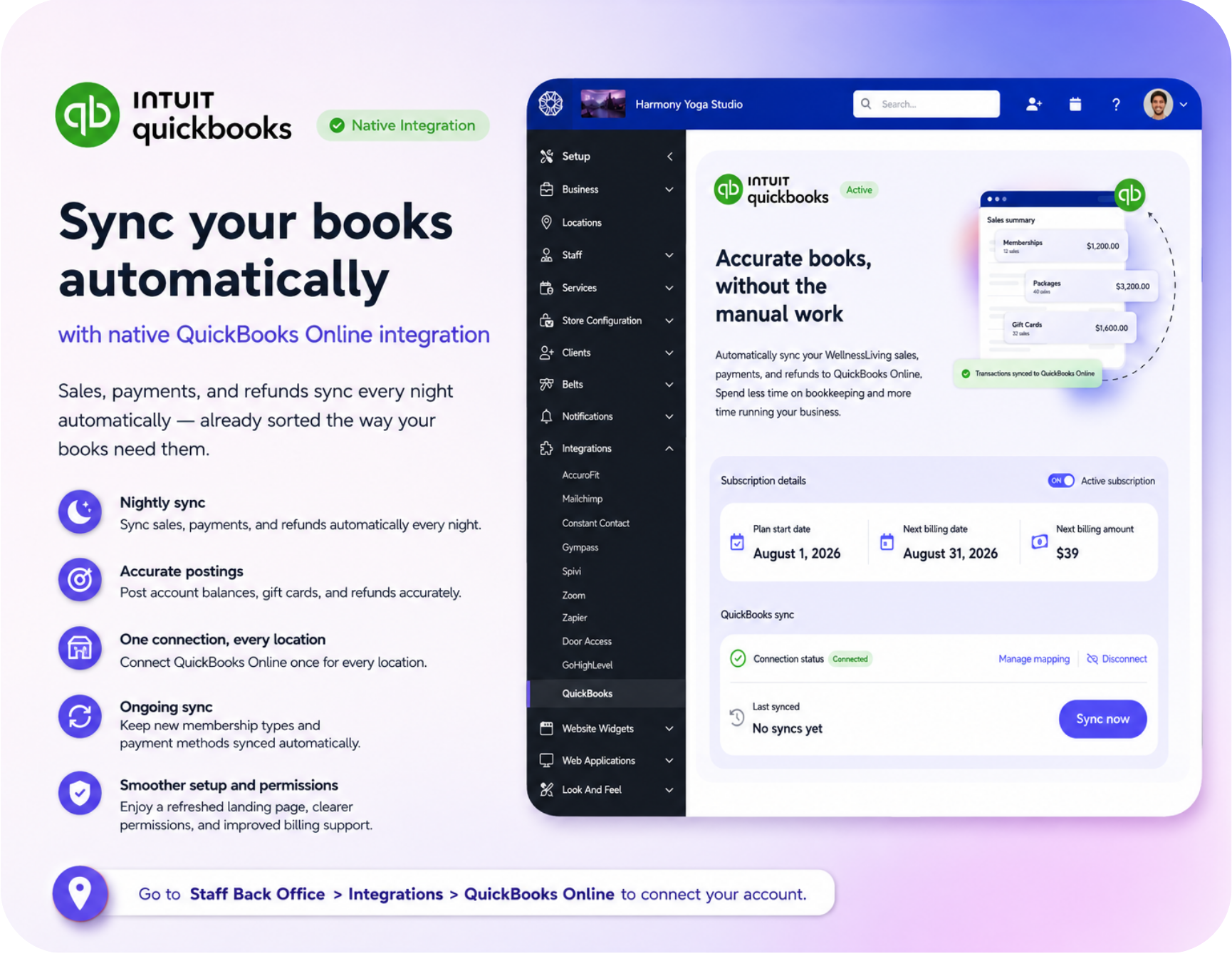
Manually re-entering sales, payments, and refunds into QuickBooks costs bookkeepers hours every month — and one missed gift card or refund can throw off the whole P&L. WellnessLiving now connects natively to QuickBooks Online, syncing every transaction overnight so the books are accurate without anyone touching a spreadsheet.
Key features:
Nightly sync – Sales, payments, and refunds sync automatically every night.
Accurate postings – Account balances, gift cards, and refunds post correctly on their own.
One connection, every location – Connect QuickBooks Online once and cover every location on the account.
Ongoing sync – New membership types and payment methods stay synced without extra setup.
One flat price – Available as a $39/month Add-On for every business, regardless of size or number of locations — no tiers, no per-location fee.
Simpler setup – A refreshed landing page and clearer permissions make it easier for the right staff member to connect and manage the integration.
📍 Go to Staff Back Office > Integrations > QuickBooks Online to connect an account and start syncing automatically — no more manual reconciliation.
Charge multiple clients at once with Bulk Billing
What is it?
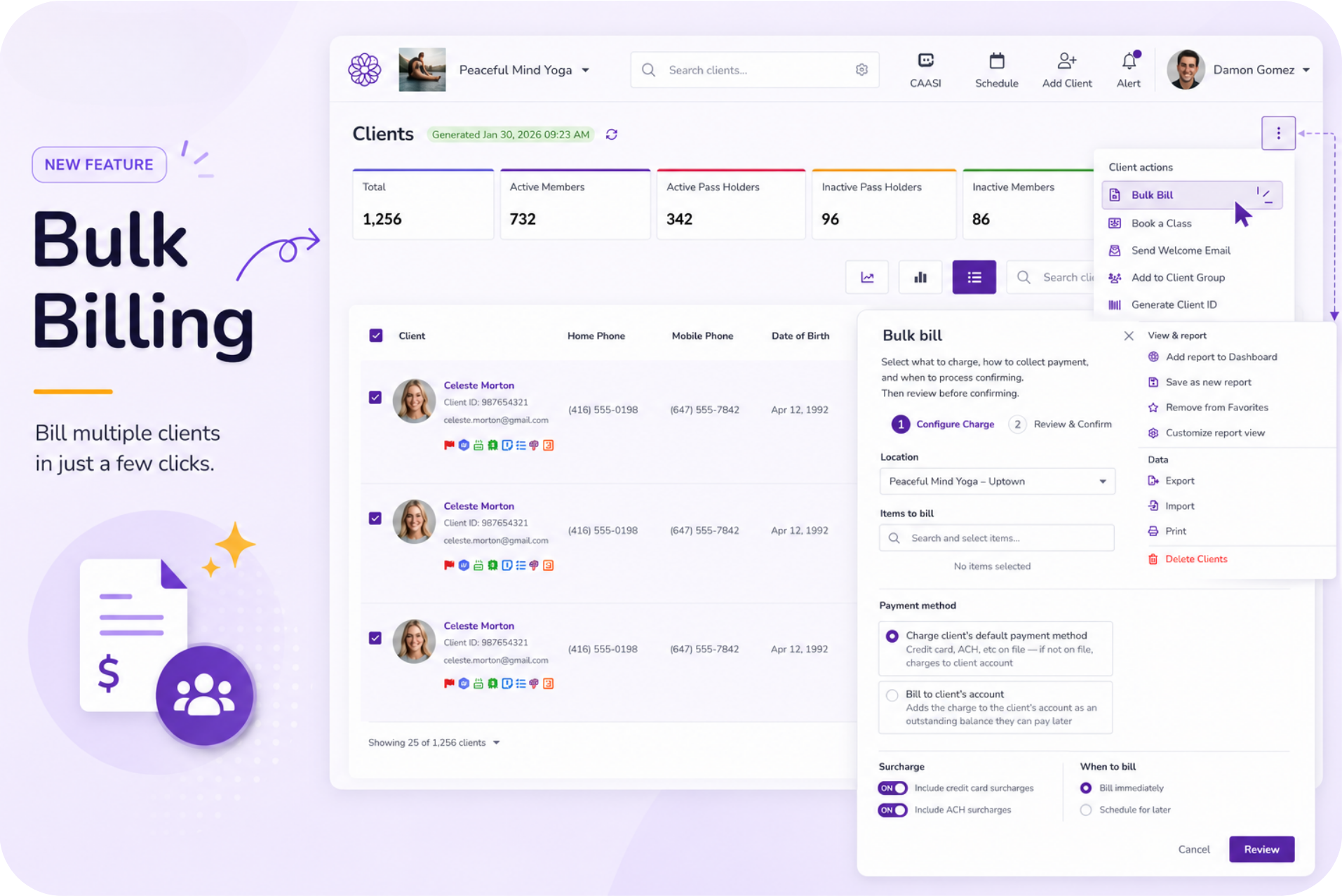
Bulk Billing lets you charge a whole group of clients, like an annual fee or registration fee, in a single flow. Select your clients, set up the charge, review the list, then post it or schedule it for everyone at once.
Key features:
Single-tab charging – Charge multiple clients in a single billing run directly from the Clients tab.
Flexible billing timing – Schedule charges or post them immediately.
Role-based permissions – Control Bulk Billing access with role-based permissions.
📍Go to Staff Back Office > Roles & Permissions to grant staff access, then go to Clients to select clients and run a charge.
Personalize the Achieve App navigation and home page
What is it?
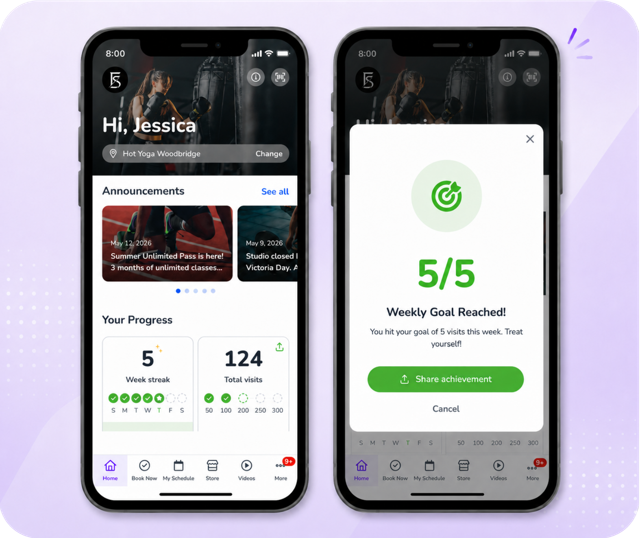
The White Label Achieve App now includes a brand new home tab. Clients see their upcoming booking details, where they stand with their pass or membership, and what they've accomplished, all in one place, and you control the bottom navigation around it.
Key features:
New home tab – Display upcoming classes, memberships, and achievements on the Home tab.
Customizable navigation – Customize the Achieve App navigation and menu order.
Ongoing client engagement – Encourage repeat engagement with personalized home experiences.
📍Go to Staff Back Office > Achieve App Settings to customize navigation and the home page.
Reach clients at the right moment with new Automated Marketing triggers
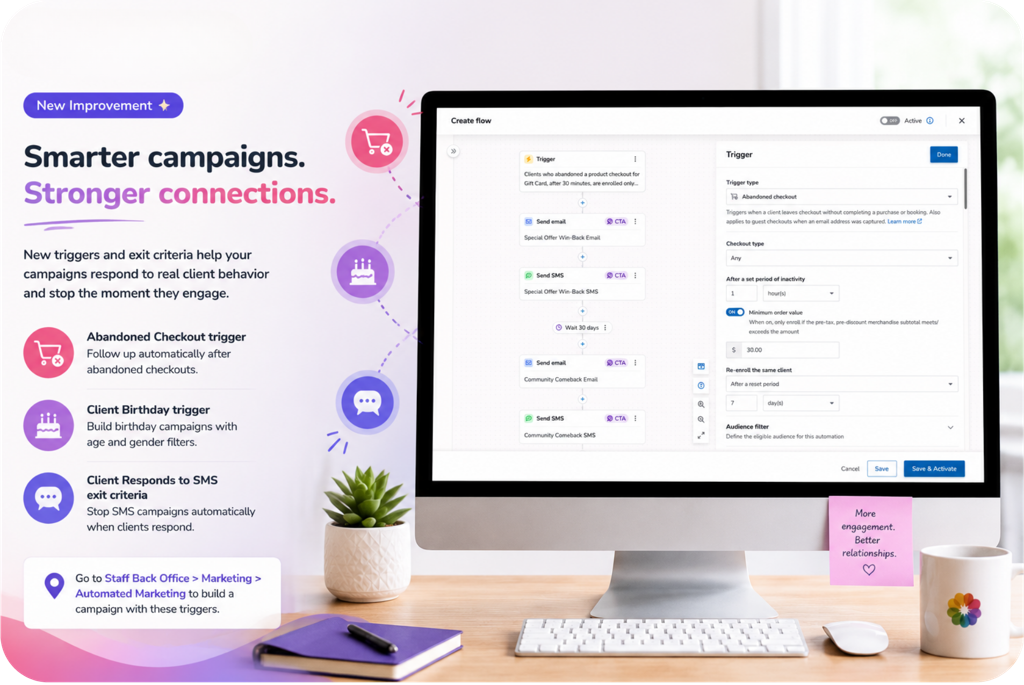
What is it?
Automated Marketing now supports new triggers for abandoned checkouts and client birthdays, plus a new exit criteria for when a client responds to an SMS, so your campaigns can react to real client behavior and stop the moment a client engages.
Key features:
Abandoned Checkout trigger – Follow up automatically after abandoned checkouts.
Client Birthday trigger – Build birthday campaigns with age and gender filters.
Client Responds to SMS exit criteria – Stop SMS campaigns automatically when clients respond to a marketing SMS.
📍Go to Staff Back Office > Marketing > Automated Marketing to build a campaign with these triggers.
Clients can now manage their own saved cards
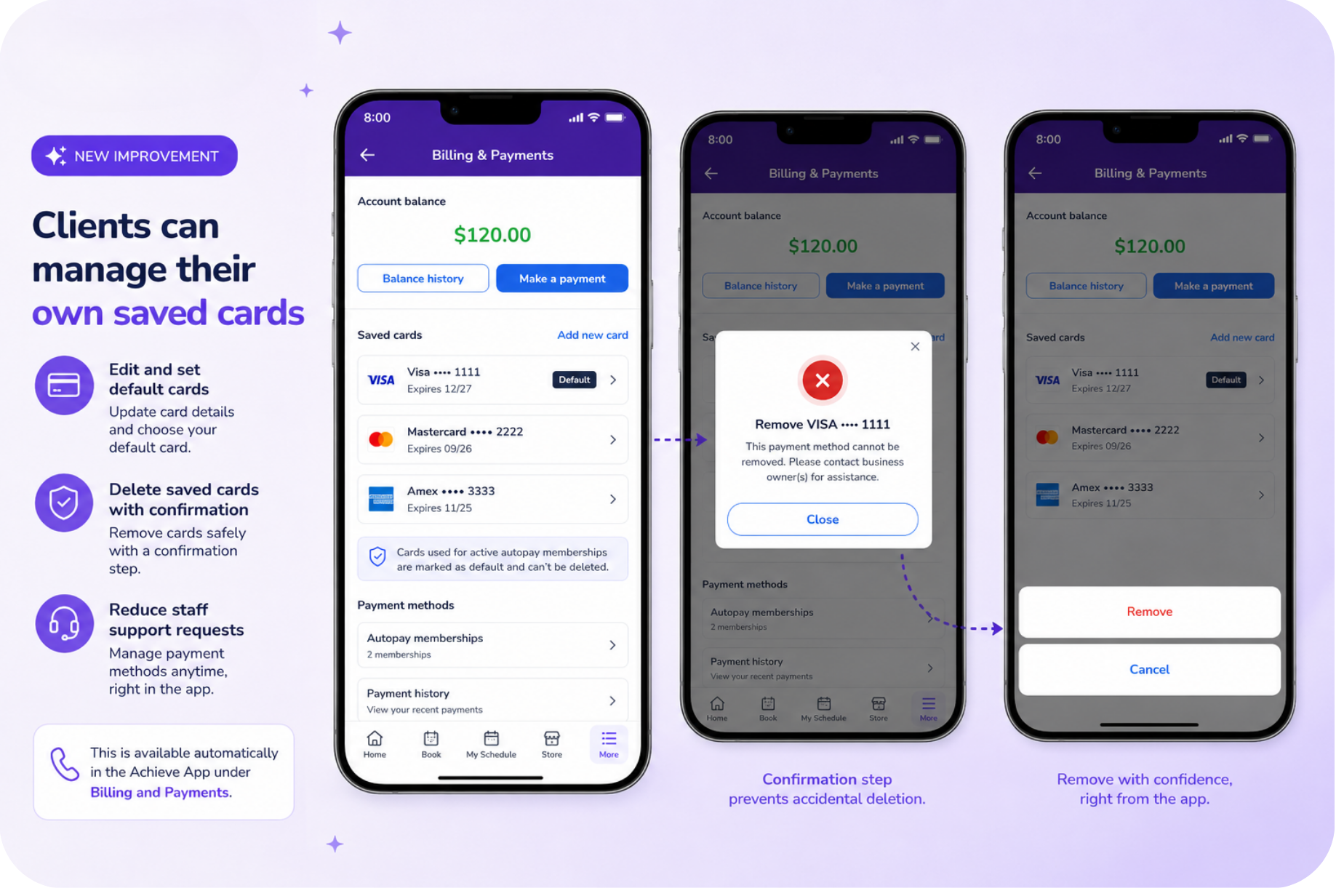
What is it?
Clients can now update, set as default, or remove their saved credit cards directly in the Achieve App, with a confirmation step so nothing gets deleted by accident. If a card is tied to an active autopay membership, WellnessLiving flags it and asks the client to select a new default payment method before deleting.
Key features:
Card editing and default selection – Edit and set default saved cards.
Confirmed card deletion – Delete saved cards with confirmation.
Fewer support requests – Reduce staff support requests to manage payment methods.
📍This is available automatically in the Achieve App under Billing and Payments.
Fill open spots automatically when you increase class capacity
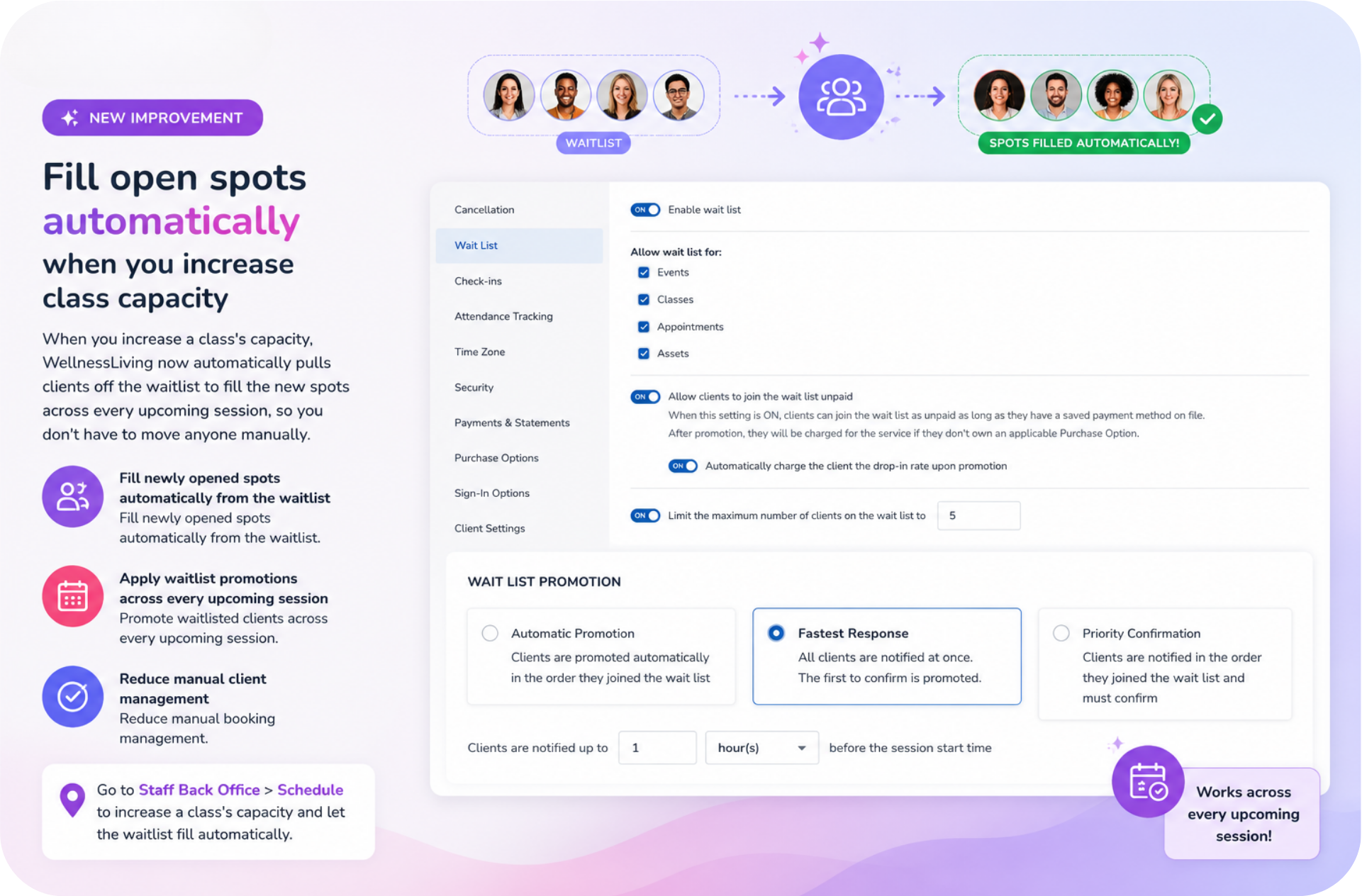
What is it?
When you increase a class's capacity, WellnessLiving now automatically pulls clients off the waitlist to fill the new spots across every upcoming session, so you don't have to move anyone manually.
Key features:
Automatic waitlist fill – Fill newly opened spots automatically from the waitlist.
Every-session promotions – Promote waitlisted clients across every upcoming session.
Less manual work – Reduce manual booking management.
📍Go to Staff Back Office > Schedule to increase a class's capacity and let the waitlist fill automatically.
Faster checkout with SMS one-time passcodes
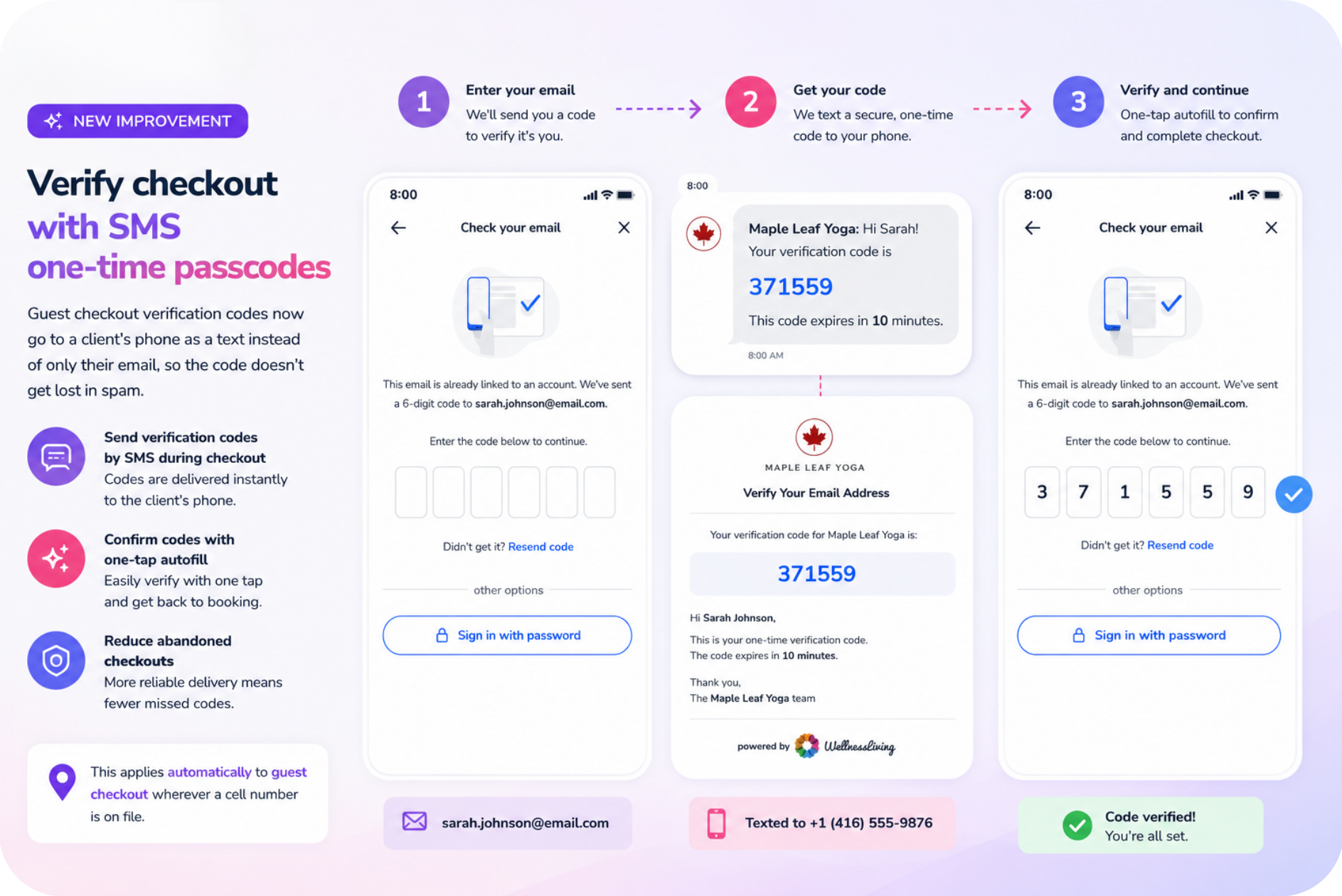
What is it?
Guest checkout verification codes now go to a client's phone as a text instead of only their email, so the code doesn't get lost in spam. If there's a cell number on file, the code arrives as a text with one-tap autofill.
Key features:
SMS verification codes – Send verification codes by SMS during checkout.
One-tap autofill – Confirm verification codes with one-tap autofill.
Fewer abandoned checkouts – Reduce abandoned checkouts caused by missed email codes.
📍This applies automatically to guest checkout wherever a cell number is on file.
Manage Active Tuition Plans right from the Client Profile
What is it?
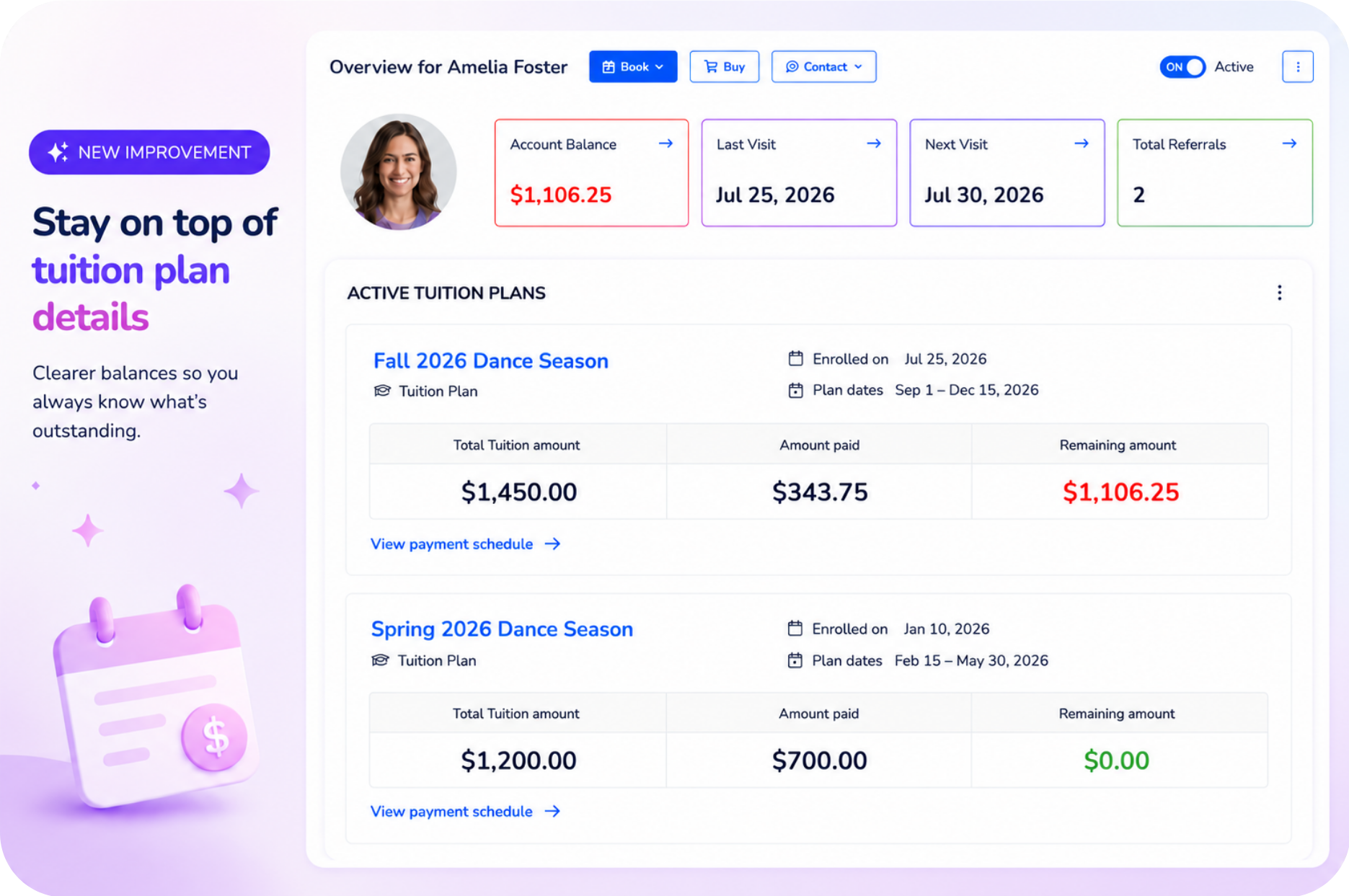
Staff can now see every active Tuition Plan for a client directly from the Client Profile > Overview page. Whether the client is enrolled in the plan or paying for someone else's, staff can quickly review tuition details without navigating to the Billing page.
Key features:
Active Tuition Plans overview – View all active Tuition Plans for a client directly from the Client Profile > Overview page.
At-a-glance payment details – See the participant name, total tuition, amount paid, and remaining balance for each plan.
Participant and payor support – Tuition Plans appear whether the client is the participant or the payor for another participant.
Quick access to Billing – Select View payment plan to open that specific Tuition Plan in the Billing page.
📍Go to Staff Back Office > Client Profile > Overview to review a client's active Tuition Plans and quickly access payment details.
Capture client photos directly in WellnessLiving
What is it?
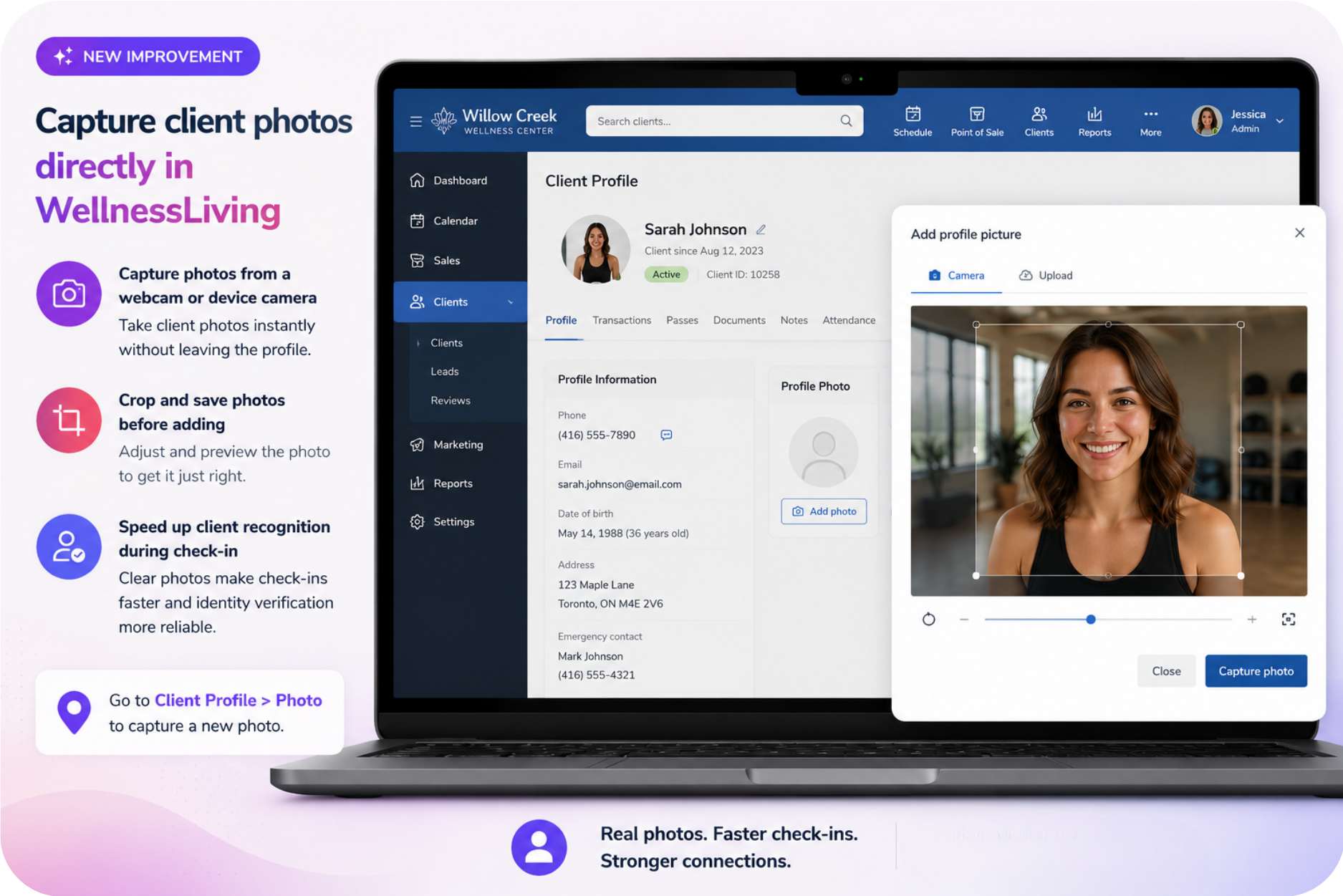
Staff can now capture a client's photo right from a webcam or device camera on the client profile, then crop and save it, instead of uploading a photo separately. Better profile photos speed up check-in and help with identity verification when reviewing door access.
Key features:
Webcam and camera capture – Capture client photos directly from a webcam or device camera.
Crop-and-save editing – Crop and save photos before adding them to the Client Profile.
Faster check-in recognition – Speed up client recognition during check-in.
📍Go to Client Profile > Photo to capture a new photo.
See exactly how clients check in through your door access system
What is it?
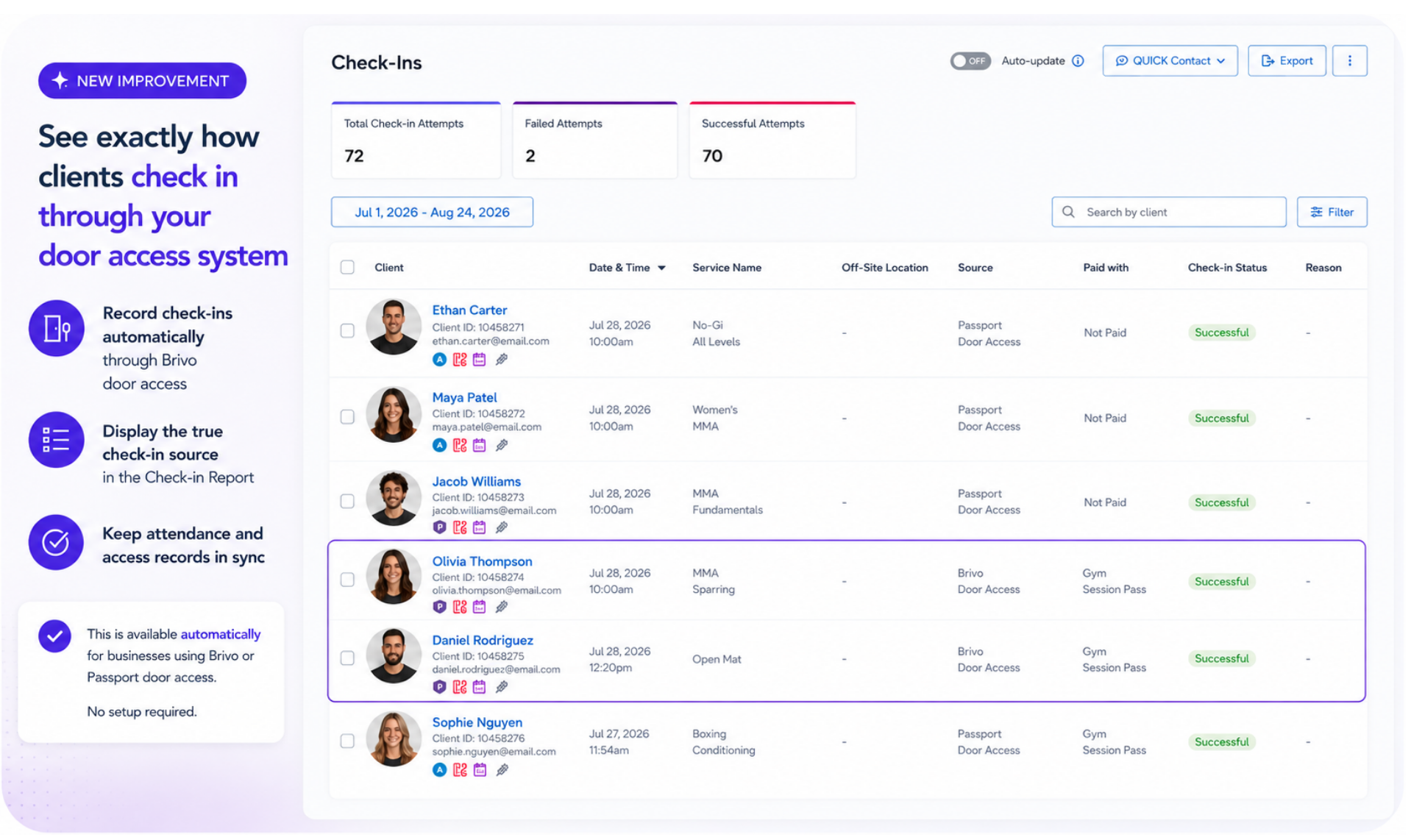
For businesses running door access, entering the facility through Brivo now counts as the check-in automatically, no key tag or manual step required. Check-ins from Passport and Brivo also show their true source in the Check-in Report, so your attendance data matches exactly how clients came in.
Key features:
Automatic Brivo check-ins – Record check-ins automatically through Brivo door access.
True check-in source reporting – Display the true check-in source in the Check-in Report.
Synced attendance and access records – Keep attendance and access records in sync.
📍Passport check-ins are automatic — no setup required. For Brivo, go to Setup > Clients > Groups > [select group] > Door Access Setting and toggle on Automatically check in clients on Brivo access granted. This toggle only appears when Add an access group to Brivo is already enabled for that group.
Choose more flexible date ranges for statements
What is it?
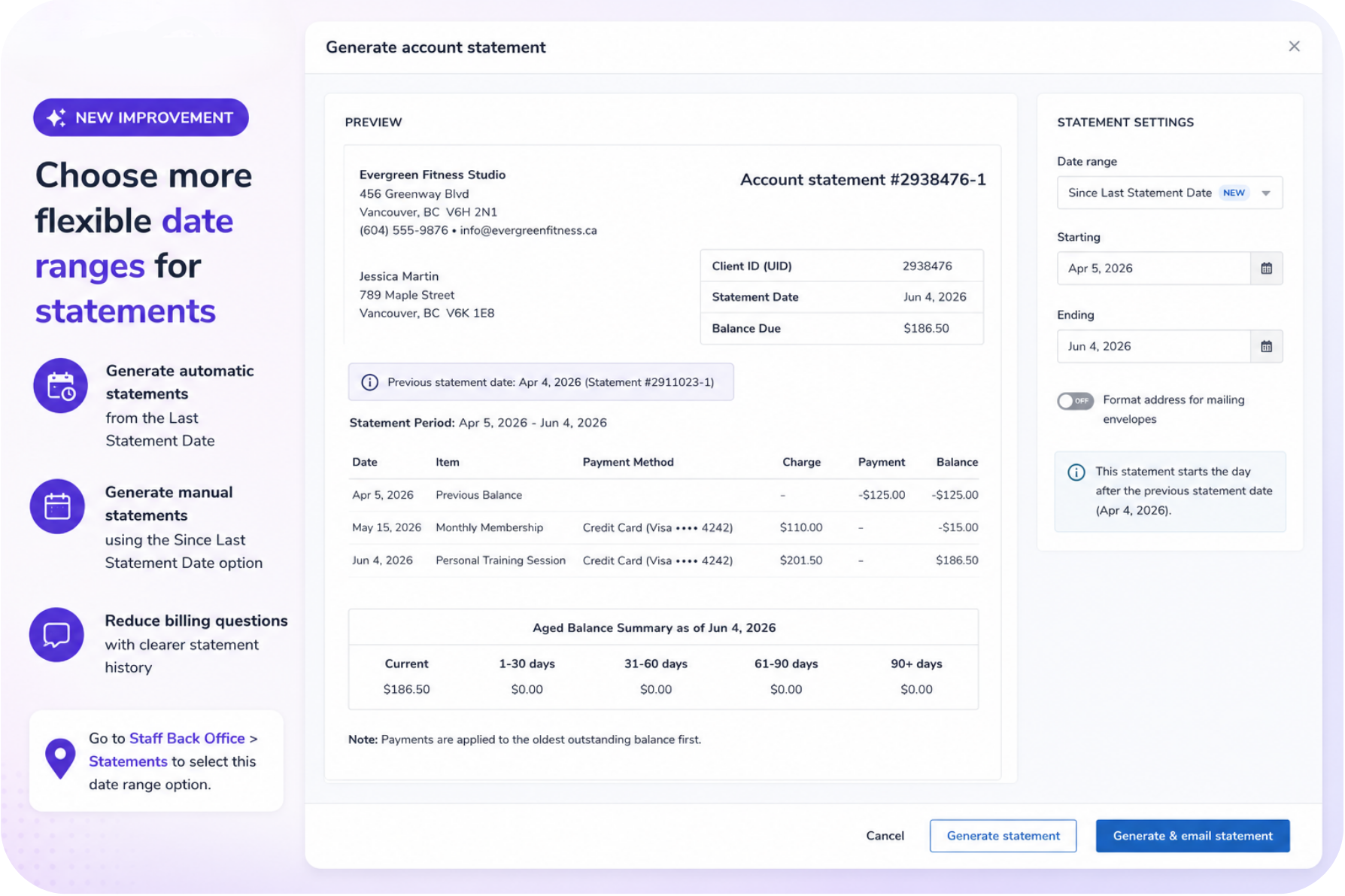
The statement period can now start from the last statement date, whether it's generated automatically or manually, so clients and staff can see billing history at a glance without digging for it.
Key features:
Automatic statements from the Last Statement Date – Generate automatic statements from the Last Statement Date.
Manual statements with the Since Last Statement Date option – Generate manual statements using the Since Last Statement Date option.
Clearer billing history – Reduce billing questions with clearer statement history.
📍Go to Staff Back Office > Statements to select this date range option.
See more with Custom Schedule Widget upgrades
What is it?
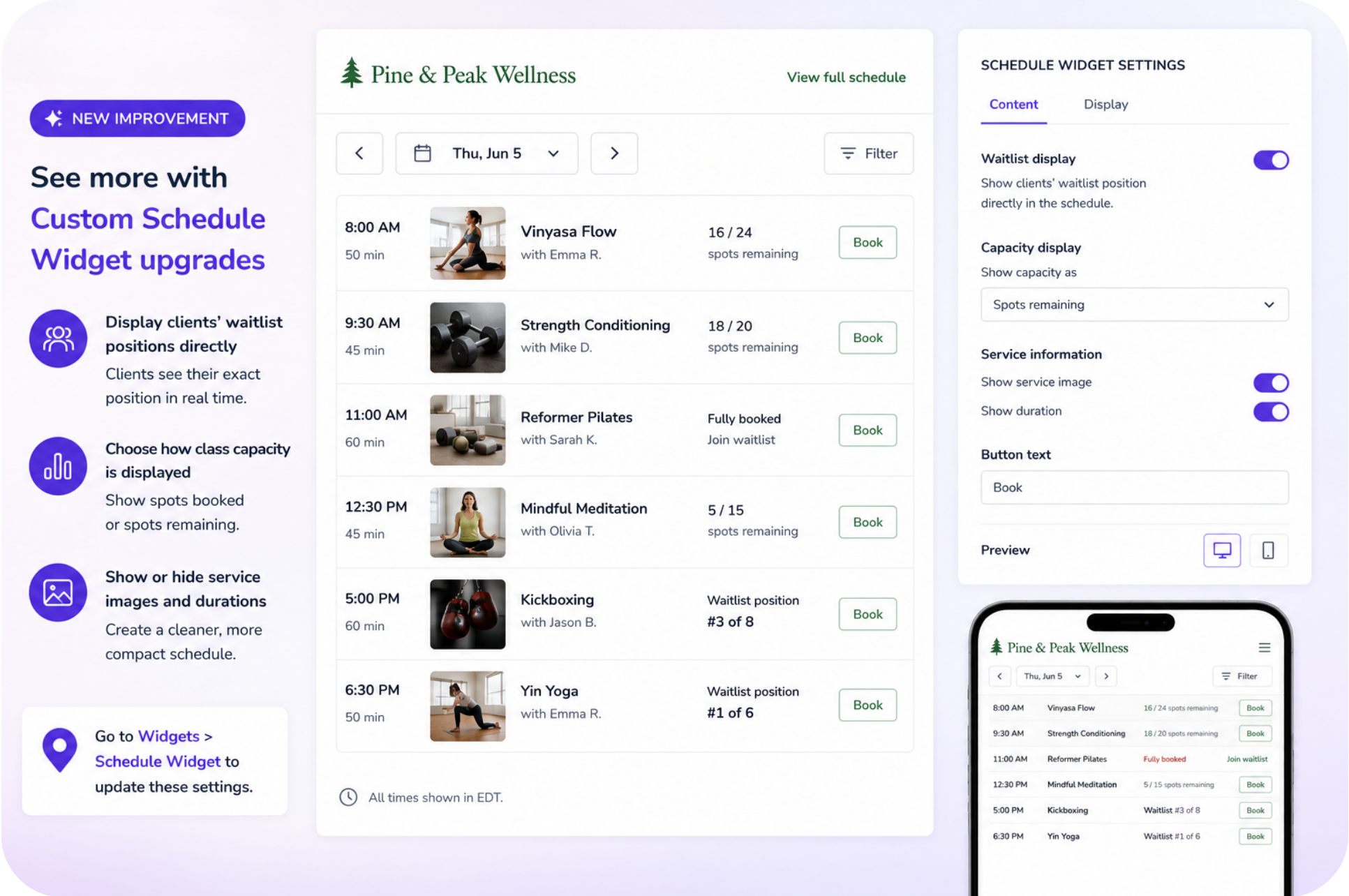
The Schedule Widget now gives clients more information right in the class list, and gives you more control over how it's displayed. Clients see their exact waitlist position inline, you choose whether capacity shows as spots booked or spots remaining, and you can hide the service image or duration for a cleaner, more compact schedule.
Key features:
Inline waitlist positions – Display clients' waitlist positions directly in the schedule.
Flexible capacity display – Choose how class capacity is displayed.
Optional image and duration display – Show or hide service images and durations.
📍Go to Widgets > Schedule Widget to update these settings.
Style your booking widgets to match your brand
What is it?
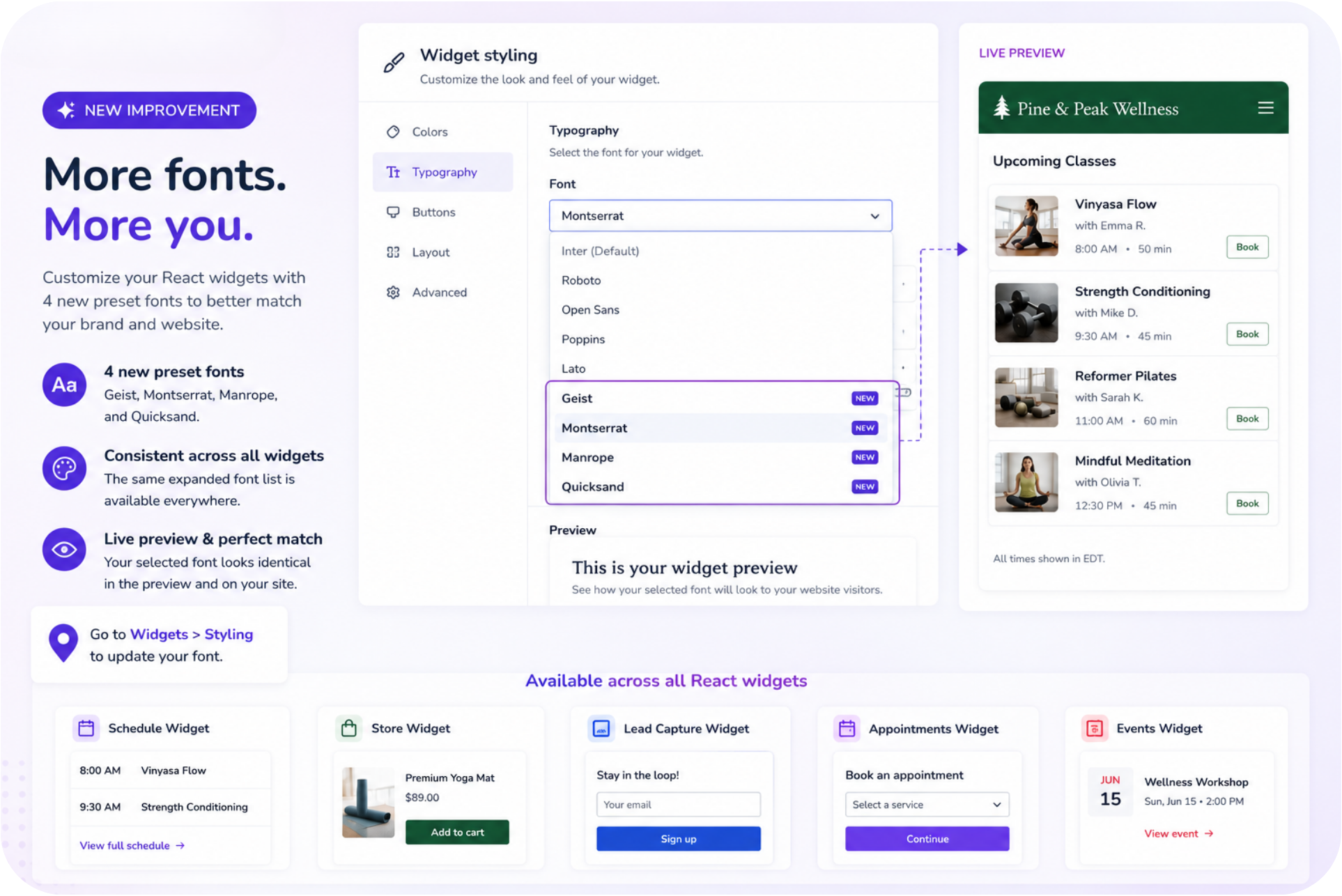
New preset fonts and styling options let your booking widgets match your website's look and feel, without touching custom CSS.
Key features:
Additional preset fonts – Choose from additional preset fonts.
CSS-free brand matching – Match widget styling without custom CSS.
📍Go to Widgets > Styling Settings to choose a new font.
✏️ More updates
Rescheduled appointment fix – Fixed an issue where a rescheduled appointment didn't disappear from the Schedule page in real time.
Payment plan account payments fix – We fixed an issue where scheduled payment plan amounts were added to a client's account balance ahead of their scheduled date. If you created a payment plan between Jul 29 and Aug 26, and at least one installment was charged before Sep 2, the client's account balance may not have been credited for that payment. We recommend adding a manual credit to the client's account balance to correct this.
Marketing Suite filter fix – Fixed filtering by Event Type and Instance across Marketing Suite selectors.
Split payments rounding fix – Fixed rounding issues with split payments.
Prorated credit amount fix – Fixed the amount shown as paid by Account after prorated credits from memberships were applied.
More accurate transformation log timestamps – Transformation log entries now capture and display the actual timestamp.
Automatic client group re-evaluation – New clients are now automatically re-evaluated for client group membership at registration.
Default attachment visibility – Set a new default visibility setting for attachments added to new client profiles.
❤️ Behind the Build
Every feature in this release started with a conversation.
Whether it was shared in our Community Forum, raised during a customer conversation, or suggested through product feedback, your ideas continue to shape WellnessLiving
A special thank you to Jillian Morrisini at Songbirds Music, Art, and Dance Center for championing direct photo capture at the front desk, making client check-ins faster and more seamless.
Thank you to Sarah Nuse, CEO of Tippi Toes, for inspiring the new bulk billing workflow, helping businesses save time when managing payments at scale.
We're also grateful to Estelle Nicol at City Dance Corps, whose feedback helped shape the new Achieve app home experience, creating a more intuitive starting point for clients.
And thank you to Ian Lashley at Lashley Training Center for driving the latest door access improvements, helping us make facility access even more convenient.
To Jillian, Sarah, Estelle, Ian, and every customer who shares ideas, votes on feature requests, and helps guide our roadmap—thank you. Your feedback continues to shape the future of WellnessLiving, and we can't wait to show you what's next.
We’d love to hear what you think about this release—share your feedback in our Community Forum!