
Release 26.73 is here! 🚀
This update is packed with powerful upgrades to improve scheduling, booking flexibility, reporting, and overall business management. From a fully integrated Guest Pass system for gym visits to smarter booking controls and enhanced client-facing experiences, we’ve made it easier to manage access, reduce scheduling conflicts, and deliver a smoother experience for both staff and clients.
Behind every feature is a story. Meet the customers who inspired many of the updates in this release.
Here’s what’s new!
What's New
Launch and manage Guest Passes with complete control across your business
Let members invite guests with a simple, guided flow
Reward your best clients with priority booking by client group
Show job titles instead of staff names on schedules
Give staff more control with session-level editing permissions
More Updates
Account statements
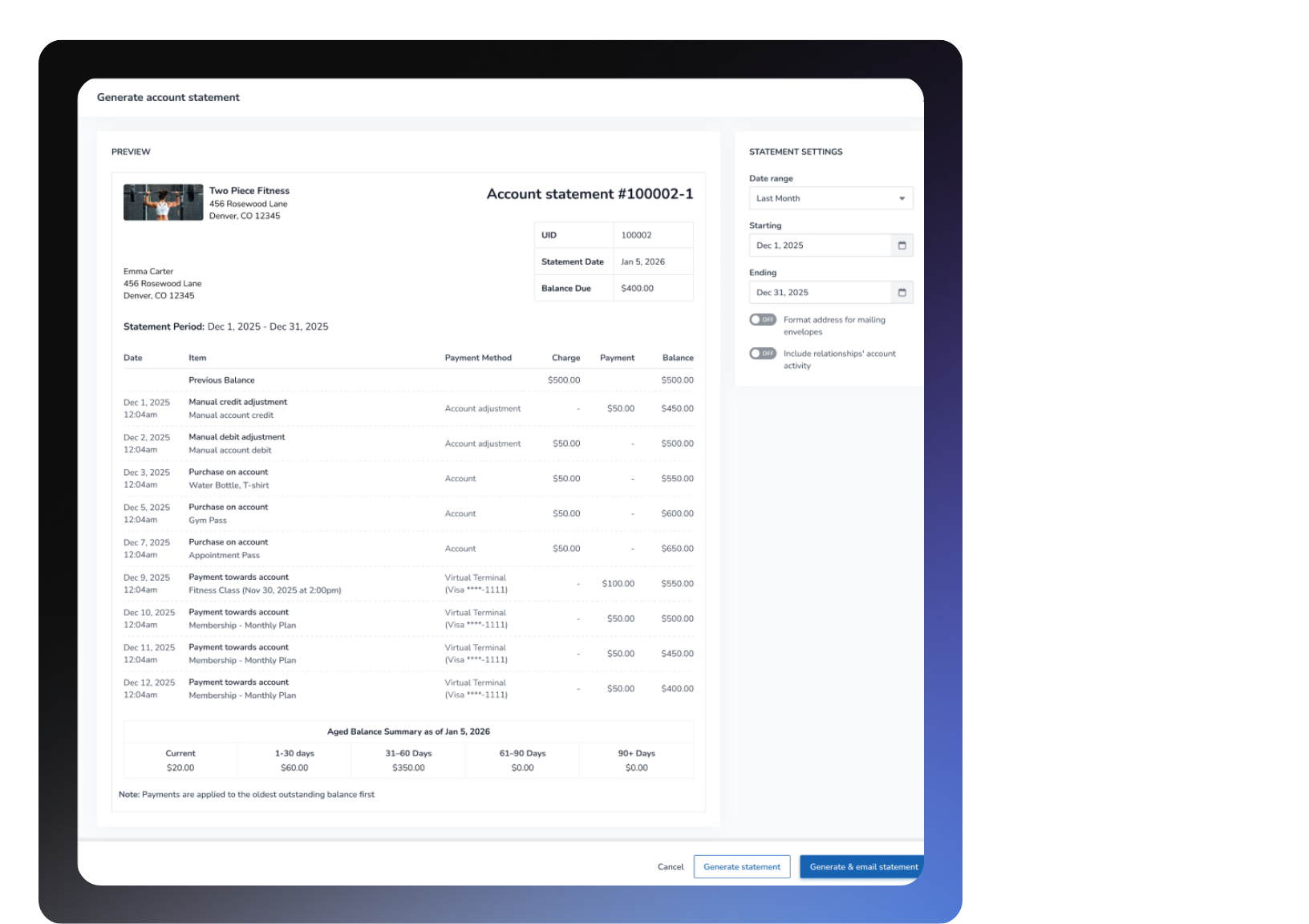
Please note: The Account Statements improvements will be available on May 27th, 2026.
What is it?
Account Statements is a powerful upgrade to how businesses track and share financial activity with their clients. Instead of static invoice snapshots, you now get dynamic, real-time statements that show a full picture of account activity — including previous balance, purchases, payments, manual adjustments, and running balance — all within a configurable time period.
Key features:
Dynamic statements that reflect real-time running balances, replacing outdated static invoice views
Aging balances displayed per statement so you can quickly identify how long each amount has been outstanding
Flexible statement periods that can be configured to match your billing cycles (monthly, bi-weekly, and more)
Exportable PDFs ready to send directly to clients for professional, clear billing communication
Email statements directly to clients from within the platform
Statement history so you and your clients always have a record of past statements
Automatic statement generation to reduce manual admin and keep your clients informed on schedule
📍 Save time, reduce billing confusion, and give your clients the financial transparency they expect — Account Statements puts you in control of the full billing conversation. To access, navigate to Client Profile > Account > Balance History & Statements or you can also access it by going to Business Policies > Payments and Statements.
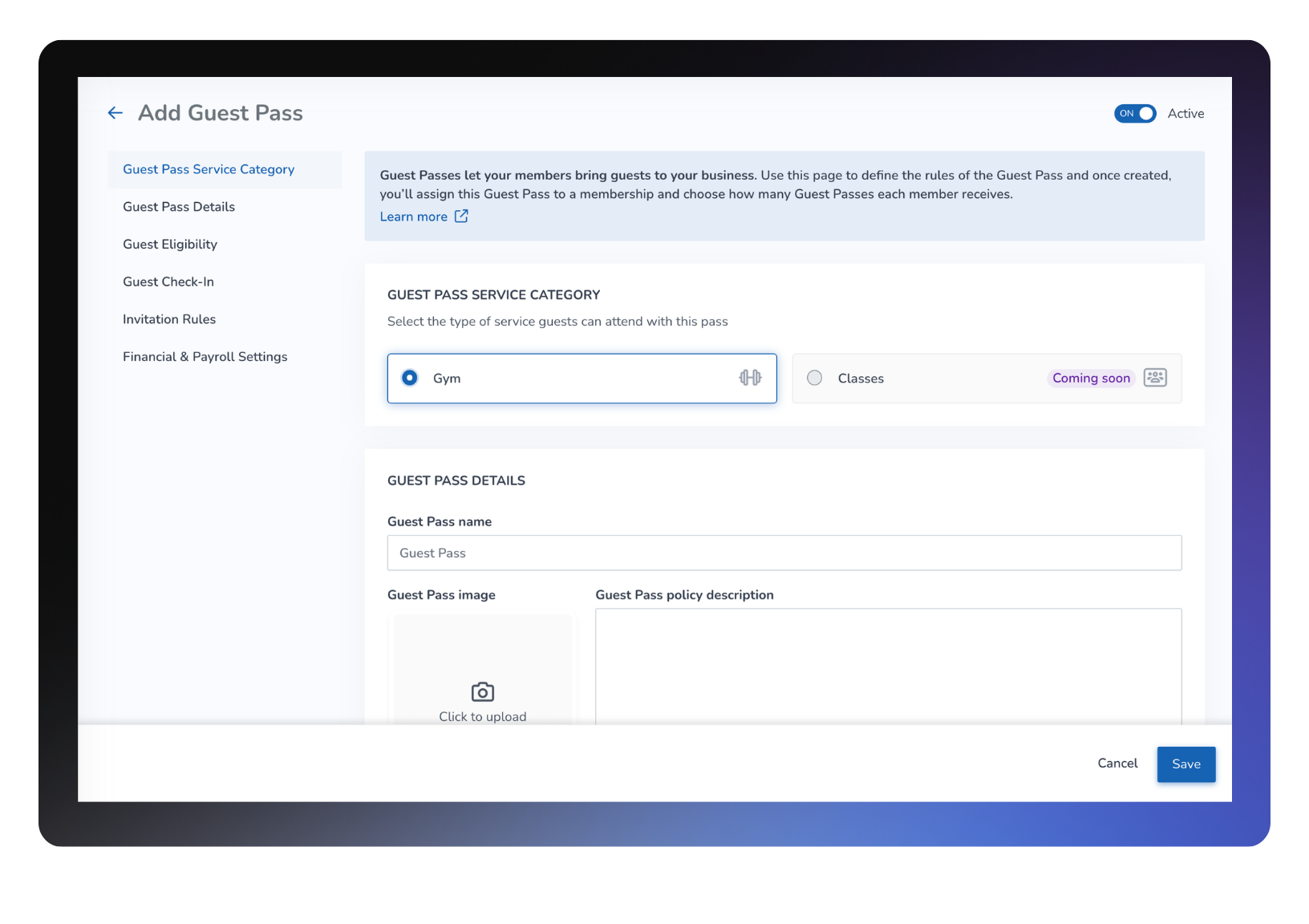
Launch and manage Guest Passes with complete control across your business
What is it?
You can now create and manage Guest Passes for gym visits end-to-end, from setup to redemption. Assign passes to memberships, control how and when they’re used, and track every interaction. This helps you attract new clients, simplify guest access, and maintain full visibility across your business. Guest Pass support for classes is coming in a future release.
Key features
Flexible pass setup and eligibility – Offer limited or unlimited passes, apply daily limits, and enforce membership and service rules
End-to-end guest experience – Members can invite guests, who can redeem passes, receive notifications, and check in seamlessly
Smart booking and location controls – Prevent duplicate bookings and enforce capacity, waitlists, age restrictions, and valid location rules
Optional member-present validation – Require the inviting member to be present when a guest redeems a pass for added security and policy enforcement
Automated lifecycle handling – Manage pass behavior across cancellations, no-shows, waitlists, membership changes, and studio updates automatically
Referral tracking support – Automatically link guests to the inviting member through the Referred By field
Client and staff visibility tools – View remaining passes, adjust balances, resend or revoke invitations, and track full Guest Pass history directly from attendance and client profiles
Comprehensive reporting and tracking – Monitor invites, bookings, check-ins, and statuses in one place
Gym Visit support in this release – Guest Passes currently support gym visits, with class support planned for a future release
📍Go to App Drawer> Purchase Options > Add New to create Guest Passes, then go to Setup > Purchase Options > Memberships to assign them.
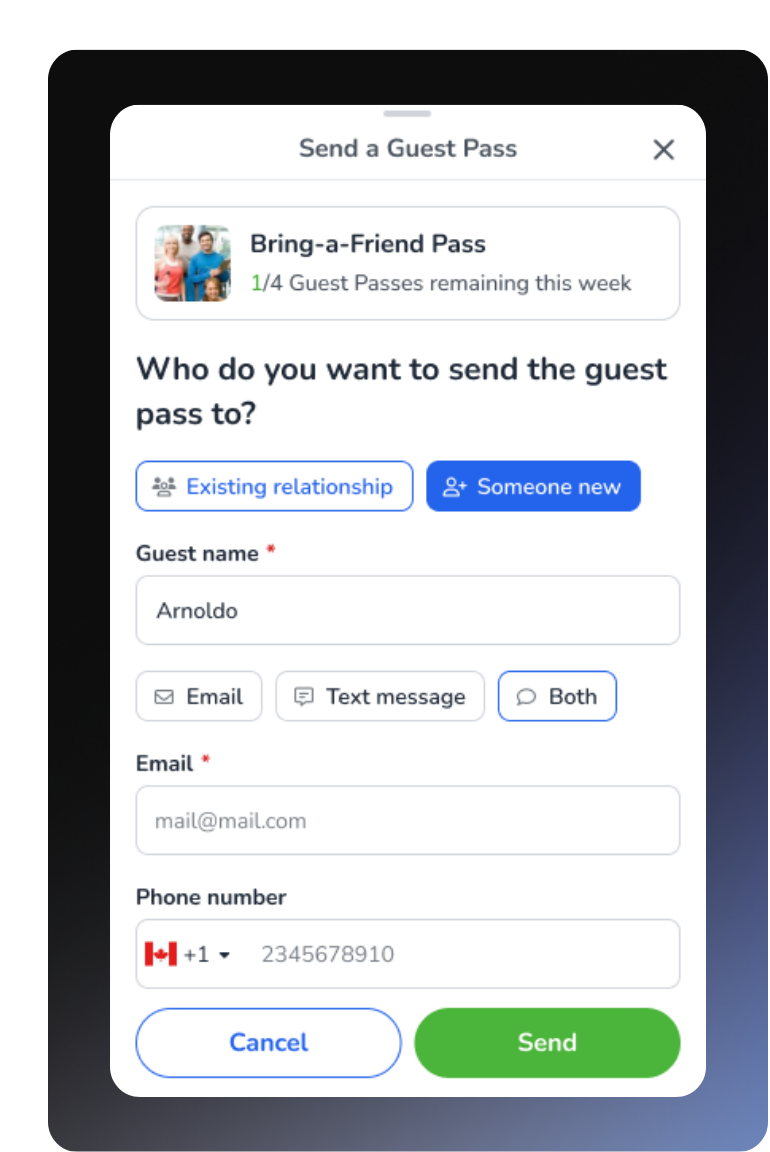
Let members invite guests with a simple, guided flow
What is it?
Members can now invite guests directly from their profile using a guided, step-by-step flow. The experience walks members through selecting a Guest Pass, entering guest details, and sending the invitation without needing staff assistance. Once invited, guests receive everything they need to redeem their pass and check in seamlessly.
Key features
Simple invitation steps – Clear prompts guide members through each stage of the process
Invite management – Members can view, resend, or revoke invitations directly from their profile
Automatic guest notification – Guests receive an email with redemption and booking instructions
Eligibility enforcement – Only valid and available Guest Passes appear for selection
Seamless redemption experience – Guests can redeem passes through a quick sign-up and confirmation flow
📍Members access this from their profile in the Client Portal or Achieve App under Guest Passes.
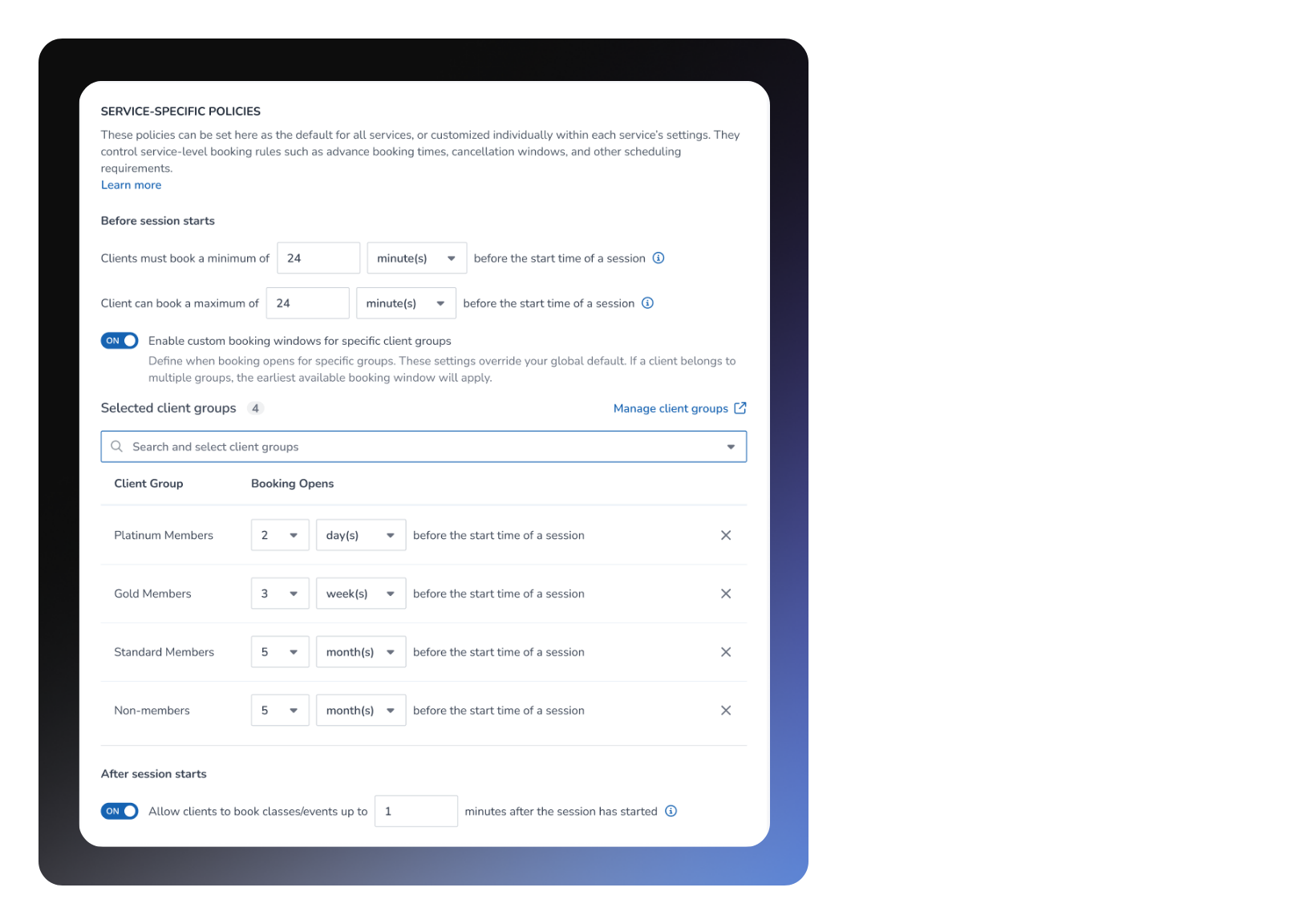
Reward your best clients with priority booking by client group
What is it?
You can now offer priority booking access based on client groups, allowing premium members to book earlier than others. Client groups help you organize and segment clients based on membership tiers, loyalty programs, or other business needs. This helps increase membership value, improve retention, and ensure your top clients secure spots in high-demand sessions.
Key features
Custom booking timeframes – Set different booking windows for specific client groups that override global settings
Automatic best access – If a client belongs to multiple groups, the earliest booking window applies
Clear client visibility – Clients can see when their booking window opens so they can plan ahead
Booking enforcement – Prevent bookings before a client group’s access window opens
Group and family bookings supported – The booker’s priority access applies to all attendees in the transaction
📍Go to App Drawer > Setup > Business Policies > Service Specific Booking.
Learn more about Client Groups in our Knowledge Base: Client Groups
Show job titles instead of staff names on schedules
What is it?
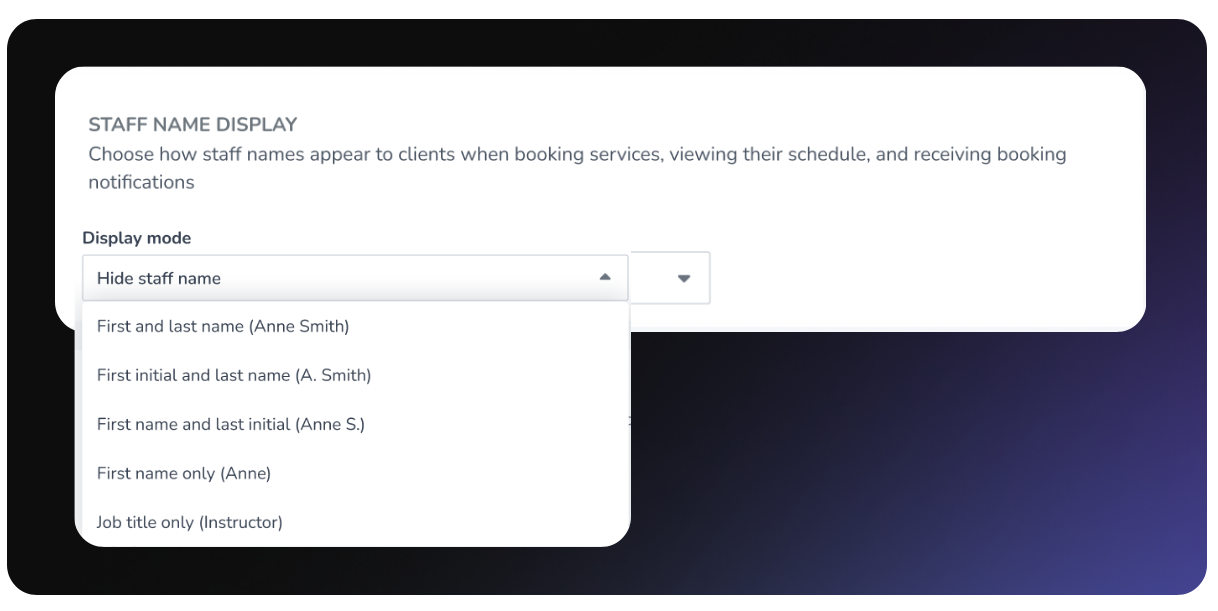
You can now choose to display staff job titles instead of individual names on client-facing schedules. This is especially valuable for franchise and multi-location businesses where instructors frequently rotate, helping maintain a consistent client experience while keeping the focus on your brand.
Key features
Job title display option – Show role titles like “Lead Instructor” instead of staff names on public schedules
Brand-first scheduling – Maintain consistency even when instructors substitute or schedules change
Expanded client-facing controls – Manage room details, special instructions, availability displays, and schedule visibility with improved Client View Settings organization
Cleaner schedule experience – Clients can land directly on today’s sessions without scrolling through past dates
Works across all client surfaces – Applies to the Client Portal, Achieve App, and Schedule Widgets
📍Go to App Drawer > Setup > Web Applications > Staff Name Display and then select the job title display option.
Give staff more control with session-level editing permissions
What is it?
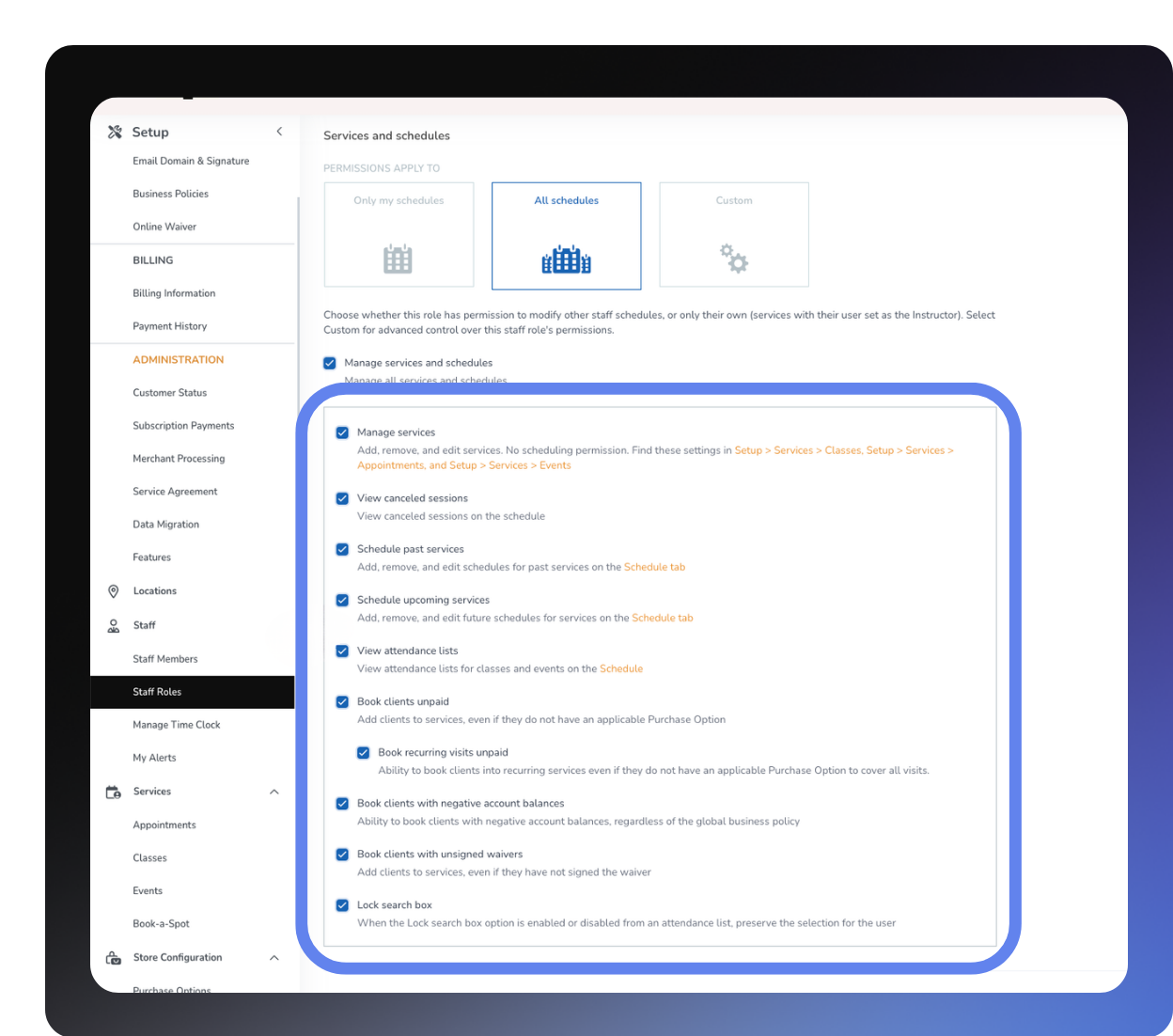
You can now give staff permission to edit session-level details like price, capacity, duration, and special instructions without granting full access to manage services. This makes it easier to delegate scheduling responsibilities while keeping your service configurations secure.
Key features
Granular permission control – Allow staff to edit session details without access to create or modify services
Flexible session management – Adjust pricing, capacity, duration, and special instructions for individual sessions
Centralized service protection – Keep service-level settings secure while enabling operational flexibility
Supports real-world scheduling needs – Easily handle promotions, room changes, and instructor updates
Seamless compatibility – Staff with full Manage Services permissions continue to have complete access
📍Go to App Drawer > Setup > Staff Roles & Permissions.
More updates
Check-In
Resolve check-in issues faster with a clear QUICK AUTO Check-In confirmation pop-up that explains exactly why a check-in failed and provides direct resolution links.
Client billing
Clients now automatically receive account statements as PDFs with quick payment and account history links, helping them stay informed without manual staff follow-up.
Store
Choose whether package pricing appears as a simple total or a detailed itemized breakdown showing one-time and recurring charges across the purchase journey.
Reports
Added date of birth and last visit to the Unpaid Visits report so staff can verify billing eligibility faster.
The Balance Due report now includes a unified Actions column for viewing statements, generating reports, and taking payments directly from the report.
Account Balance History now defaults to a 90-day view while preserving existing custom date range settings.
Memberships
Receipts and reports now display accurate Total After Credits values after prorated membership conversions.
Staff management
New permissions now control which staff members can access Balance History and Statements.
Automations
Prebuilt automation descriptions now more clearly reflect whether the automation is booking-based or purchase-based.
Dashboard
Legacy dashboard metrics are now grouped under a dedicated Unsupported Key Metrics section to clearly identify outdated metrics during the transition to newer alternatives.
FitVID On Demand
Custom video thumbnails now display exactly as uploaded across the web app and Achieve App without grey overlays.
Widgets
Booking and Store Widgets now provide clearer package pricing visibility, improved customization tools, guest appointment booking support, persistent cart badges, and better post-booking form guidance.
Behind every feature is a story. Meet the customers who inspired many of the updates in this release.
We’d love to hear what you think about this release—share your feedback in our Community Forum!