
SMS variables can be used in your automated notifications and automated marketing campaigns to add customized details to your message. All variables are enclosed within square brackets to distinguish them from regular text. These variables also apply to push notifications.
For example, when you send a client the Purchase Receipt SMS notification, the variables [PurchaseItem], [Purchase], [DateDaySms], and [PayMethod] are included by default. The template will replace each of these variables with real information when the notification is generated, creating a customized SMS message.
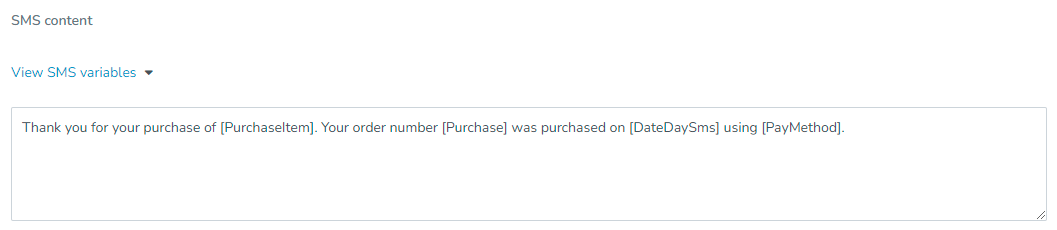
SMS messages and push notifications have certain character limitations. For more information, see SMS character limitations.
Each automated marketing campaign type has its own SMS variables. For more information, see Automated marketing campaign types.
You can also send customized emails by using email variables. For more information, see Email variables.
Key tips
An SMS variable won't load properly if any additional text, HTML, CSS, or JavaScript code is placed inside of the square brackets of the variable.
If an SMS fails to send for any reason, the variables in the SMS might not populate the client’s information properly. If this occurs, the variable names in square brackets will be displayed.
Variables applicable to all SMS types
Variable | Description |
|---|---|
[CurrentdateLong] | The date in the following format: May 15th, 2015. |
[CurrentdateShort] | The date in the following format: 2015/05/15. |
[Currentday] | The day of the week the SMS is sent on. For example, Monday. |
[Firstname] | The first name of the SMS recipient. |
[Fullname] | The first and last name of the SMS recipient. |
[Lastname] | The last name of the SMS recipient. |
[Unsubscribe] | A link clients can click to unsubscribe from your business’s notifications. |
Variables applicable to specific SMS types
Variable | Description |
|---|---|
[AbandonedItemBlock] | A list of the items left in an abandoned checkout. In SMS, this appears as a short text list of item names. Used in the Abandoned checkout automation trigger. |
[AbandonedItemName] | The name of the first item in an abandoned checkout. Used in the Abandoned checkout automation trigger. |
[AbandonedItemPrice] | The price of the first item in an abandoned checkout. Used in the Abandoned checkout automation trigger. |
[AbandonedItemType] | The type of the first item in an abandoned checkout, such as a membership, class, or product. Used in the Abandoned checkout automation trigger. |
[AddOn] | Generates a list of add-ons purchased for an appointment. Used in appointment notifications. |
[BirthdayMonthDay] | The client's birthday month and day, for example July 12. Used in the Client Birthday automation trigger. |
[BusinessName] | The name of the business that you entered in your General Information. |
[BusinessPhone] | The phone number of the business that you entered in your General Information. |
[CallerName] | The name of the caller, if identified. This variable can be used in the Phone Agent Call Received staff notification. |
[CallOutcome] | A short label describing how a Phone Agent call ended, such as Resolved, Transferred, or Callback Requested. This variable can be used in the Phone Agent Call Received staff notification. |
[CallerPhone] | The caller's phone number. This variable can be used in the Phone Agent Call Received staff notification. |
[CancellationDate] | The date the Purchase Option cancellation takes effect. |
[CancelReason] | The reason entered by the staff member when canceling an appointment booking. This variable can be used in the Appointment Canceled By Staff and Recurrent Appointment Canceled by Staff client notifications. |
[CancellationReason] | The reason entered by the staff member or client when cancelling a membership. This variable can be used in the Receive membership cancel notification staff notification. |
[CheckoutItemCount] | The total number of items in an abandoned checkout. Used in the Abandoned checkout automation trigger. |
[CheckoutTotal] | The subtotal of an abandoned checkout, before tax and discounts. Used in the Abandoned checkout automation trigger. |
[CheckoutUrl] | A personalized link that returns the client to their saved checkout. Used in the Abandoned checkout automation trigger. |
[ClientWebAppUrl] | Your Client Portal URL as set in Business URLs. |
[CurrentStage] | The stage the lead was moved to. This variable can be used in automations with the Lead stage updated trigger. |
[DateDay] | The date of the service. |
[DateRange] | The date range during which the session is available. |
[DateTime] | The time of the service. |
[DateTimeSms] | The time of the service formatted for SMS. |
[Delay] | The number of days, months, or years since the client last booked or checked in. |
[Duration] | The duration or length of time of the service. |
[DurationDelay] | The time units (days, months, or years) for the [Delay] variable. For example, if you want to write 5 months, you can enter the number 5 in the [Delay] variable and the word months in the [DurationDelay] variable. |
[End] | The end date of the service. |
[ExpirationDate] | The expiration date of the session pass or membership. |
[LastPaymentDate] | The last date on which the client made a payment on the Purchase Option. |
[LastPaymentAmount] | The amount the client last made on the Purchase Option. |
[Location] | The location name for the specific location referred to in the SMS. |
[LocationAddress] | The location address for the specific location referred to in the SMS. |
[LocationCity] | The city that the specific location referred to in the SMS is within. |
[LocationCountry] | The country that the specific location referred to in the SMS is within. |
[LocationName] | The business location for an abandoned booking. Available only when the abandoned checkout was a booking. Used in the Abandoned checkout automation trigger. |
[LocationPostalcode] | The postal code for the specific location referred to in the SMS. |
[LocationRegion] | The state or province that the specific location referred to in the SMS message is within. |
[Login] | The WellnessLiving login for the individual the SMS is addressed to. |
[PurchaseOption] | The Purchase Option used to book the service. |
[PurchaseOptionName] | The name of the membership that was cancelled. |
[RecordedSessionUrl] | A link that clients can click to view a video of the recorded session. |
[Room] | The room in which the service will be held. |
[Sender] | The name of the sender. |
[Service] | The name of the service associated with the SMS. |
[ServiceName] | The name of the class, appointment, event, or asset left in an abandoned booking. Available only when the abandoned checkout was a booking. Used in the Abandoned checkout automation trigger. |
[ServiceType] | The type of the service. |
[SessionDate] | The date of an abandoned booking session, for example Saturday, July 12, 2026. Available only when the abandoned checkout was a booking. Used in the Abandoned checkout automation trigger. |
[SessionTime] | The time of an abandoned booking session, for example 9:00 AM. Available only when the abandoned checkout was a booking. Used in the Abandoned checkout automation trigger. |
[Special] | Any special instructions associated with the service. |
[Staff] | The name of the staff member associated with the service. |
[StageChangeDate] | The date and time the lead's stage changed, shown in your business's timezone. This variable can be used in automations with the Lead stage updated trigger. |
[Start] | The start date of the service. |
[UrlBook] | The link to start booking process. |
[UrlCancel] | A link that clients can click to cancel the service. |
[UrlConfirm] | A link that clients can click to confirm the service. |
[ViewConversationLinkSMS] | A link that staff members can click to view the conversation between a caller and CAASI in the Communication Hub. This variable can be used in the Phone Agent Call Received staff notification. |
[WeekDay] | The day of the week when the service will take place. |