
This update is packed with powerful upgrades to improve scheduling, booking, client management, marketing, and business operations. From flexible Tuition Plans and enhanced family booking experiences to smarter automation tools and off-site location support, we've made it easier to run your business and deliver exceptional client experiences.
Behind every feature is a story. Meet the customers who inspired many of the updates in this release.
Let’s dive in!
COMING SOON: Offer flexible semester billing with Tuition Plans
Grow referrals on autopilot with Guest Passes for classes
Deliver a faster booking experience in Achieve
Keep everyone informed with Secondary Contacts
Customize your online storefront with the new Store Widget
Schedule services anywhere with Off-site Locations
Streamline family booking with attendee selection
Customize QUICK Auto Check-In to match your workflow
Build Marketing Suite automations before you're ready to launch
Track client journey stages in Marketing Suite
Offer flexible semester billing with Tuition Plans
COMING SOON: Offer flexible semester billing with Tuition Plans
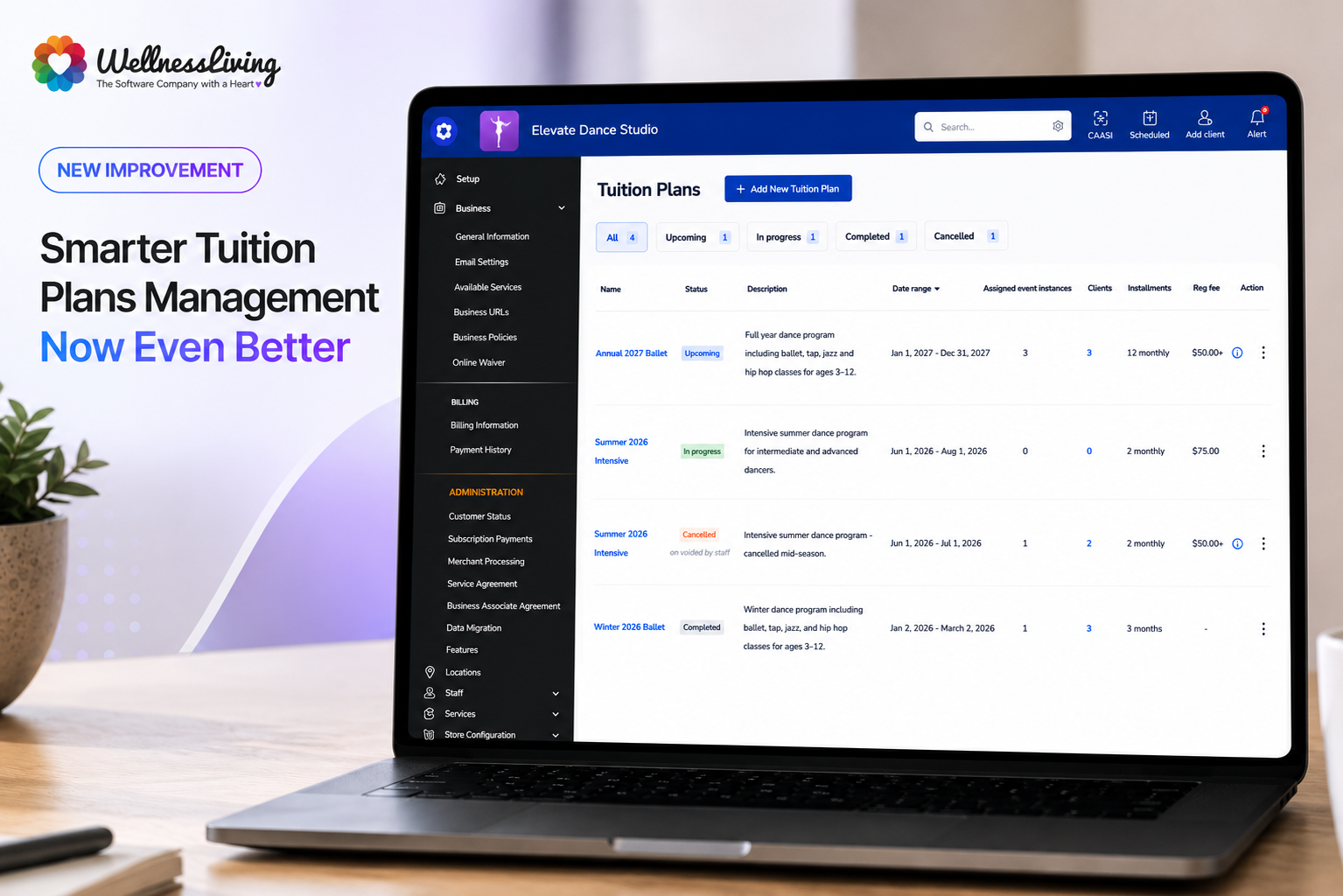
What is it?
Tuition Plans make it easier to manage semester-based programs with flexible instalment billing. Designed for businesses that run long-term programs, such as dance, gymnastics, martial arts, and swim schools, Tuition Plans help you streamline enrolments, payment schedules, and ongoing tuition management from one central location.
Key features
Flexible instalment schedules – Allow clients to spread tuition payments across multiple instalments.
Centralized plan management – Manage tuition plans from a dedicated area in the Staff Back Office.
Enrolment workflows – Connect eligible events to tuition plans for a smoother registration experience.
Enhanced visibility – View tuition plan information throughout client and event management workflows.
📍Go to App Drawer > Store Configuration > Tuition Plans to create and manage tuition plans.
Grow referrals on autopilot with Guest Passes for classes
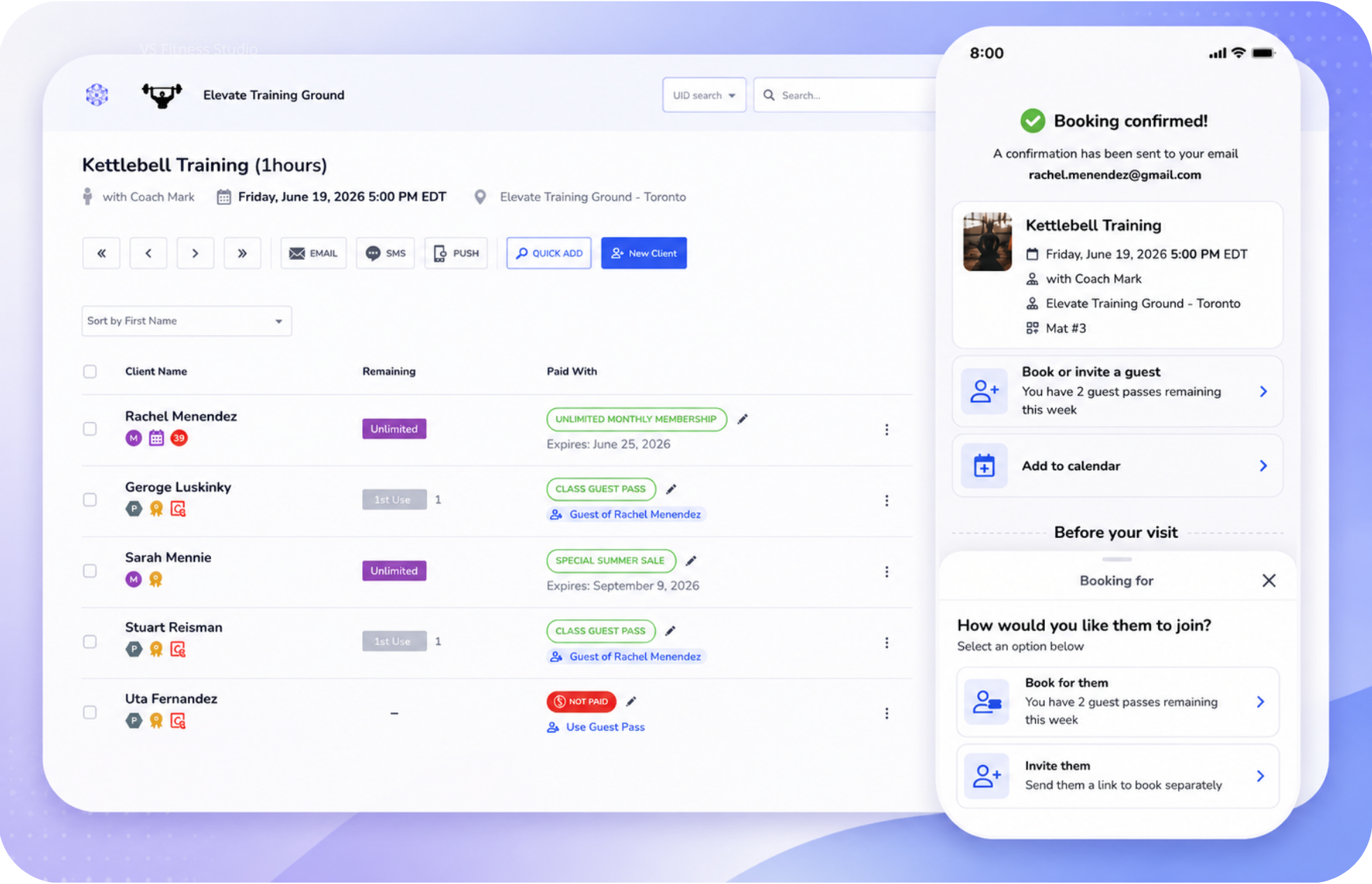
What is it?
Guest Passes for classes make it easier for clients to invite friends and family to attend classes while giving staff better visibility and control over guest attendance.
Key features
Book guests directly into classes – Allow clients to redeem guest passes during class booking.
Improved attendance management – Easily identify and manage guest attendees in attendance lists.
Better referral tracking – Associate guest bookings with the inviting client.
Location-aware validation – Ensure guest passes follow location restrictions and booking rules.
📍To access, head to App Drawer → Setup → Store Configuration → Purchase Options. (Note: Guest passes are set up as a Purchase Option assigned to a membership).
Deliver a faster booking experience in Achieve
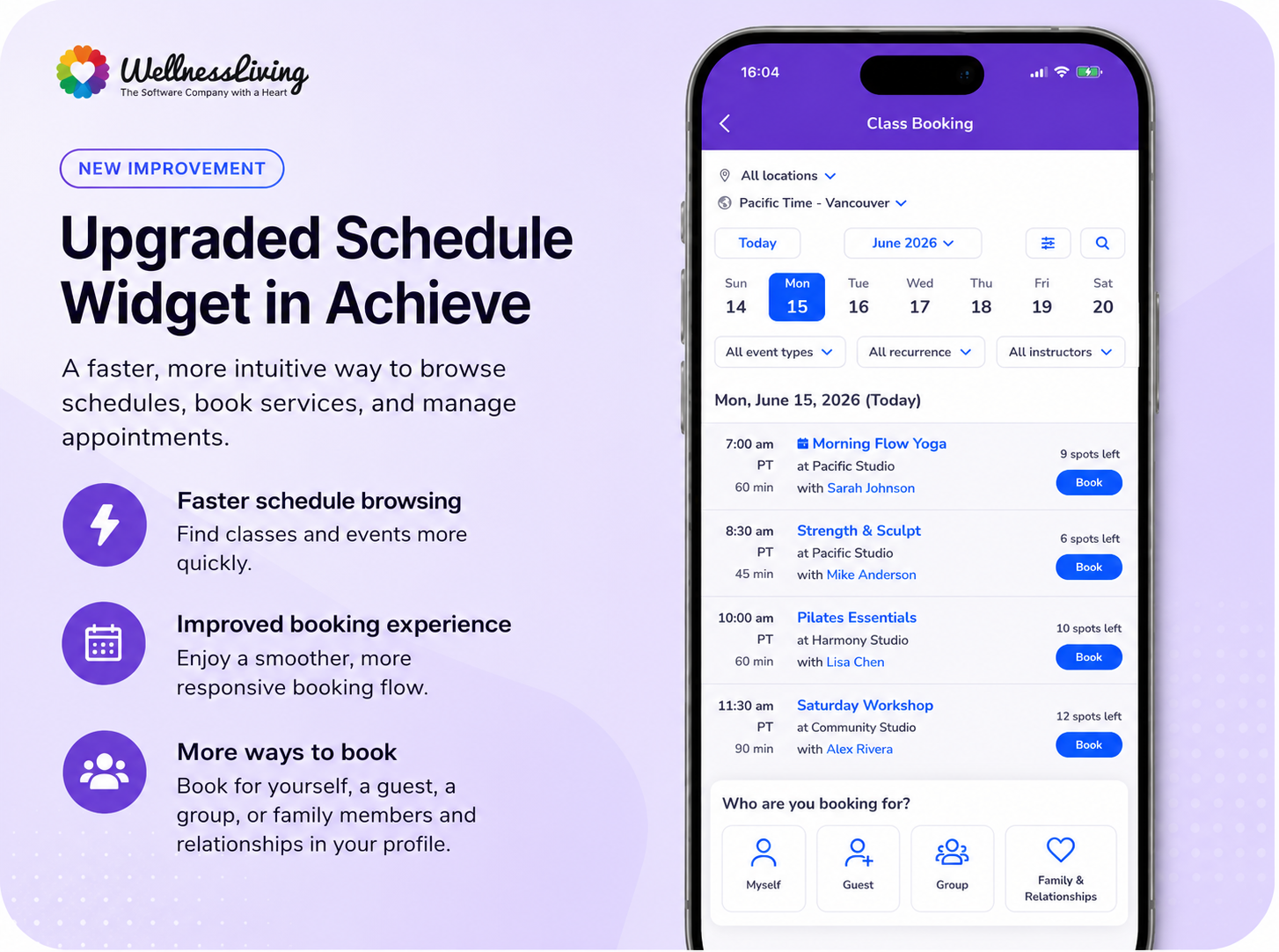
What is it?
The upgraded Schedule Widget is now available in Achieve, giving clients a faster and more intuitive way to browse schedules, book services, and manage appointments.
Key features
Faster schedule browsing – Help clients find classes and events more quickly.
Improved booking experience – Enjoy a smoother and more responsive booking flow.
More ways to book - You can now book for a guest, for a group or for member’s listed as relationships in your profile.
📍Go to Setup > Business > Features > Other to manage this setting.
Keep everyone informed with Secondary Contacts
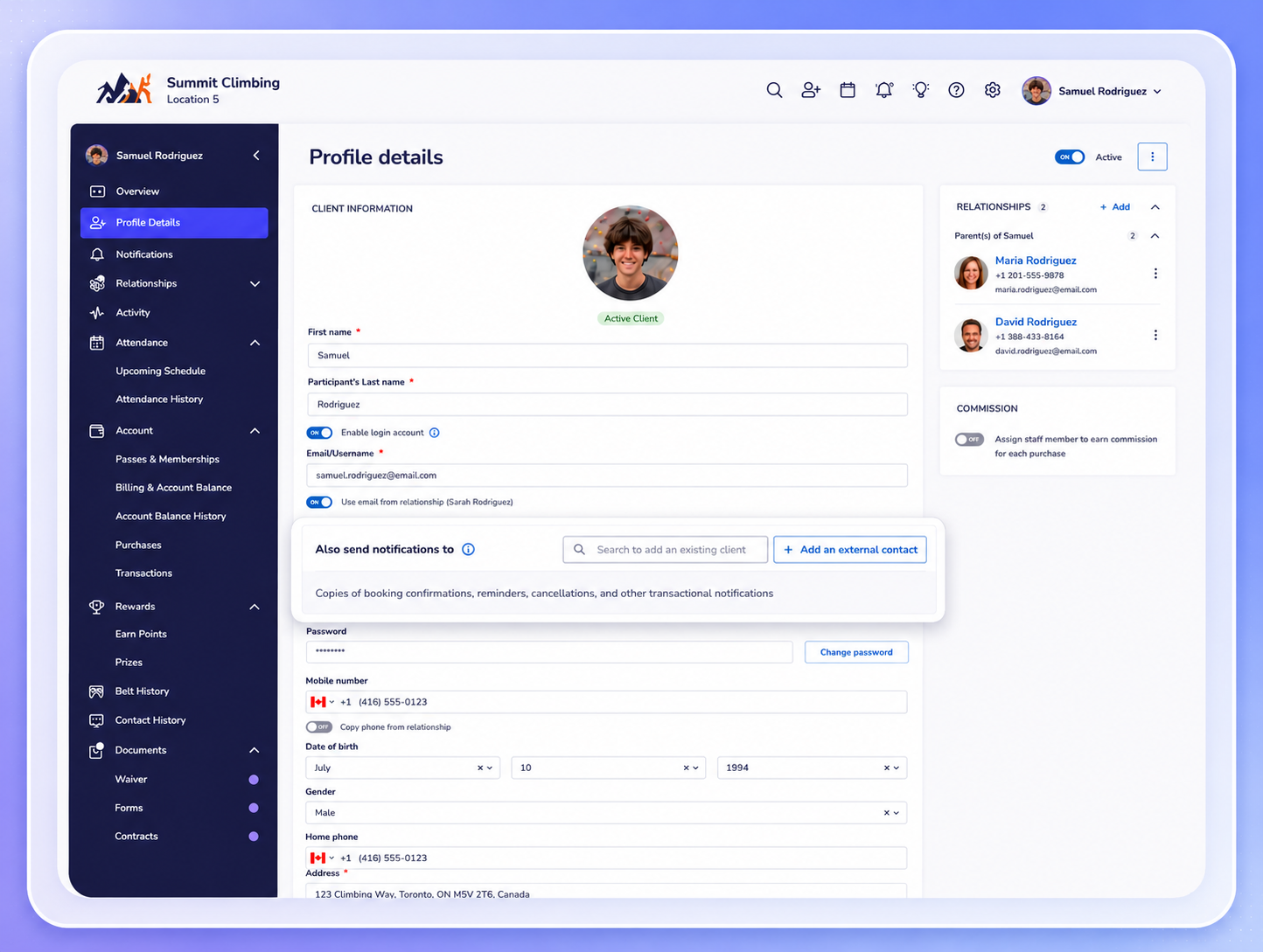
What is it?
You can now add secondary contacts to client profiles, making it easier for parents, guardians, caregivers, and family members to receive important account updates and scheduling notifications.
Key features
Multiple notification recipients – Send important communications to additional contacts.
Support family accounts – Keep parents, guardians, and caregivers informed.
Flexible contact management – Add and manage secondary contacts with ease.
Improved communication visibility – Ensure important updates reach the right people.
📍Go to Client Profile > Personal Information to manage secondary contacts.
Customize your online storefront with the new Store Widget
What is it?
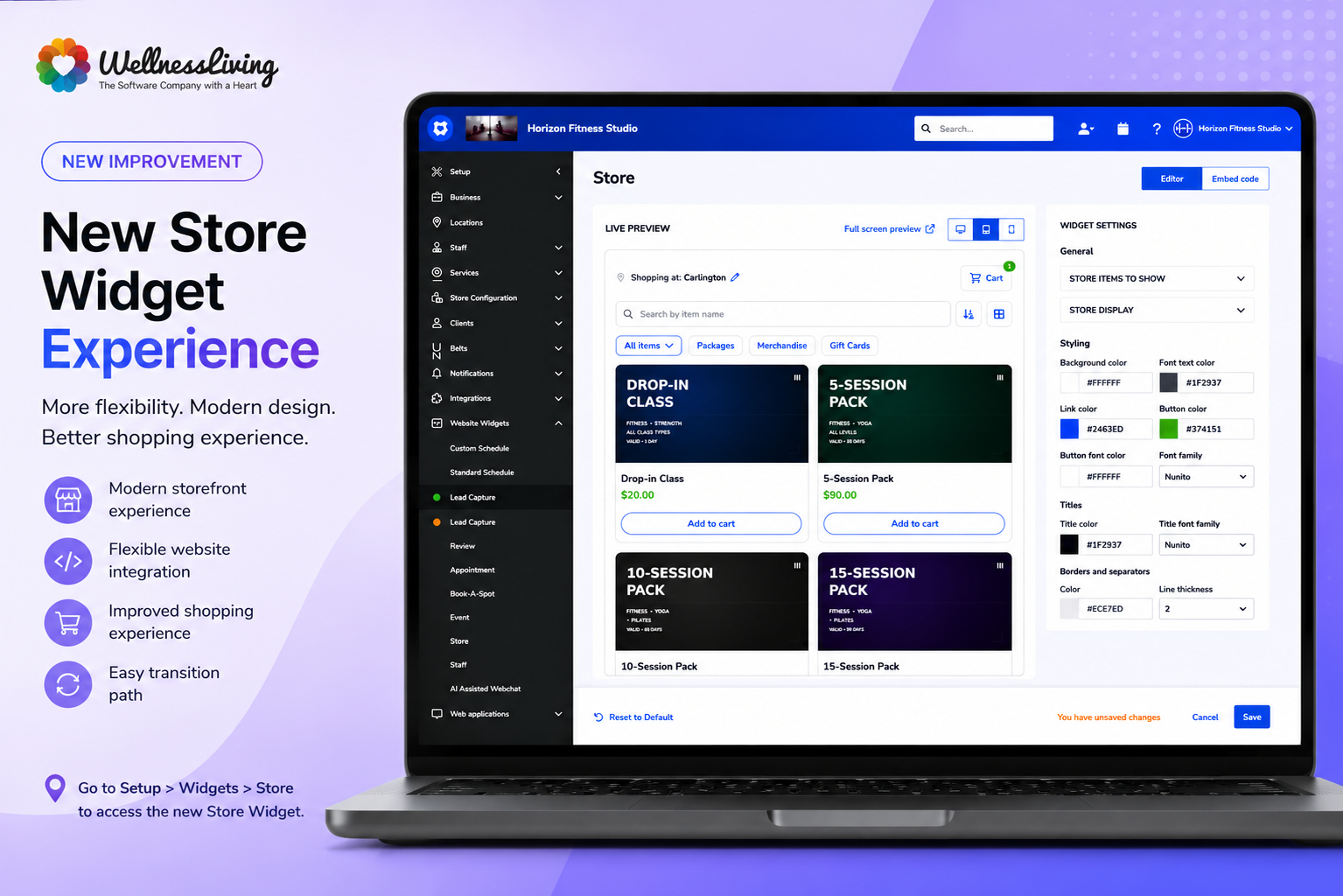
A new Store Widget experience gives businesses more flexibility when displaying products and purchase options online. The updated widget delivers a modern shopping experience while remaining easy to configure and embed on your website.
Key features
Modern storefront experience – Present products and services with an updated design.
Flexible website integration – Easily embed the widget into your website.
Improved shopping experience – Help clients browse and purchase more efficiently.
Easy transition path – Access both the current and updated widget experiences while preparing for future upgrades.
📍Go to Setup > Widgets > Store to access the new Store Widget.
Schedule services anywhere with Off-site Locations
What is it?
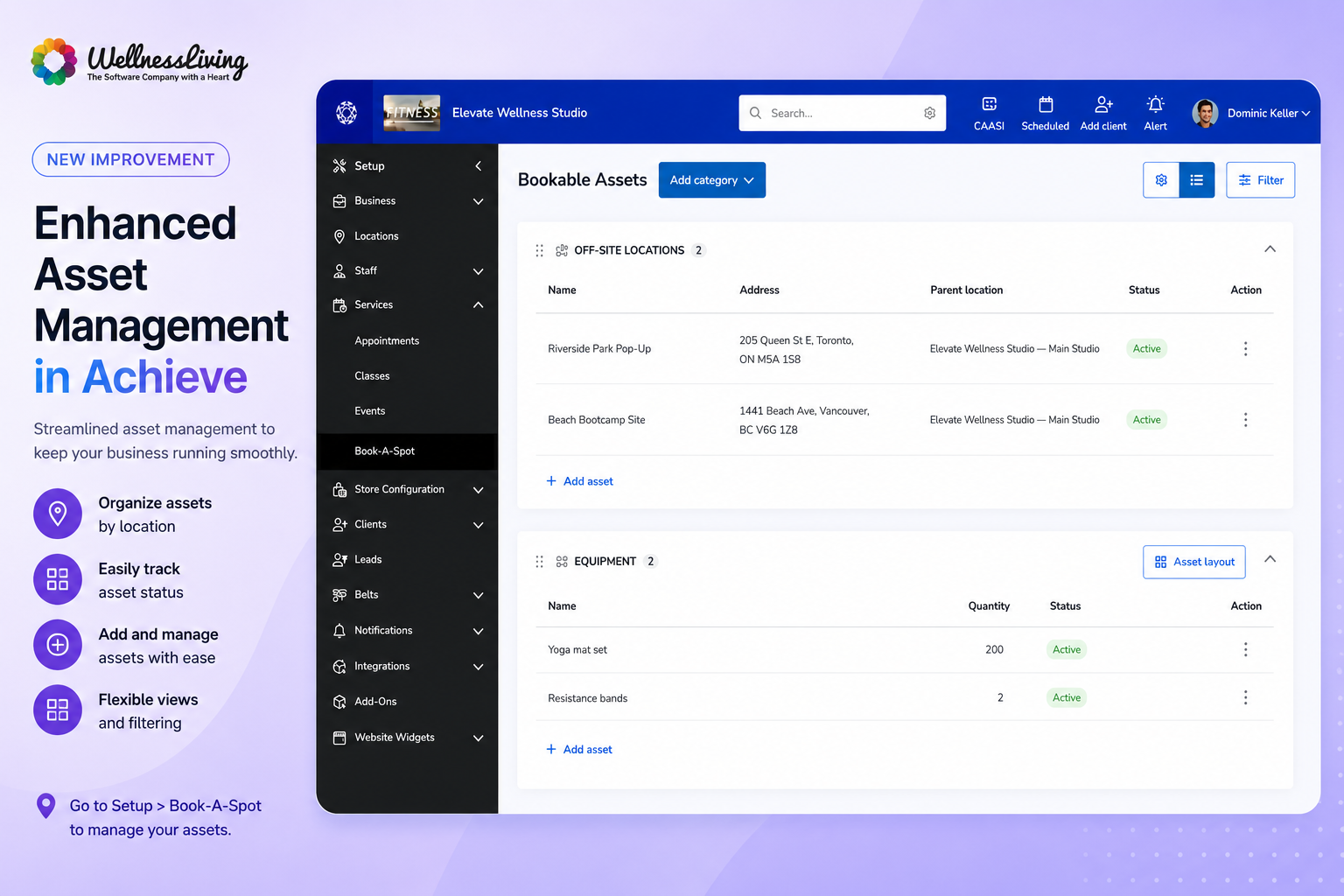
You can now assign classes, events, and appointments to off-site venues without creating additional business locations. Clients will see the correct venue details throughout the booking experience, helping reduce confusion and missed appointments.
Key features
Create reusable off-site venues – Configure off-site locations directly through Assets.
Display accurate addresses – Show venue details throughout the booking journey.
Reduce client confusion – Help clients arrive at the correct location every time.
Maintain operational reporting – Keep revenue and reporting tied to the parent location.
📍Go to Setup > Assets to create and manage off-site venues.
Streamline family booking with attendee selection
What is it?
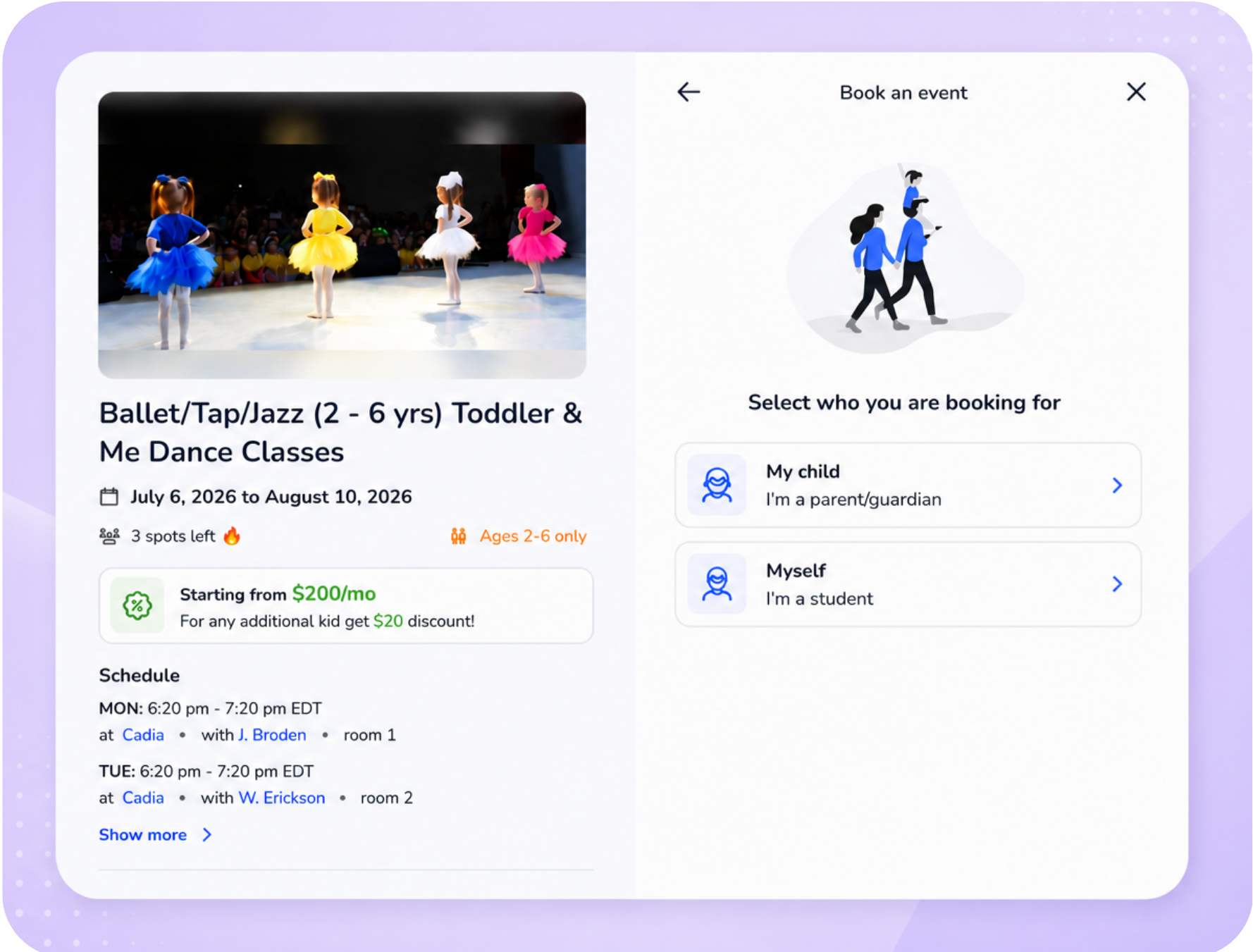
A new attendee selection step helps clients choose who they are booking for before registration begins. This makes it easier for parents and guardians to book services for children and reduces accidental bookings under the wrong profile.
Key features
Choose the attendee upfront – Select who the booking is for before registration begins.
Better support for family accounts – Easily book for children, dependents, and relationships.
Fewer booking errors – Reduce staff corrections caused by bookings under the wrong profile.
Simplified registration flow – Make the booking process more intuitive for families.
📍Go to Setup > Business Policies to enable attendee selection at the start of the booking flow.
Customize QUICK Auto Check-In to match your workflow
What is it?
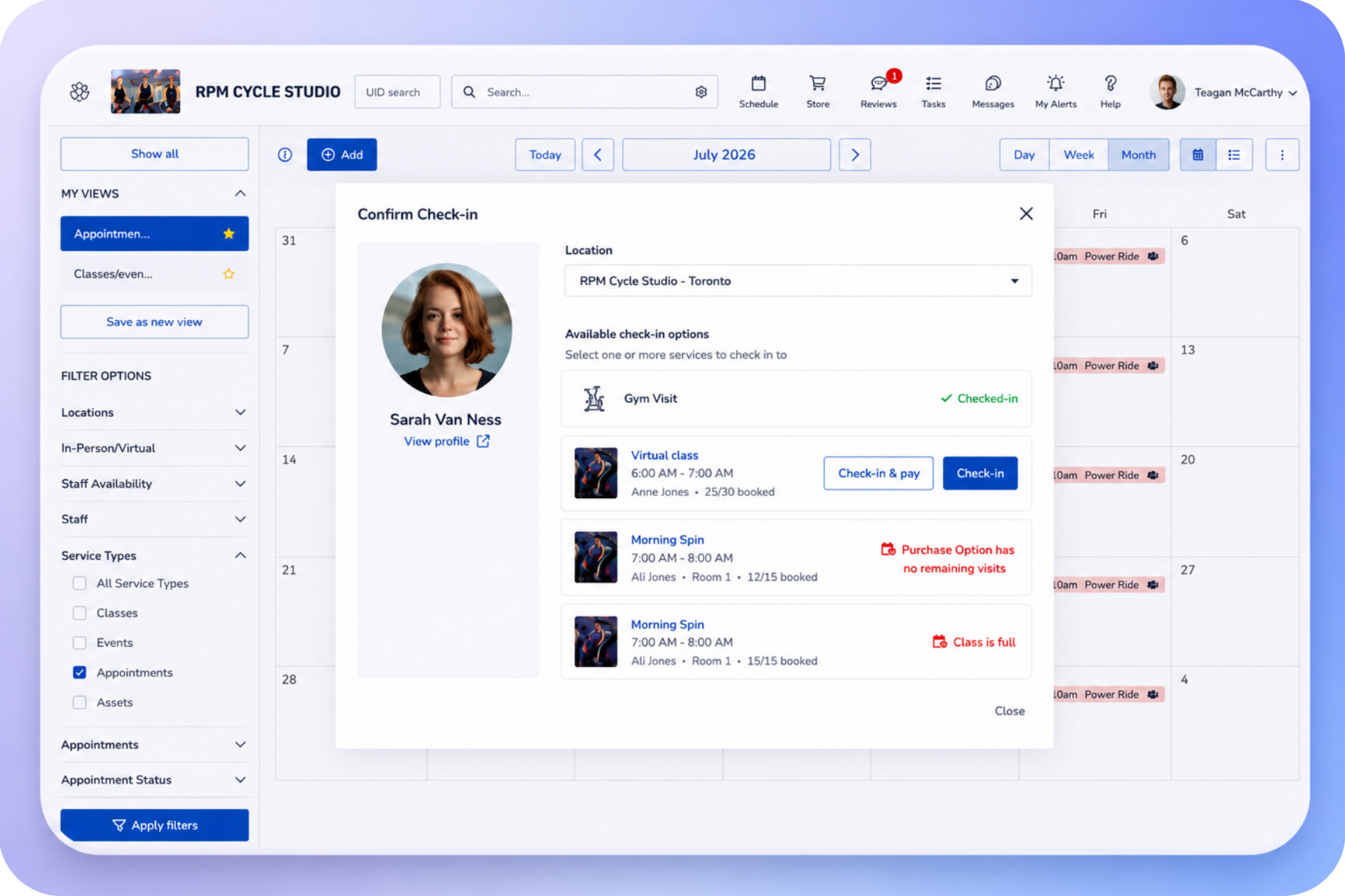
QUICK Auto Check-In now offers additional configuration options, giving staff more control over how check-in confirmations behave and what happens after a successful scan.
Key features
Configurable auto-close timers – Control how long confirmation messages remain visible.
Stay on the current screen – Prevent automatic navigation after scanning a client.
Faster front-desk workflows – Reduce interruptions during busy check-in periods.
Flexible experience settings – Configure QUICK Auto Check-In to match your team's preferences.
📍Go to Setup > Business Policies > Check Ins to manage QUICK Auto Check-In settings.
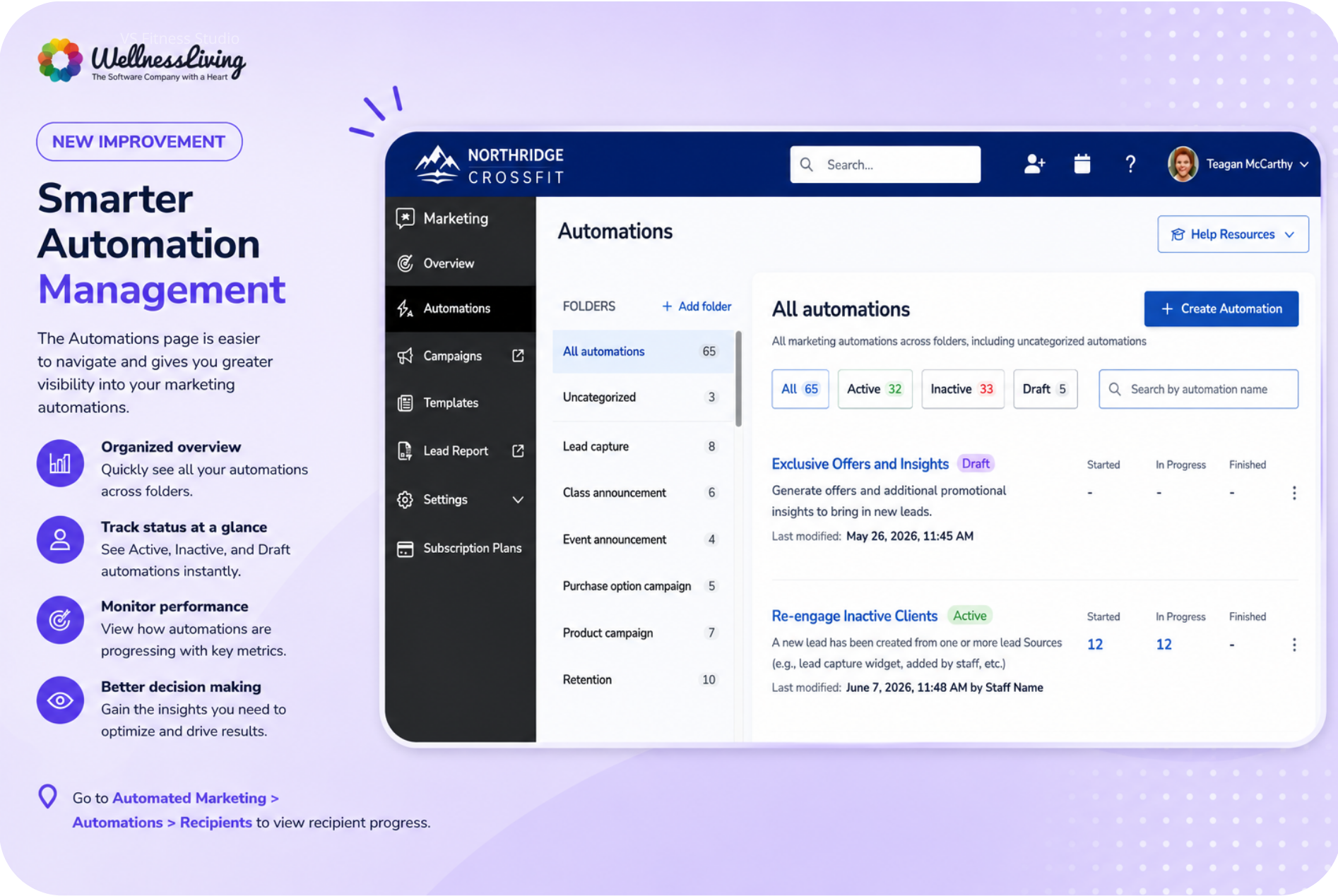
Build Marketing Suite automations before you're ready to launch
What is it?
Marketing Suite now supports draft automations, allowing you to create, review, and refine automation workflows before activating them. This gives teams more flexibility when planning campaigns and marketing journeys.
Key features
Save work in progress – Create automations without activating them immediately.
Review before launch – Refine workflows and content before going live.
Duplicate safely – New automation copies begin as drafts until activated.
Clear automation status visibility – Easily distinguish draft, active, and inactive automations.
📍Go to Automated Marketing > Automations to create and manage draft automations.
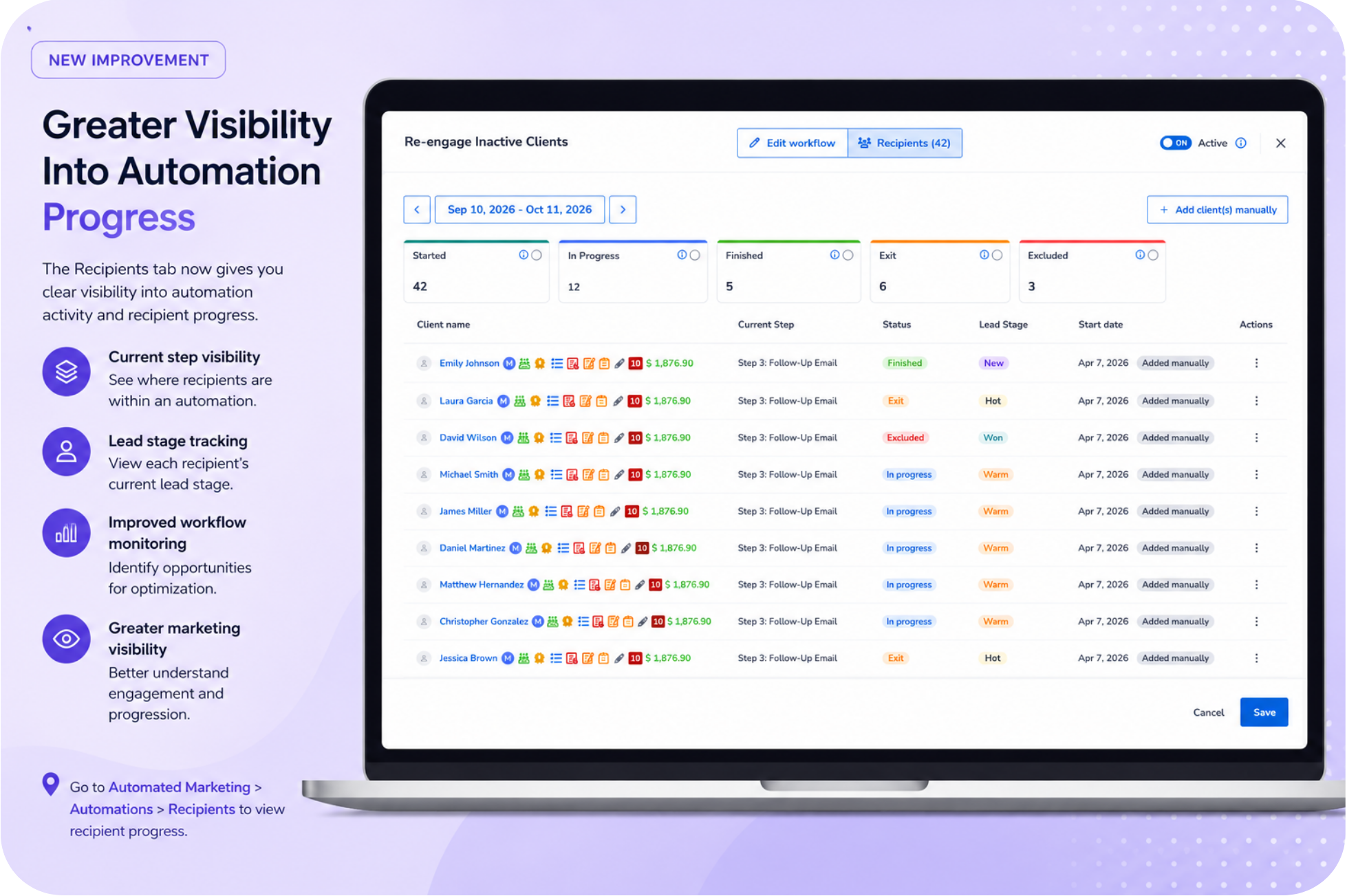
Track client journey stages in Marketing Suite
What is it?
The Recipients tab now provides greater visibility into automation activity, helping you understand where recipients are within a workflow and how they are progressing through your marketing journey.
Key features
Current step visibility – See where recipients are within an automation.
Lead stage tracking – View each recipient's current lead stage.
Improved workflow monitoring – Identify opportunities for optimization.
Greater marketing visibility – Better understand automation engagement and progression.
📍Go to Automated Marketing > Automations > Recipients to view recipient progress.
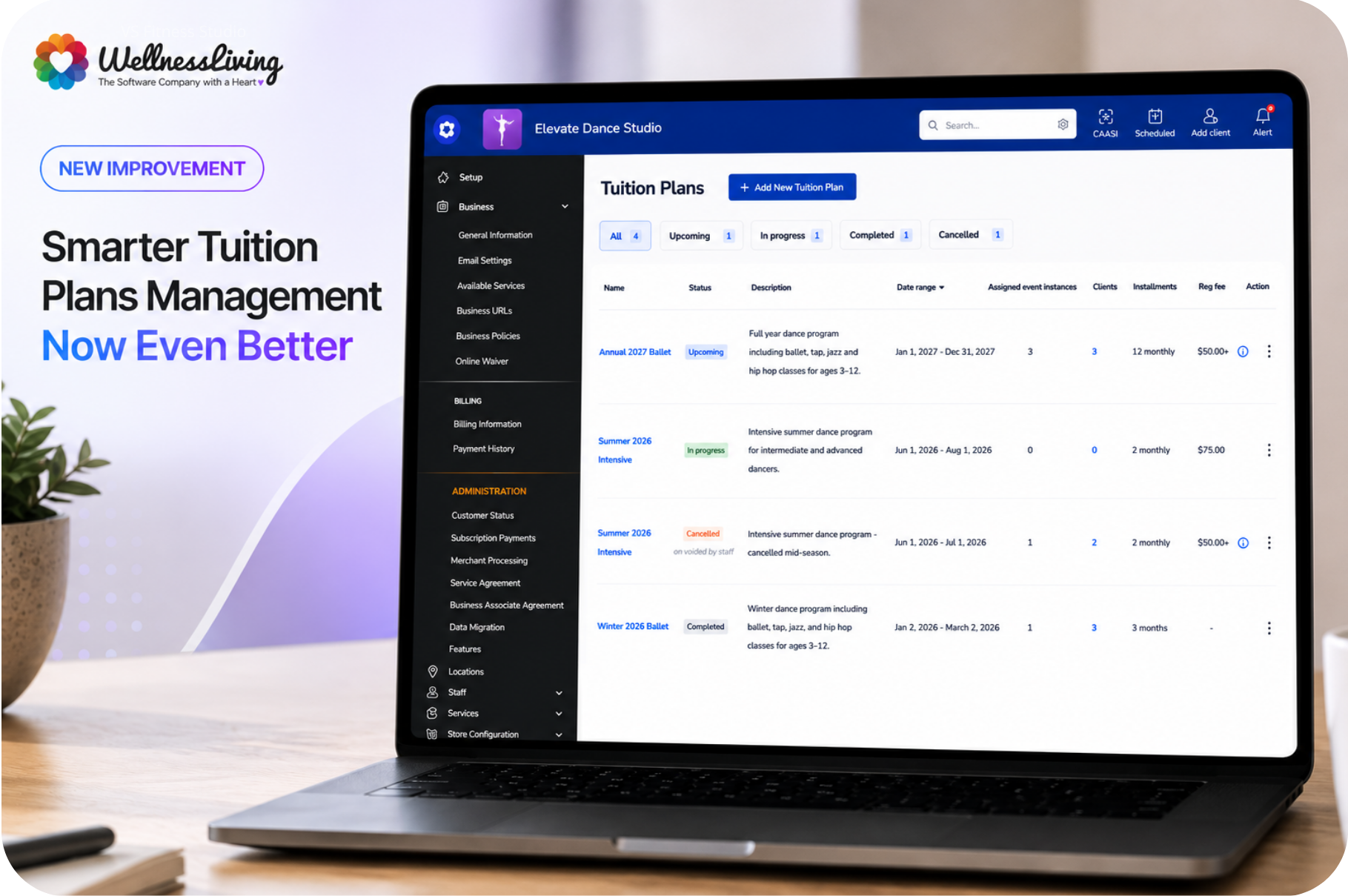
Offer flexible semester billing with Tuition Plans
What is it?
Tuition Plans make it easier to manage semester-based programs with flexible instalment billing. Designed for businesses that run long-term programs, such as dance, gymnastics, martial arts, and swim schools, Tuition Plans help you streamline enrolments, payment schedules, and ongoing tuition management from one central location.
Key features
Flexible instalment schedules – Allow clients to spread tuition payments across multiple instalments.
Centralized plan management – Manage tuition plans from a dedicated area in the Staff Back Office.
Enrolment workflows – Connect eligible events to tuition plans for a smoother registration experience.
Enhanced visibility – View tuition plan information throughout client and event management workflows.
📍Go to App Drawer > Store Configuration > Tuition Plans to create and manage tuition plans. (Coming soon)
✏️ More updates
Reduced failed charges for clients sent to collections
Clients marked as Sent to Collections are no longer automatically charged when Charge clients with a negative account balance is enabled, helping reduce failed payment attempts and unnecessary processing fees.
More accurate payment plan reporting
Taxes, tips, net sales, and revenue categories are now distributed proportionally across payment plan instalments, improving the accuracy of financial and sales reporting.
Improved service descriptions in sales reports
Service purchases now include the scheduled date, time, and instructor information directly in applicable sales reports and balance history records, making transactions easier to identify.
Enhanced Booking Source reporting
Booking Source reports now include updated source names, visual icons, and cleaner reporting by removing non-booking-related sources.
Better dashboard organization
Dashboard 2.0 now supports expandable and collapsible metric sections, making it easier to focus on the information that matters most.
Dashboard export and print improvements
Dashboard 2.0 now supports exporting and printing dashboards, reports, and metric sections, making it easier to share business insights with staff and stakeholders.
SMS usage warnings while composing messages
Persistent SMS usage banners now appear throughout SMS workflows, helping you stay informed about monthly usage and potential overage charges.
Email domain verification reminders
Businesses with unverified email domains will now see reminders throughout email-sending workflows to help improve deliverability and brand recognition.
Enterprise tuition plan distribution
Enterprise businesses can now distribute tuition plan templates from headquarters to franchise locations while allowing each location to assign their own event instances.
❤️ Behind the Build
Every feature in this release started with a conversation.
Whether it was shared during a roadmap session, submitted as feedback, or raised through everyday conversations with our team, your ideas continue to shape WellnessLiving.
A special thank you to Cathy VanKuiken and Carina Easley-Appleyard from The Funky Buddha Yoga Hothouse in Grand Rapids, Michigan, for championing Guest Passes for classes. Their feedback helped make it easier for businesses to invite friends and family into classes while creating a smoother experience for both staff and clients.
We're also grateful to Sarah Nuse, CEO of Tippi Toes in Phoenix, Arizona, for inspiring Off-site Locations. Sarah's business brings classes directly to schools and community spaces, and her feedback helped us build a solution that makes managing services beyond a traditional studio simpler than ever.
To Cathy, Carina, Sarah, and every customer who shares ideas with us—thank you. Your feedback helps shape the future of WellnessLiving, and we can't wait to show you what's next.
We’d love to hear what you think about this release — share your feedback in our Community Forum!