
The revenue snapshot in the Elevate Staff App gives staff a quick, mobile-friendly way to review projected and earned pay, service revenue, and session activity based on the staff schedule. It’s designed for trainers and other revenue-generating staff who want to stay informed about their performance and compensation while managing day-to-day bookings.
Available directly from the Schedule, the revenue snapshot can be tapped to expand a summary panel showing scheduled and completed sessions for a selected daily or weekly date range.
This allows staff to review expected earnings, completed work, and remaining sessions without leaving the app or signing in to the Staff Back Office.
The snapshot summarizes key totals in one place, including:
Projected pay
Earned pay
Projected service revenue
Earned service revenue
Total services scheduled
Total services completed
By grouping this information together, Revenue Snapshot helps staff quickly understand how much they’re expected to earn, how much they’ve already earned, and how their schedule is shaping up.
Why it matters
Without access to revenue snapshots and summaries, staff and business owners may struggle to:
Track performance goals
Identify schedule gaps
Forecast weekly earnings and workload
Monitor staff productivity without signing in to the Staff Back Office
Revenue Snapshot removes this friction by surfacing key pay, revenue, and scheduling insights directly in the Elevate Staff App.
Staff visibility rules
Revenue Snapshot follows staff access rules to determine which metrics are visible.
Staff can always view their own metrics.
If staff are granted access to view others, they can also view totals for other staff.
Businesses can configure visibility to allow access to:
All staff
One specific staff member
Multi-select is not supported.
How projected vs earned revenue is calculated
A session is counted as Earned if it is marked:
Completed
Checked-in
A session is counted as Projected if it is:
Booked
Not canceled
Projected totals include earned sessions, so projected values reflect the full total for the selected date range.
View a revenue summary in the Elevate Staff App
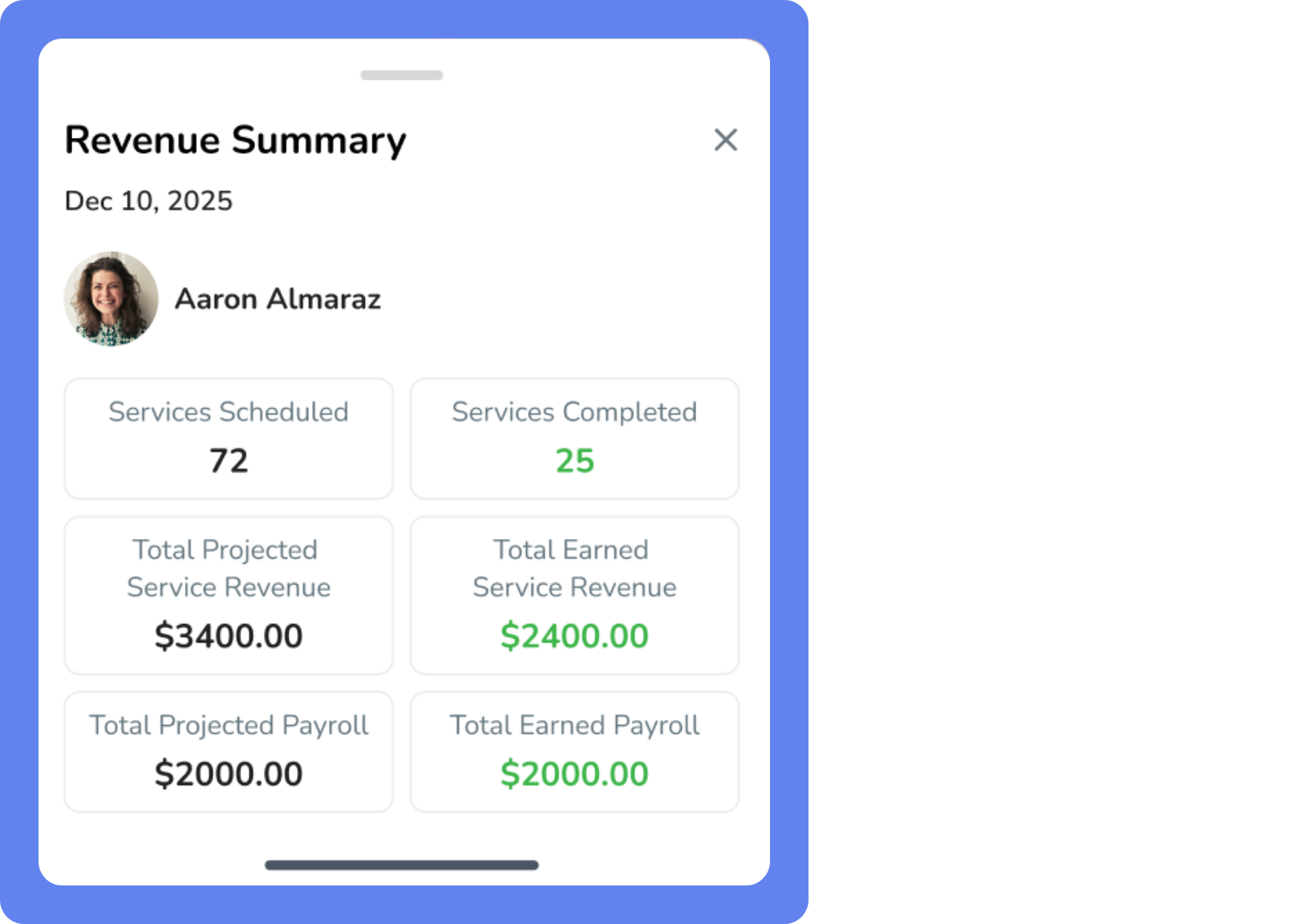
To view a revenue summary in the Elevate Staff App:
Open the Elevate Staff App.
Tap the Schedule tab. A snapshot appears in the bottom-left of your screen

Tap the snapshot. A summary appears with totals based on whether you’re using Day or Week schedule view.
If you’re using Day, totals reflect that day only.
If you’re using Week, totals reflect the full week.
Information in your revenue summary
Summary | Description |
|---|---|
Staff Pay | These numbers are based on Payroll reports. You must have the report permissions View staff reports > Payroll Details and Payroll Summary enabled to view this information. Total Projected Staff Pay
Total Earned Staff Pay
|
Service Revenue | These numbers are based on the Revenue by Service Report. You must have the report permissions View sales reports > Revenue by Service enabled to view this information. Total Projected Service Revenue
Total Earned Service Revenue
|
Session Counts | Total Services Scheduled
Total Services Completed
Note: Canceled sessions, including early cancellations, are not included. |