
To access the Visit Milestones & Lifetime Value Report, click the App Drawer  > View All > Reports > Clients > Visit Milestones & Lifetime Value.
Visit Milestones & Lifetime Value Report
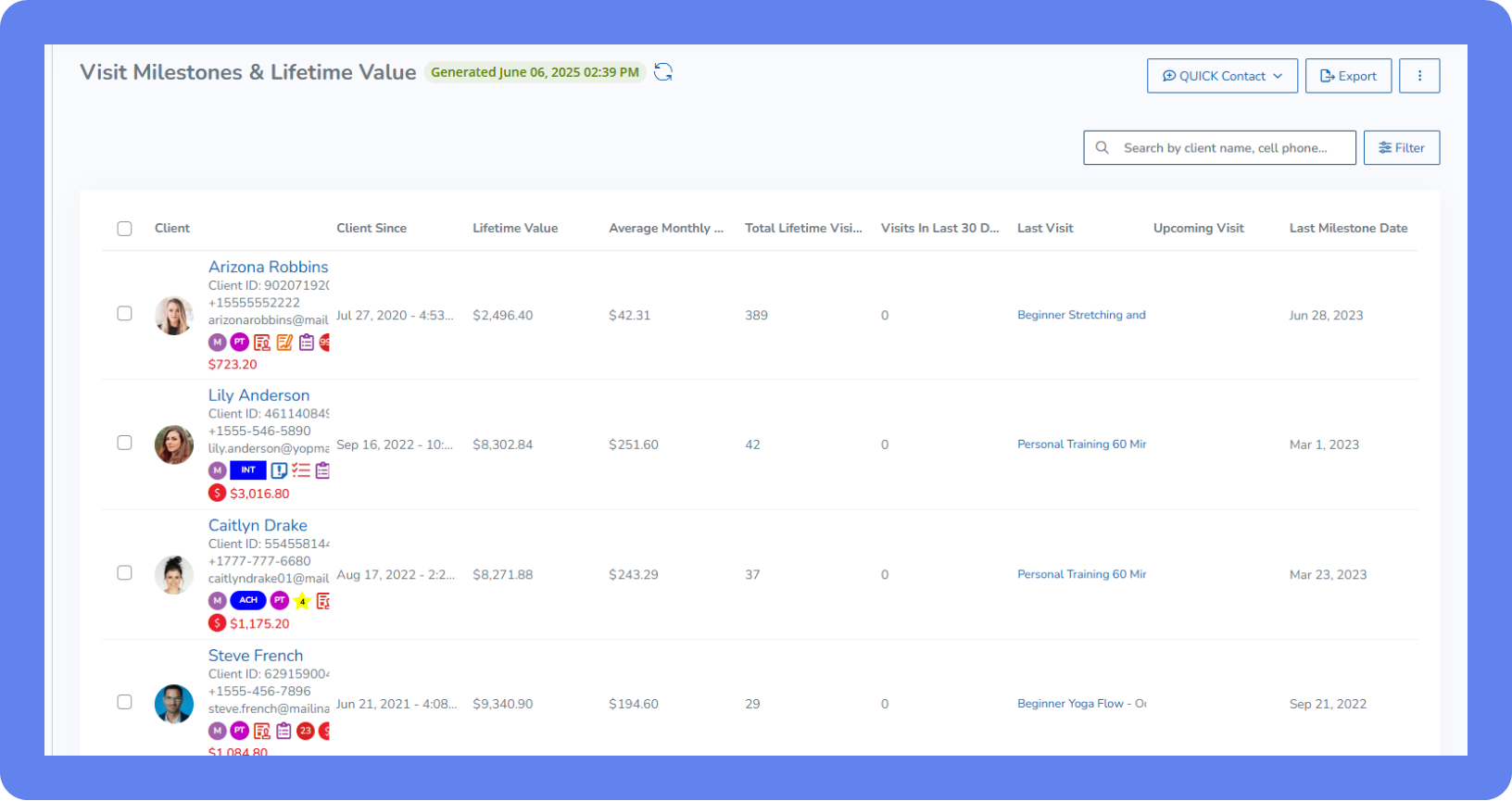
The Visit Milestones & Lifetime Value Report is a client report that shows details about your clients' visit history, including the number of visits they’ve made, the average monthly revenue you make from their visits, and details about their most recent and upcoming visits. Clients are listed from most visits to fewest.
Business Strategy Insights: Why It’s Valuable
This report makes it easy to spot your most active and highest-spending clients, while also flagging those who may be becoming less engaged—giving you a chance to reconnect before they drop off. Whether you’re planning targeted promotions, refining your Rewards program, or simply looking to better understand client behavior, these insights help you take action that strengthens retention, boosts engagement, and supports long-term revenue growth.
Summary cards in the Visit Milestones & Lifetime Value Report
Summary card | Description |
|---|---|
Average Monthly Spend | The average amount of money earned per client each month, based on their entire visit and purchase history. Only clients who have made at least one purchase and completed at least one visit are included in the calculations for this card. |
Average Lifetime Value | The average total revenue each paying client has brought in since they first became a client. Clients who haven’t made any purchases aren’t included. |
Average Lifetime Visits | This shows the average number of visits clients make over their entire time with the business. Clients who haven’t made any purchases aren’t included. |
Visit Milestones | These cards show the number of visits clients have reached over their lifetime. Click a card to filter the report to show only clients who have achieved that milestone. Milestone cards only appear when at least one client at the business has reached that specific milestone. For example, when a client has made between 1 and 5 visits, the 5-visit milestone card appears. When someone makes between 6 and 10 visits, the 10-visit milestone card appears. After that, milestone cards follow higher visit counts, including 25, 50, 100, 250, 500, 1,000, 2,000, 3,000, and 4,000, and so on. |
Columns in the Visit Milestones & Lifetime Value Report
Column | Description |
|---|---|
Client | The profile image of the client. Hover over the image to view more details. Click the image to view the client profile. |
Client Since Date | The date and time the client joined your business. |
Lifetime Spend | The total amount the client has spent at your business. Note: This column is only visible if the staff member has the View transactions details permission enabled. |
Average Monthly Spend | The average amount the client has spent each month since joining your business. |
Total Lifetime Visits | The number of times the client has visited your business. |
Visits in Last 30 Days | The number of times the client has visited your business over the past 30 days. |
Last Visit Date | The details of the last visit the client made to your business, including the service name, time, and date. Click the name of the service to view the attendance list or appointment flyout. |
Upcoming Visit Date | The details of the next visit the client has booked with your business, including the service name, time, and date. Click the name of the service to view the attendance list or appointment flyout. |
Last Milestone Date | The last time your client reached a visit milestone. Milestones occur when the client reaches one of the following number of total visits:
|
Filters in the Visit Milestones & Lifetime Value Report
Filter | Description |
|---|---|
Client Groups | Shows clients in the selected client groups only. |
Lifetime Value | Enter a range to view only clients who have spent a certain amount at your business. |
Total Lifetime Visits | Enter a range to view only clients who have visited your business a certain number of times. |