
To access your Partner Program dashboard, open the App Drawer  then use one of these methods:
Click Earn $1500 for every business you refer to WellnessLiving
Click View All > Refer a Business
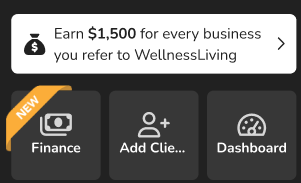
From your Partner Program dashboard, you can review your referrals and find the tools you need to share WellnessLiving with other businesses and start earning your commissions.
For each business you refer, you can receive up to $1500 and the referred business can receive $500, so let’s get started.
Modify your Partner Program URL
You can customize your Partner Program URL to make it easier to share with the businesses you refer.
To modify your Partner Program URL:
On your Partner Program dashboard, in the Custom URL field, enter your custom URL and then press Enter on your keyboard.
In the Confirmation Required popup, click OK.
If the custom URL you have entered is already being used by another business, the Custom URL field will turn red and you must enter a different custom URL.
Preview your Partner Program landing page
Before sharing your landing page with others, you can preview exactly what they'll see.
To preview your Partner Program landing page:
On your Partner Program dashboard, beside your Partner Program URL, click the Action button
 and select Preview my landing page.
Copy your Partner Program URL and promo code
Share your Partner Program URL or promo code directly with businesses you want to refer.
To copy your Partner Program URL and promo code:
On your Partner Program dashboard, click the Copy to clipboard button
 next to your Partner Program URL or promo code.
Share the link or promo code with the business you’re referring. Businesses can follow the link to your landing page to request a demo with WellnessLiving or use your promo code when requesting a demo to receive a discount when they sign up with WellnessLiving.
Share your Partner Program URL and promo code on Facebook or X
You can also share your referral link directly to your social media accounts.
To share your Partner Program URL and promo code on Facebook or X:
On your Partner Program dashboard, click the Action button
next to your Partner Program URL, then select Share via Facebook or Share via X.
Sign in to your social media account if necessary, add any required information about the link to the post, then submit the post
Review your referrals
The My Referrals table on your Partner Program dashboard shows every business you've referred to WellnessLiving and whether those referrals are generating your payments.
To review your referrals:
On your Partner Program dashboard, view the My Referrals table. Each row includes:
Referral Date – The date the referral was recorded.
Business Name – The name of the referred business.
Status – The referred business's current subscription status. Hover over a status to see more details:
Active – The referred business has an active paid subscription. This referral counts towards your Referral Program payments.
Not Yet Subscribed – The referred business hasn't subscribed yet. Once they do, they'll count towards your Referral Program payments.
Inactive – This account is no longer active and doesn't count towards your Referral Program payments.
The My Referrals table only appears once you have at least one referral on file.
To download your referral list, click Export, then select CSV, Excel, or PDF.